

About Iru AI
Iru AI is a system of specialized agents that span all of the Iru products: identity & access, endpoint security & management, and compliance automation. Iru AI delivers insights, actions, and answers through a unified interface, making device management more intuitive and efficient.How Iru AI Works
Iru AI is available to all Iru customers, and enabled by default. Ask a question in the chat, and Iru AI routes the request to the agent that owns the relevant data. When you ask Iru AI a question in the chat, you’ll receive both a summary view of your requested information and a link to the detailed data for deeper analysis, where you can view full table representations with all relevant attributes. Adaptive Compliance can also place a control update card in Insights on Home when a Compliance item you have open has a recommendation to serve. Home shows that section only when there is at least one active insight card.What each agent does
Which agents a team member can reach depends on their role. See Team Member Role Permissions and Compliance Permissions.
Iru AI Capabilities
Natural Language Queries
Ask questions about your device fleet in natural language:- “What versions of Zoom are installed across my devices?”
- “Which OS versions are installed?”
- “Which devices have FileVault turned off?”
- “Which devices have Activation Lock enabled?”
- “Show me devices that haven’t checked in recently”
Iru AI Insights
Insights on Home shows Adaptive Compliance control update cards. The section appears only when a Compliance item you have open has a recommendation to serve. Select Review Control Updates on the card. See Using Iru AI.Cross-Platform Intelligence
Iru AI answers questions across Apple, Windows, and Android devices, providing:- Detailed Analysis: Access detailed device data through conversational interfaces
- Universal Access: Chat interface available from anywhere in the platform
Accessing Iru AI
Top Navigation Bar
Wherever you are in the Iru platform, select Iru AI in the top right of the top bar to open the Iru AI chat panel. For the controls in the panel, see Using the Iru AI Chat Panel.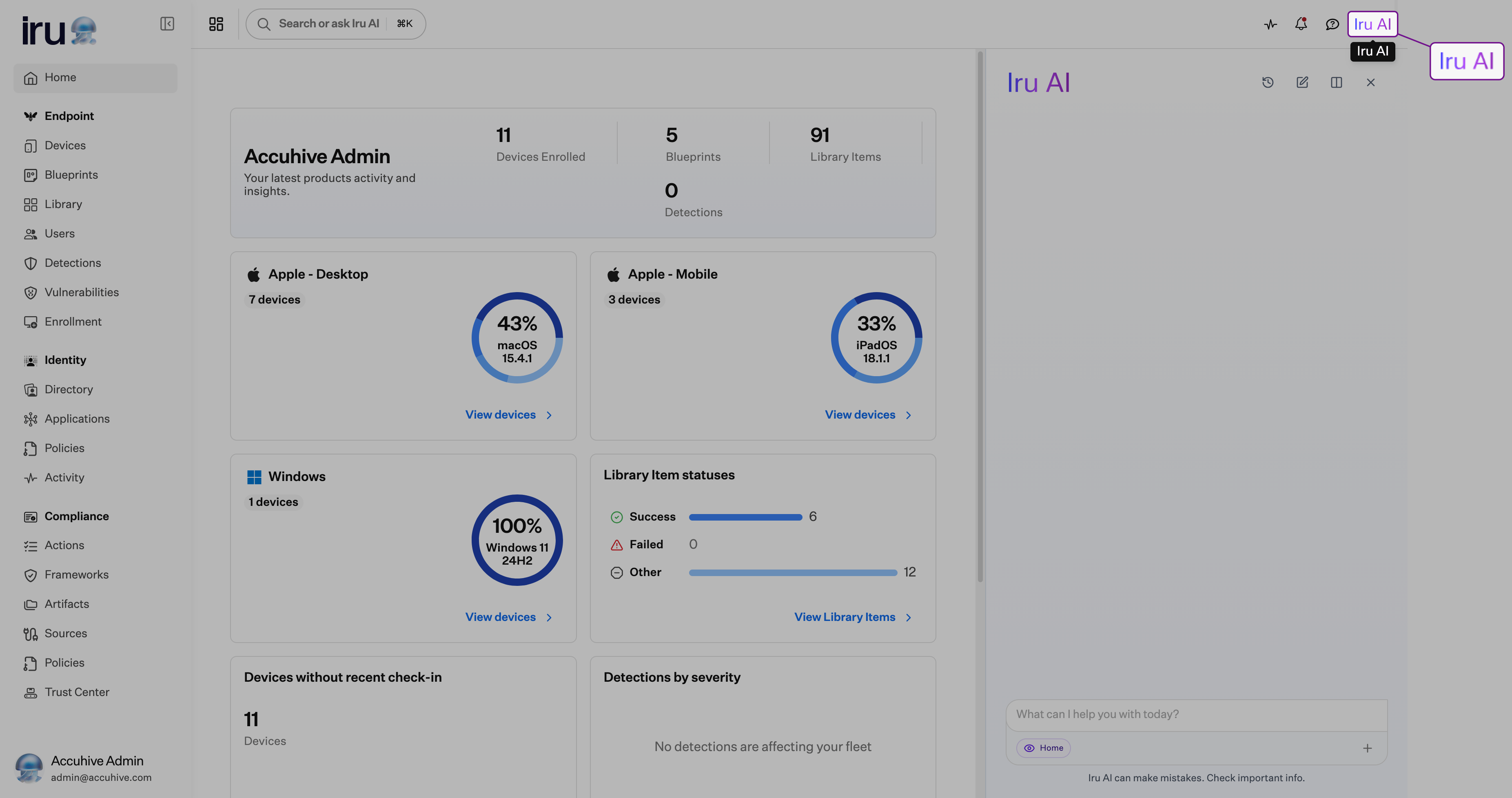
Universal Search
Select Search or ask Iru AI in the top bar or press ⌘K (Mac) or Ctrl+K (Windows) to open search, then select Ask Iru AI to pass your query to Iru AI. See Search or ask Iru AI for search filters.Managing Iru AI Access
Account Owners turn Iru AI on or off for the whole tenant on the Iru AI tab of the Organization page. When Iru AI is off, the Iru AI chat interface and Insights are hidden, and team members can’t open Iru AI from the top nav or Universal Search. Certain AI-powered features such as control generation for Iru Compliance and Adaptive Compliance control update recommendations can still rely on Iru AI to function properly.User Permissions
Two things must both be true for a team member to use Iru AI:- Iru AI is enabled for the organization (see Managing Iru AI Access above).
- The team member’s role reaches at least one agent. Every role that can open Iru AI can ask documentation and support questions. Product data (devices, vulnerabilities, EDR, Compliance, and Trust Center) is scoped by role.
Privacy and Data Considerations
Iru AI is designed to protect your privacy. Chats keeps earlier conversations so you can open them again. Your conversations are not used to train AI models. Regarding data handling, we adhere to high standards for privacy and security. We hold ISO 42001 certification, which ensures our AI processes comply with strict guidelines for maintaining data privacy. Your data is stored securely within Iru’s infrastructure. Iru AI only accesses a limited portion of your data, just what’s necessary to answer your question. If you don’t use Iru AI, it won’t access your data. When working with large language models (LLMs), they do not store, use for training, or retain any of your data.Best Practices
- Natural language queries: Ask questions in natural language rather than trying to construct complex filters
- Audit actions: Monitor Activity to audit any Iru AI actions taken in your environment
Considerations
Full width covers the page
When the chat panel is open to full width and you select another page, Iru opens that page behind the panel. Close the panel, or leave full width, to see the page.
Access follows the role
Iru AI grants no access a role does not already have in the web app. When a question falls outside that access, Iru AI says so and answers from documentation instead.
Off for the organization
When Iru AI is off on the Iru AI tab in Organization, the chat panel and Insights are hidden. Control generation for Iru Compliance and Adaptive Compliance recommendations can still use Iru AI.
Related Articles
Using Iru AI
Ask questions in the chat.
Iru Navigation and Interface
Open Iru AI from the top bar and from search.
Prism Data Analytics
Open the detailed reports linked from Iru AI answers.
Team Member Role Permissions
See which roles can reach each Iru AI agent.
Compliance Permissions
See which Compliance roles can use Iru AI.
Activity
Audit Iru AI actions taken in your environment.