

Need help with a step? Contact Iru Support.
About Iru Compliance
You can add standards such as SOC 2, ISO 27001, ISO 42001, and HIPAA in your tenant. Other catalogs (for example GDPR, NIST CSF) appear when your tenant makes them available. Open Frameworks to see what you can add. Iru uses your organization profile (industry, company size, tech stack, and security tooling) so generated controls match how you work. After setup, when connected Sources or policy artifacts change, Adaptive Compliance can propose updates to control and action text so your frameworks stay aligned with how you operate. Use Policies Management to draft, publish, and track acknowledgement of security and compliance policies. Trust Center is optional: it publishes approved certifications and documents externally. See Trust Center Management.Recommended Setup
1
Navigate to the Account Menu Button
In the sidebar, select the Account Menu Button.
2
Open Organization profile
Select Organization to open Organization profile. Iru may prompt you while you add a framework.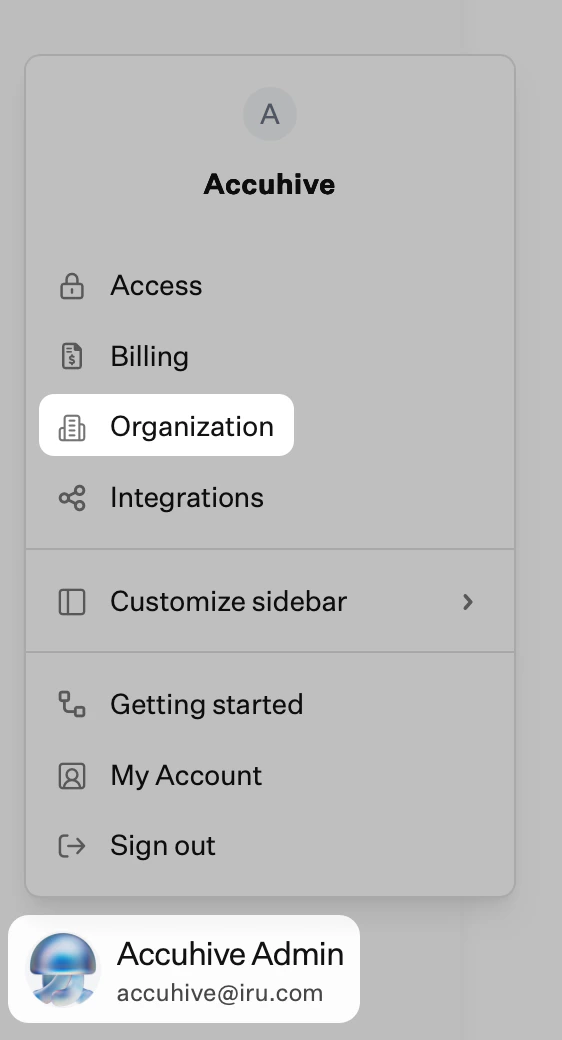
3
Enter edit mode
On Organization profile, select Edit at the top right.
4
Complete your company details
Fill in the fields that apply. For example: company logo, company name, business description, industry, business type, company size, company language, whether you have an IT department, and security team size. Keep this information current as your environment changes.
5
Save your changes
Select Save changes.
6
Add a framework
On the left navigation bar, expand Compliance and select Frameworks. Use AI-assisted setup, CSV import, migration from a supported product, or a custom framework. See Frameworks Management.
7
Connect sources
Expand Compliance and select Sources. Turn on the toggle for each integration that should supply evidence (identity, HR, cloud, code hosts, and others). See Sources Management.
8
Assign actions
Expand Compliance and select Actions. Review actions, assign owners, set due dates, and attach or confirm evidence. See Actions Management.
Core Concepts
FrameworksStandards your organization tracks. You can run several at once; one piece of evidence can cover more than one obligation when requirements overlap. Controls
Requirements mapped to the framework. They may come from AI generation, import, or manual entry. Actions
Tasks linked to controls. Descriptions tell the product and connected Sources what evidence to collect. Artifacts
Files and records (policies, exports, screenshots, logs, reports) tied to actions and controls. See Artifacts Management. For the Policies module (library templates, drafts, publishing, and workforce acknowledgement), see Policies Management. Sources
Integrations that pull or attach evidence for the actions they support. See Sources Management.
What You Can Do Next
- Turn framework language into controls and actions with owners and due dates.
- Draft and publish security policies from the library or uploads; track workforce acknowledgement. See Policies Management.
- Gather evidence manually or through Sources; validate artifacts where the product supports it.
- Track readiness from framework and action views.
- Review Iru AI control update recommendations when integrations or policies change. See Adaptive Compliance.
- Publish selected content through Trust Center when your plan includes it.
Related Articles
Frameworks Management
Add frameworks, imports, and migrations.
Policies Management
Policy library, publishing, acknowledgements, and linking policies to actions.
Adaptive Compliance
Review and approve Iru AI recommendations when controls should reflect new integrations or policies.
Platform Workflows
How profile, frameworks, sources, actions, and evidence connect.
Sources Management
Connector guides by category (use search and Category on Sources).
Related Product Documentation
Iru Overview
How Endpoint, Identity, Compliance, Trust Center, and Iru AI fit together.
Getting Started
Endpoint setup from foundation through platform setup, Blueprints and Library, and enrollment; pair with the Iru Endpoint Compliance source when controls need device evidence.
Iru Endpoint
Connect Endpoint to Compliance for device evidence.
Team Member Role Permissions
Organization roles (alongside Compliance Permissions).