

About the Slack Integration
The Slack Integration in Iru Endpoint allows you to receive Iru Agent and system notifications directly in Slack channels, providing centralized monitoring and alerting for your device management operations.How It Works
Integrate your Slack workspace with Iru Endpoint to receive Iru Agent and Iru Endpoint System notifications inside public and private Slack channels. For more information on alerts, see our Global Alerts support article.Creating a New Slack Integration
When you grant access in Slack, Slack still names this app Kandji 
 . Allow the Kandji app to connect your workspace to Iru Endpoint.
. Allow the Kandji app to connect your workspace to Iru Endpoint.1
Open Integrations
In the sidebar, select the Account Menu Button, then select Integrations.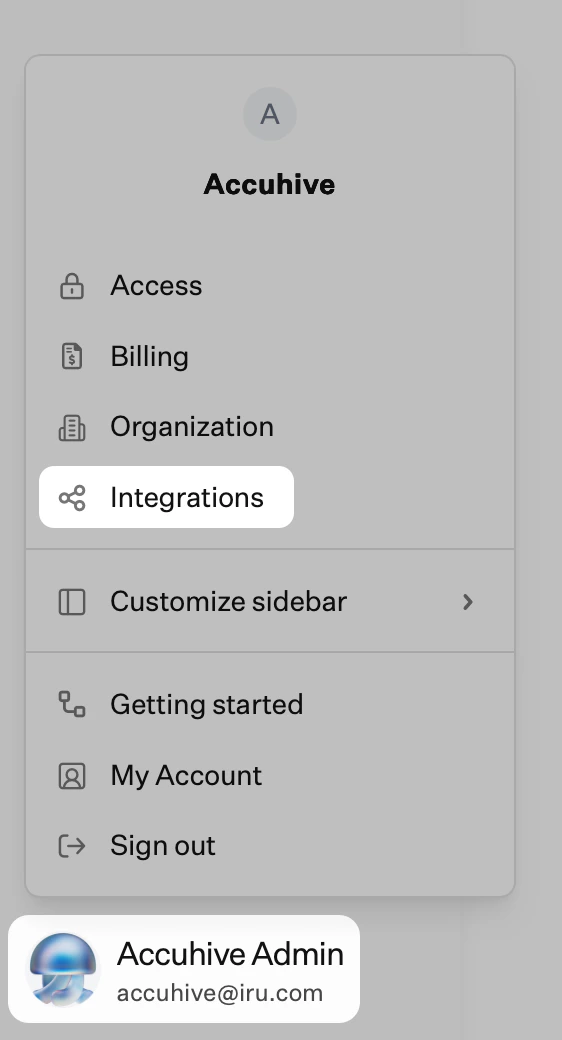
2
Browse all integrations
Select Browse all integrations in the upper-right of the Integrations page.
3
Select Slack
Select the Slack tile.
4
Start Setup
Select Get started.
5
Sign in to Slack
If you have not already signed into a Slack workspace, enter your workspace information and select Continue.
6
Grant Permissions
In the permissions dialog, select Allow.
7
Verify Connection
A notification message near the bottom left will let you know if Slack was successfully connected.
8
Wait for Slack channels
Iru Endpoint loads channels from your workspace and shows Loading Slack channels. This can take longer if the workspace has many channels. Until it finishes, Add event notification shows Loading Slack channels. Please check back in soon.
9
Add Event Notification
After the channels finish loading, select Add event notification.
10
Select Channels
Search for the Slack channel you’d like to use by typing its name or selecting the arrow to display a list of all channels. Select the checkbox next to each channel you want to send notifications to.
To send notifications to a private Slack channel, add the Kandji Slackbot to the channel before searching for it. In the channel settings, select Add people or agents, select Continue, search for the Kandji app, then select Add. You can also @mention Kandji in the private Slack channel and add the app when prompted.
11
Configure Notification
Enter an Event notification name into the field.
12
Select Event Triggers
Select the event triggers you want.
13
Test Notification
Select Send test notification to verify that it’s working as expected.
14
Save Configuration
Select Save.
15
View Integration
You will see the Slack integration and event notification you just created.
16
Add More Notifications
Select Add event notification to add more event notifications.
Event Triggers
When you add or edit an event notification, specify which events should trigger a notification.General
- Remediations
- Device goes offline
- Device no longer offline
- New device enrolled
- Device unenrolled
- New Mac first run summary
- An application is blocked
Endpoint Detection and Response
- Malware file detection on device
- PUP file detection on device
- Malicious behavioral detection on device
- Suspicious behavioral detection on device
Vulnerability Management
- Critical vulnerability detected
- High vulnerability detected
- Medium vulnerability detected
- Low vulnerability detected
- Critical vulnerability detected on device
- High vulnerability detected on device
- Medium vulnerability detected on device
- Low vulnerability detected on device
Changing an Existing Event Notification
1
Access Notification Menu
Select the ellipsis next to the notification you would like to modify.
2
Edit Event Notification
Select Edit event notification.
3
Modify Configuration
Modify the configuration, then select Save or Cancel.
Deleting an Event Notification
1
Access Notification Menu
Select the ellipsis next to the notification you would like to delete.
2
Delete Event Notification
Select Delete event notification.
3
Confirm Deletion
Select Delete to confirm you’d like to delete the notification.
Adding more workspaces
1
Add workspace
On the Slack integration page, select Add workspace.
2
Choose Add another workspace
Open the Workspace dropdown and select Add another workspace.
3
Complete Slack sign-in
Continue from Sign in to Slack in Creating a New Slack Integration.
Deleting a Slack Integration
1
Access Workspace Menu
Select the ellipsis next to the Slack workspace you would like to delete.
2
Delete Workspace
Select Delete workspace.
3
Confirm Deletion
Select Delete to confirm you’d like to delete the workspace.
Considerations
Privacy and data processing
Review how we process data for the Slack integration in our privacy policy.
Private channel access
To send notifications to a private Slack channel, add the Kandji Slackbot to the channel before searching for it. In the channel settings, select Add people or agents, select Continue, search for the Kandji app, then select Add. You can also @mention Kandji in the private Slack channel and add the app when prompted.
More workspaces
To connect another Slack workspace, see Adding more workspaces.