

This guide applies to Mac computers
About Remote Shell
Remote Shell gives administrators a secure command line on a managed Mac in the Iru Endpoint Web App. Administrators can investigate a detection, respond to a threat, or retrieve a file without a separate remote access tool. Start a session from a detection or from a device record. Remote Shell is a response action on the Detections page. For status, tags, and other security operations actions, see Security Operations Actions in Endpoint Detection.How It Works
Selecting Launch remote shell opens the Remote shell terminal page, which starts connecting to the Mac. If that attempt fails, select Connect to try again. Remote Shell works while the Mac is in Partial Isolation. It does not work while the Mac is in Complete Isolation.Prerequisites
Licensing
Remote Shell is included with an active Endpoint Detection and Response add-on.
Permissions
Starting a session requires permission to manage threats and device actions. See Team Member Role Permissions.
Session limits
Only one Remote Shell session can be open in the web app at a time, and only one session can be active on a Mac at a time.
Isolation
Remote Shell works while the Mac is in Partial Isolation. It does not work while the Mac is in Complete Isolation.
Start a session from Detections
1
Open Detections
In the left-hand navigation bar, select Detections (under Endpoint).
2
Open the side panel
Select a detection to open the side panel.
3
Open the device menu
In the side panel, find the affected Mac and select the ellipsis.
4
Launch remote shell
Select Launch remote shell.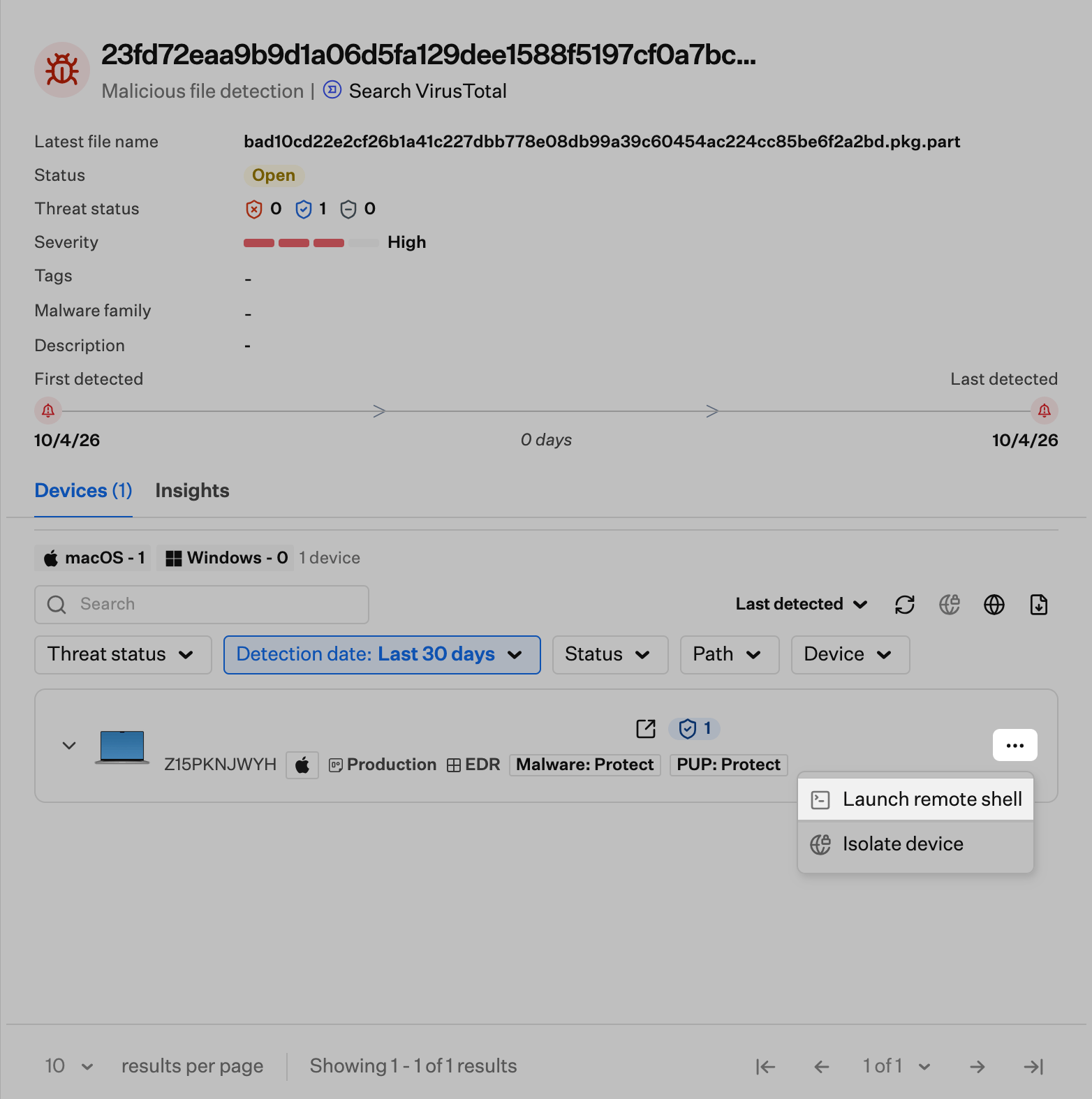
Start a session from a device record
1
Open the device record
In the left-hand navigation bar, select Devices, then select the Mac.
2
Open the Device Action Menu
Open the Device Action Menu (ellipsis) in the upper right of the device record.
3
Launch remote shell
Select Launch remote shell.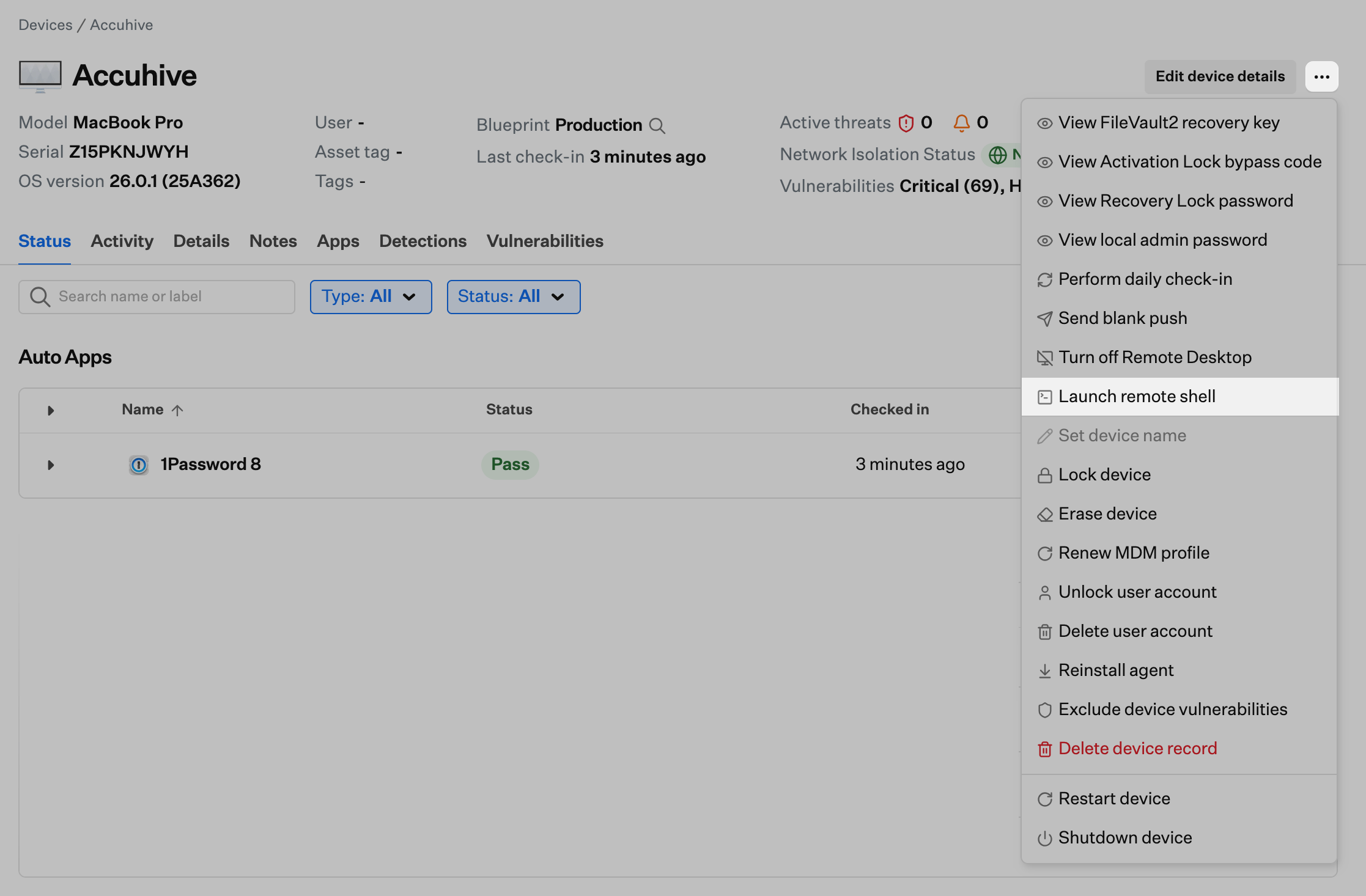
Remote shell terminal
The Remote shell terminal page opens after you launch Remote Shell, and it starts connecting to the Mac. The left side shows the Mac you opened the shell for. The terminal is on the right.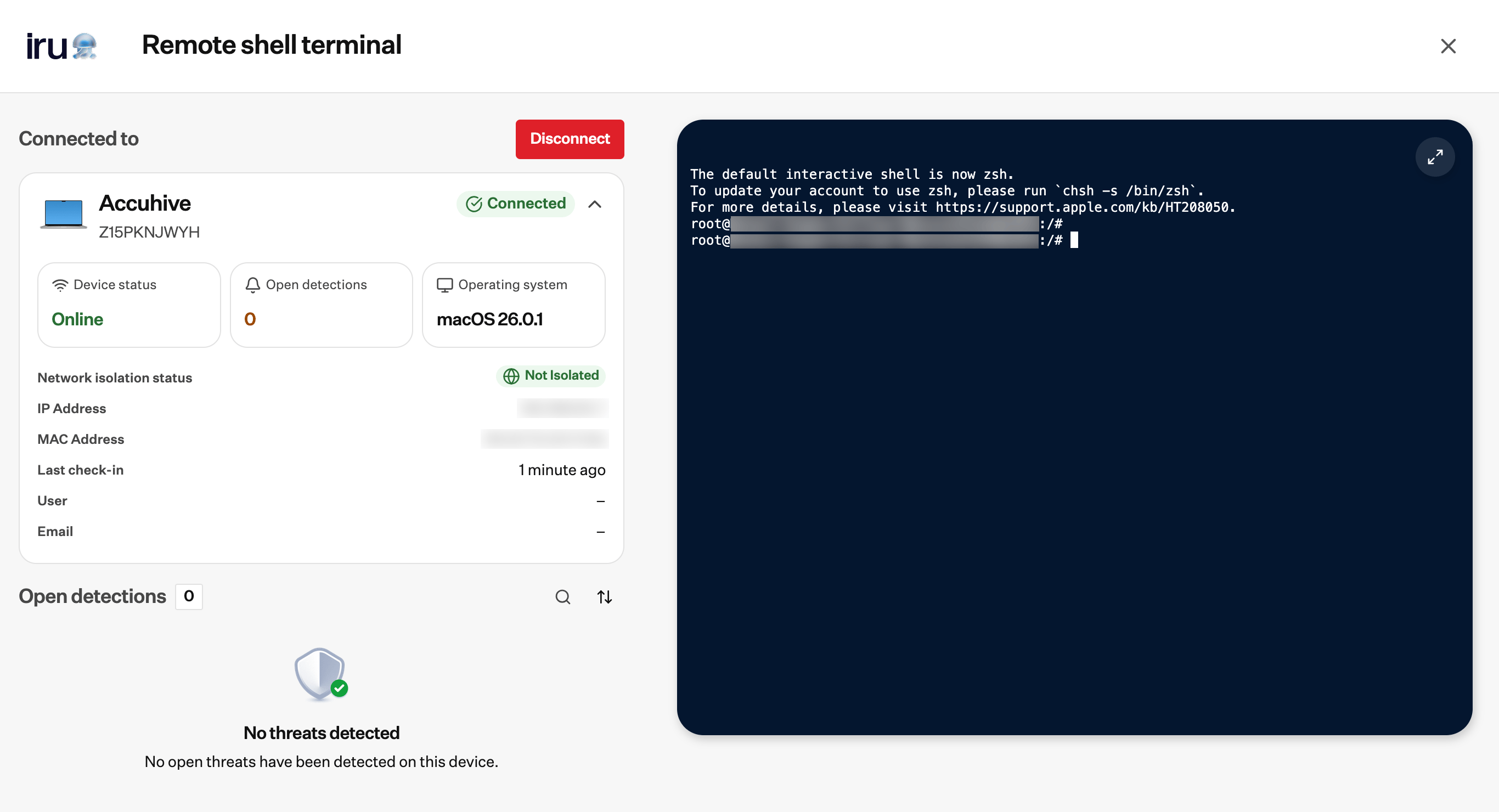
1
Wait for the connection
Wait while the page connects to the Mac.
2
Try again if the connection fails
If the connection fails, select Connect at the top of the device panel.
3
Make the terminal full screen
Select the button at the top right of the terminal to make it full screen. Select it again to leave full screen and return to the Mac and the terminal side by side.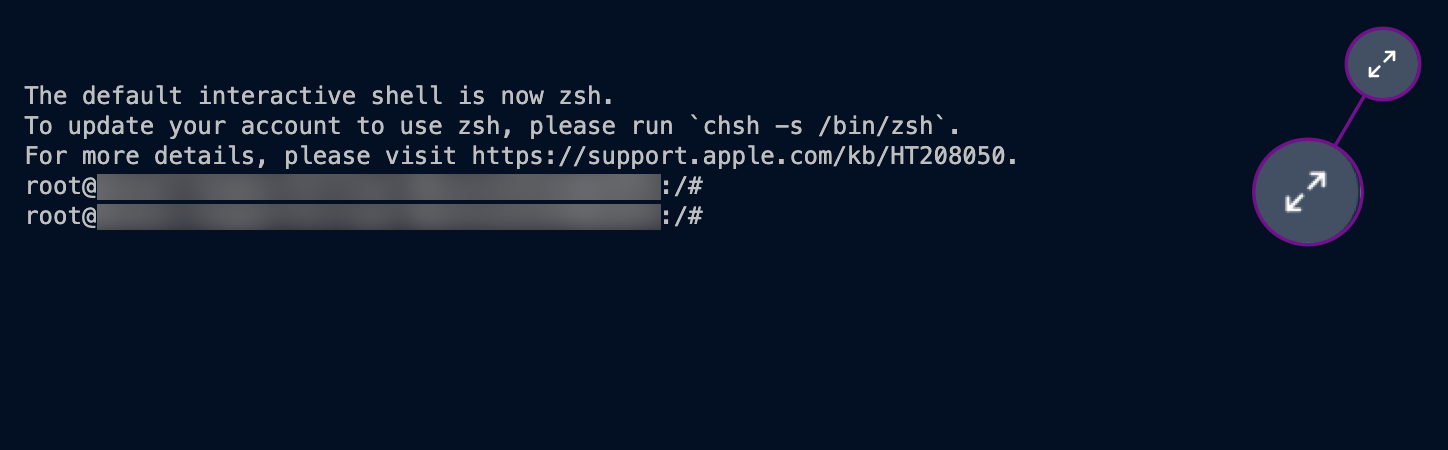
4
Run a command
When the shell is connected, the terminal shows a prompt and a blinking cursor. You may see macOS’s note that the default interactive shell is zsh, then a root prompt for that Mac.
The shell session runs as root, so sudo is unnecessary.
5
Send the command
Type a command, then press Return to send it.
Auditing
Remote Shell sessions are recorded in Activity under Detections. Some events are attributed to the administrator who opened the shell. Others are attributed to the Mac. Activity records how many commands were entered. It does not record the text of those commands.1
Open Activity
Select the Activity icon (pulse icon) in the top right navigation bar.
2
Filter to Detections
Set Category to Detections.
3
Read an event
Select a Remote Shell row to expand it.
- Remote shell session started: Recorded when the session begins.
- Remote shell connection: Recorded when the connection is accepted, once for the web app and once for the Mac. The row includes the host that connected.
- Live response command request: Records the request to open the shell, including which shell is used and the timeout for the session.
- Live response command updated: Records the command as its status changes. You may see Pending, Connected, Started, or Disconnected. If the command does not complete, the status is Failed and the row includes a failure reason, such as a timeout.
- Remote shell session ended: Shows how long the session lasted, how it was closed, how many commands were entered, and how much data was sent and received. A session you close with Disconnect is recorded that way.
End a session
Close the session when you finish. You can disconnect from the device panel, close the page, or leave the session until it expires.1
Disconnect
Select Disconnect at the top of the device panel.
2
Close the page
Select the X at the top right of the Remote shell terminal page.
3
Confirm while the session is open
While the session is connecting or Connected, the page asks Are you sure you want to navigate away? Quitting now loses your progress and access to logs for this session. Select Stay here to remain on the page, or Disconnect remote terminal to end the session.
4
Close a session that is not connected
When the session is Not connected or Failed to connect, the X closes the page.
Troubleshooting
The shell does not connect
The shell does not connect
What you see:The page shows Failed to connect. The terminal says the remote shell could not be started, and the Mac stays Not connected. The device status on the card can still show the Mac as online.What to do:The Mac seems to be off or offline. Select Connect at the top of the device panel to try again, or come back when the Mac is available.
The Mac is in Complete Isolation
The Mac is in Complete Isolation
What you see:The shell does not connect. The Mac is in Complete Isolation.What to do:Remote Shell works while the Mac is in Partial Isolation. It does not work while the Mac is in Complete Isolation. Release the Mac from Complete Isolation before you start a session. See Device Isolation.
The session stays paused
The session stays paused
What you see:The status is Session paused. The terminal says the relay is holding the session until the Mac attaches.What to do:Wait for the Mac to attach. To stop waiting, select Disconnect.
Considerations
- Security operations: Use Remote Shell with the status and tag controls on the Detections page. See Security Operations Actions in Endpoint Detection.
- Isolation: A session still works while the Mac is in Partial Isolation. It does not work while the Mac is in Complete Isolation.
- Session limits: The web app allows one Remote Shell session at a time, and each Mac allows one active session.
Related Articles
Security Operations Actions in Endpoint Detection
Update status, assign tags, and open response actions
Device Isolation
Isolate a Mac from the network while you investigate a detection
Understanding the Detections Page
Review detections, filters, and the threat detail panel
Activity
Review Remote Shell session, connection, and live response events