

This Library Item is available for Android devices
Add an Android Restrictions Library Item
To add this Library Item to your Iru Endpoint Library, follow the steps outlined in the Library Overview article.1
Navigate to Library
Navigate to the Iru Endpoint Library.
2
Add Library Item
Select Add Library Item in the upper-right corner.
3
Select Android Restrictions
Select Android Restrictions and select Add and configure in the lower-right corner.
4
Configure restrictions
Configure the Android Restrictions settings.
5
Save Configuration
Select Save.
Android Restrictions Reference
These controls mirror what Iru exposes from the Android Management API. Pick the ones that match your policy.Access work contacts from personal profile apps
Access work contacts from personal profile apps
Specify how personal apps can access work profile contacts, including contact searches and incoming calls.
- Allow: Personal apps can use work contacts unless you list specific apps to block.
- Deny: Personal apps cannot use work contacts unless you list specific apps to allow.
- Allow for system apps only: System apps can use work contacts; you maintain a list of any other apps that may use them.
Add exception
Add exception
Select Add exception. In the picker, use Search the Play Store in the embedded view (select Select for each app, repeat as needed), or open the Add package name tab, enter App name and Package name (for example Google Chrome and
com.android.chrome), select Add for each row, then select Done. You can also select + Add app on the restriction to add another row to the table.The line above the table is Except deny for if Allow is selected, Except allow for if Deny is selected, or and if Allow for system apps only is selected. Each row lists App name and Package name.Cross profile data sharing
Cross profile data sharing
Specify how data from one profile can be shared with apps in the other profile. This only applies to simple data sharing via app intents, such as what appears in the Android Sharesheet. Copy and paste between profiles is a separate control. Use Disallow cross profile copy & paste for the clipboard.
- Allow: Apps can share data between the work profile and the personal profile.
- Deny: Apps cannot share data between profiles.
- Deny work to personal: Apps cannot share data from the work profile to the personal profile.
Disallow cross profile copy & paste
Disallow cross profile copy & paste
Controls whether text can be copied and pasted between the work profile and the personal profile.
- Unchecked: Text can be copied and pasted both ways between profiles.
- Checked: Text copied from the personal profile cannot be pasted into the work profile, and text copied from the work profile cannot be pasted into the personal profile.
Disallow camera access
Disallow camera access
Disables camera access for the profile or device scopes you enable in the table.
Disallow screen capture
Disallow screen capture
Restricts screen capture for the scopes you select. Use the Work profile and Personal profile checkboxes. Only these three combinations are valid:
Disallow private space
Disallow private space
Blocks creation of a private space. An existing private space may be removed when this restriction is applied.
Limit number of days work profile can be paused
Limit number of days work profile can be paused
When enabled, set Max days for how long the work profile can remain paused. While the work profile is paused, the device may defer commands and policy updates.
Disallow work profile widgets
Disallow work profile widgets
Specify if work profile applications are allowed to add widgets to the device home screen. Note, this does not prevent adding work app shortcuts to the device home screen.
Disallow work profile app functions
Disallow work profile app functions
Controls whether work profile apps can expose app functions, and whether personal profile apps can call those functions. Use the Work profile and Personal profile checkboxes. Only these three combinations are valid:
Disallow apps from unknown sources
Disallow apps from unknown sources
Blocks installing apps from unknown sources for the scopes you select. Use the Work profile and Personal profile checkboxes. Only these three combinations are valid:
Disallow Android Developer Mode
Disallow Android Developer Mode
Typically applies at Device scope.
Default app permissions
Default app permissions
Applies to the work profile. Chooses the default response to runtime permission requests for work apps:
- Prompt: Ask the end user to allow or deny each permission request.
- Grant: Automatically allow permission requests.
- Deny: Automatically deny permission requests.
Credential managers
Credential managers
Sets the default for credential manager apps (password managers and passkey providers) in the work profile. Requires Android 14 or later.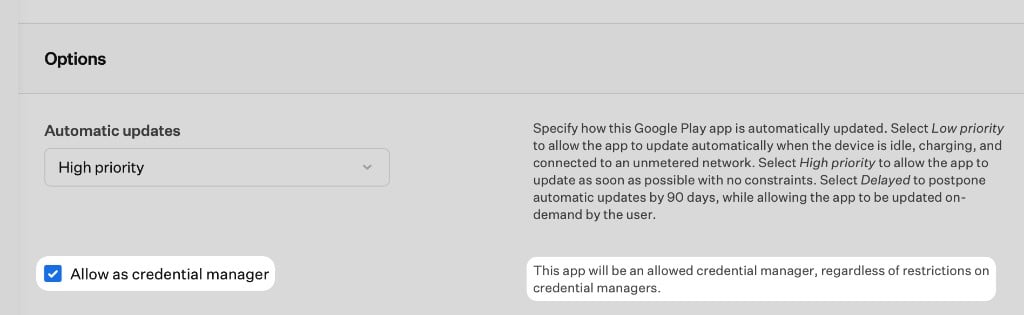
- Block all (default): No credential managers are available in the work profile unless you allow a specific app. This matches the Android Management API default.
- Allow system app credential managers: Pre-loaded OEM default credential managers (for example Google Password Manager or Samsung Pass) are available. Third-party credential managers stay blocked unless you allow them individually.
Require sign-in with managed Google Account
Require sign-in with managed Google Account
Select the Require sign-in with managed Google Account checkbox to require a managed Google Account on company-owned devices with a work profile. The managed Google Account must exist within the Google Admin console associated with Iru’s Android Enterprise integration.Under Require, choose one of the following:
- Any managed Google Account: The end user can sign in with any managed Google Account from your organization’s managed Google domain.
- A specific managed Google Account: The end user must sign in with a specific account. Enter a managed Google Account email, or type
$to use a global variable such as$EMAIL. Use a lowercase email address.
- Block the entire device or Block the work profile a set number of days after non-compliance. Set days to
0to block immediately. - Erase the entire device a set number of days after non-compliance.
Configuration options depend on Android version and hardware. The Iru web app shows what you can set for each Library Item.
Considerations
Work profile vs device-wide
Some restrictions apply to the full device; others only to the work profile or personal profile. Iru shows the scope next to each control.
Scope checkbox combinations
For Disallow screen capture and Disallow apps from unknown sources, use both unchecked, Work profile only, or both profiles. Personal profile alone is not valid.
Android Developer Mode
Developer Mode is disabled by default on managed Android devices. To allow it, deselect Disallow Android Developer Mode in this Library Item.
Require sign-in with managed Google Account
Company-owned work profile only. The account must exist in the Google Admin console for your Android Enterprise integration. Without compliance actions, devices are only prompted.
Credential managers
Android 14+ and work profile only. Block all matches the API default. Allow a third-party provider with Allow as credential manager on its Google Play app Library Item.
Android Management API limits
You only get controls the Android Management API exposes. Apple and Android policies do not always map one-to-one across platforms.
Testing recommendations
Test on representative devices and Android versions before a wide rollout. OEMs can interpret the same policy slightly differently.