> ## Documentation Index
> Fetch the complete documentation index at: https://docs.iru.com/llms.txt
> Use this file to discover all available pages before exploring further.
# 계정 메뉴
> Iru 사이드바 하단의 Account Menu Button을 열어 Access, Billing, Organization, Integrations, 파트너 포털, 내 계정 및 기타 테넌트 설정에 액세스합니다.
### 계정 메뉴 정보
**계정 메뉴 버튼**은 Iru 웹 앱의 왼쪽 사이드바 하단에 있습니다. 이름과 이메일이 표시됩니다. 이를 선택하면 단일 제품 영역(Endpoint, Identity 또는 Compliance)에 국한되지 않는 테넌트 전체 설정 및 계정 옵션 메뉴가 열립니다.
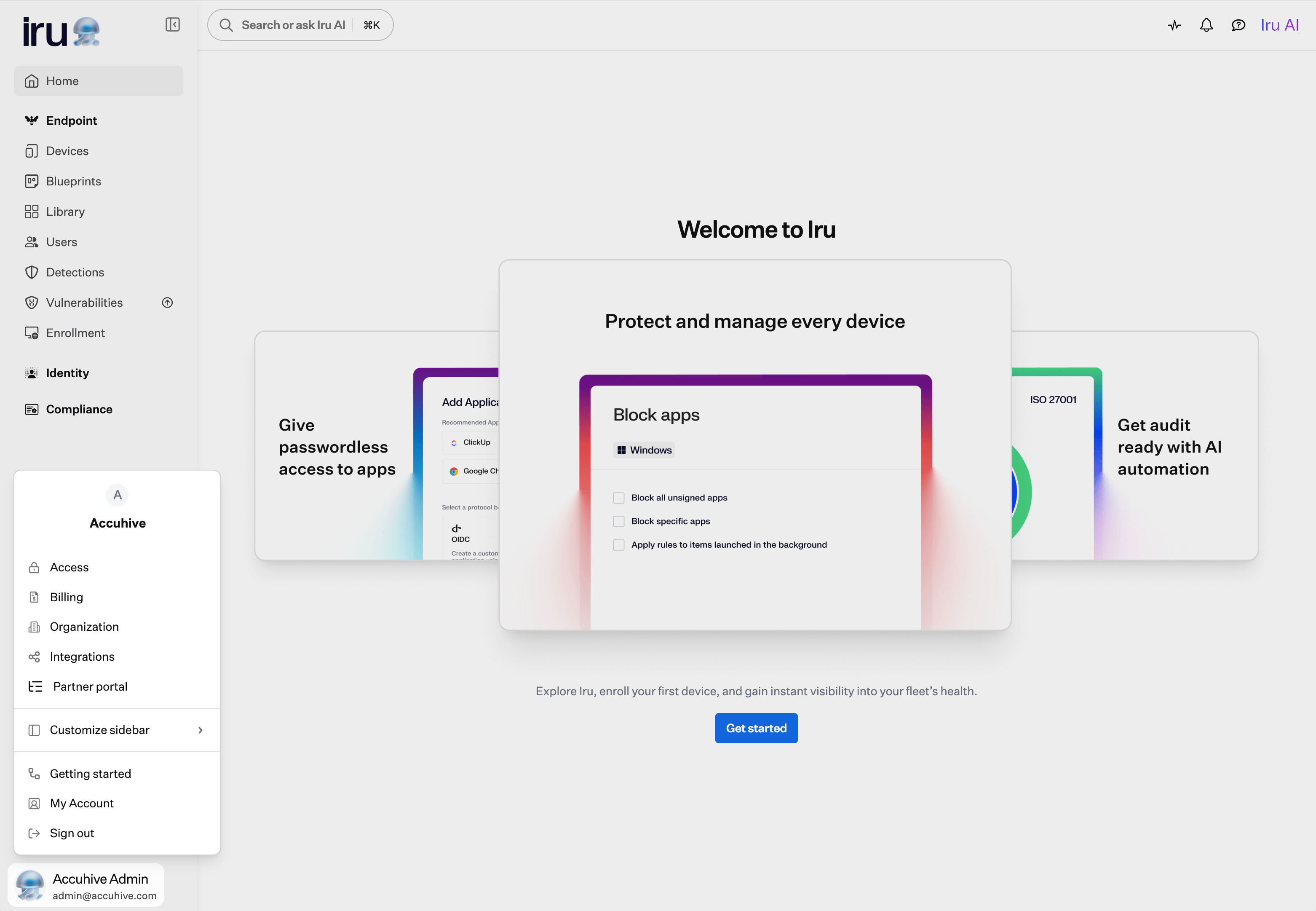 이 문서 전체에서 **Account Menu Button → Access**와 같은 경로는 **계정 메뉴 버튼**을 선택한 다음 메뉴에서 **액세스**를 선택하라는 의미입니다.
### 계정 메뉴를 여는 방법
사이드바에서 왼쪽 탐색 메뉴 하단의 **계정 메뉴 버튼**을 선택합니다.
### 메뉴 옵션
| 메뉴 항목 | 열리는 항목 |
| - | - |
| **액세스** | 인증, SSO, 패스키, 팀원, API 토큰. [SSO 설정](/ko/endpoint/getting-started/foundation/sso-setup) 및 [패스키 및 소셜 로그인](/ko/iru/access/passkeys-and-social-login)을 참조하세요. |
| **청구** | 라이선스 수, 사용량, 플랜 세부 정보. [Billing 페이지](/ko/iru/platform-overview/billing-page)를 참조하세요. 하위 테넌트에서는 이 페이지에 라이선스 관리를 MSP 관리자가 담당한다고 표시됩니다. |
| **조직** | 테넌트 프로필, 기기 도메인, Endpoint 플랫폼 설정, 조직 리소스. [Compliance 시작하기](/ko/compliance/getting-started-with-compliance) 및 [엔터프라이즈 네트워크에서 Iru 사용](/ko/iru/requirements/using-iru-on-enterprise-networks)을 참조하세요. |
| **통합** | 디렉터리 서비스, SSO 통합, Apple 플랫폼 설정, 타사 커넥터. [SCIM 디렉터리 통합](/ko/endpoint/integrations/scim/scim-directory-integration) 및 [Apple 통합 개요](/ko/endpoint/settings/apple-integrations/apple-integrations-overview)를 참조하세요. |
| **파트너 포털** | MSP 상위 테넌트: [파트너 대시보드](/ko/iru/platform-overview/partner-dashboard) 및 [MSP 청구](/ko/iru/platform-overview/msp-billing). [Partner Portal](/ko/iru/platform-overview/partner-portal-page)을 참조하세요. |
| **Customize sidebar** | 왼쪽 탐색 메뉴에서 Endpoint, Identity, Compliance 섹션을 표시하거나 숨깁니다. [사이드바 사용자 지정](/ko/iru/platform-overview/iru-navigation-and-interface#customize-sidebar)을 참조하세요. |
| **Getting started** | 제품 영역별 온보딩 작업. [시작하기](/ko/endpoint/getting-started/getting-started) 및 [Compliance 시작하기](/ko/compliance/getting-started-with-compliance)를 참조하세요. |
| **내 계정** | 프로필, 인증기, 알림 기본 설정. [내 계정 프로필 설정](/ko/endpoint/settings/user-preferences/my-account-profile-settings)을 참조하세요. |
| **Sign out** | 현재 세션을 종료합니다. |
권한에 따라 계정 메뉴에 **액세스**, **청구**, **조직**, **통합** 또는 **파트너 포털**이 표시되지 않을 수 있습니다. **파트너 포털**은 MSP 상위 테넌트의 **Account Owners** 및 **Administrators**에게만 표시됩니다. 각 옵션을 열 수 있는 역할은 [팀원 역할 권한](/ko/iru/access/team-member-role-permissions)을 참조하세요.
[파트너 포털](/ko/iru/platform-overview/partner-portal-page)에 있는 동안에는 계정 메뉴에 **홈**이 포함됩니다. **홈**을 선택하면 MSP 상위 테넌트로 돌아갑니다.
### 관련 탐색
일부 기능은 Iru 인터페이스에서 계정 메뉴 밖으로 이동했습니다. 대신 다음 위치에서 찾을 수 있습니다.
* **활동**: 오른쪽 상단 탐색 모음의 Pulse 아이콘. [Activity 페이지](/ko/endpoint/devices/activity-page) 및 [Unified Activity](/ko/iru/platform-overview/unified-activity)를 참조하세요.
* **알림**: 오른쪽 상단 탐색 모음의 종 아이콘. [전역 알림](/ko/endpoint/devices/global-alerts)을 참조하세요.
* **등록**: 왼쪽 사이드바의 Endpoint 섹션 하단. [시작하기](/ko/endpoint/getting-started/getting-started)를 참조하세요.
탐색, 이동된 페이지, 사이드바 사용자 지정 방법은 [Iru 탐색 및 인터페이스](/ko/iru/platform-overview/iru-navigation-and-interface)를 참조하세요.
이 문서 전체에서 **Account Menu Button → Access**와 같은 경로는 **계정 메뉴 버튼**을 선택한 다음 메뉴에서 **액세스**를 선택하라는 의미입니다.
### 계정 메뉴를 여는 방법
사이드바에서 왼쪽 탐색 메뉴 하단의 **계정 메뉴 버튼**을 선택합니다.
### 메뉴 옵션
| 메뉴 항목 | 열리는 항목 |
| - | - |
| **액세스** | 인증, SSO, 패스키, 팀원, API 토큰. [SSO 설정](/ko/endpoint/getting-started/foundation/sso-setup) 및 [패스키 및 소셜 로그인](/ko/iru/access/passkeys-and-social-login)을 참조하세요. |
| **청구** | 라이선스 수, 사용량, 플랜 세부 정보. [Billing 페이지](/ko/iru/platform-overview/billing-page)를 참조하세요. 하위 테넌트에서는 이 페이지에 라이선스 관리를 MSP 관리자가 담당한다고 표시됩니다. |
| **조직** | 테넌트 프로필, 기기 도메인, Endpoint 플랫폼 설정, 조직 리소스. [Compliance 시작하기](/ko/compliance/getting-started-with-compliance) 및 [엔터프라이즈 네트워크에서 Iru 사용](/ko/iru/requirements/using-iru-on-enterprise-networks)을 참조하세요. |
| **통합** | 디렉터리 서비스, SSO 통합, Apple 플랫폼 설정, 타사 커넥터. [SCIM 디렉터리 통합](/ko/endpoint/integrations/scim/scim-directory-integration) 및 [Apple 통합 개요](/ko/endpoint/settings/apple-integrations/apple-integrations-overview)를 참조하세요. |
| **파트너 포털** | MSP 상위 테넌트: [파트너 대시보드](/ko/iru/platform-overview/partner-dashboard) 및 [MSP 청구](/ko/iru/platform-overview/msp-billing). [Partner Portal](/ko/iru/platform-overview/partner-portal-page)을 참조하세요. |
| **Customize sidebar** | 왼쪽 탐색 메뉴에서 Endpoint, Identity, Compliance 섹션을 표시하거나 숨깁니다. [사이드바 사용자 지정](/ko/iru/platform-overview/iru-navigation-and-interface#customize-sidebar)을 참조하세요. |
| **Getting started** | 제품 영역별 온보딩 작업. [시작하기](/ko/endpoint/getting-started/getting-started) 및 [Compliance 시작하기](/ko/compliance/getting-started-with-compliance)를 참조하세요. |
| **내 계정** | 프로필, 인증기, 알림 기본 설정. [내 계정 프로필 설정](/ko/endpoint/settings/user-preferences/my-account-profile-settings)을 참조하세요. |
| **Sign out** | 현재 세션을 종료합니다. |
권한에 따라 계정 메뉴에 **액세스**, **청구**, **조직**, **통합** 또는 **파트너 포털**이 표시되지 않을 수 있습니다. **파트너 포털**은 MSP 상위 테넌트의 **Account Owners** 및 **Administrators**에게만 표시됩니다. 각 옵션을 열 수 있는 역할은 [팀원 역할 권한](/ko/iru/access/team-member-role-permissions)을 참조하세요.
[파트너 포털](/ko/iru/platform-overview/partner-portal-page)에 있는 동안에는 계정 메뉴에 **홈**이 포함됩니다. **홈**을 선택하면 MSP 상위 테넌트로 돌아갑니다.
### 관련 탐색
일부 기능은 Iru 인터페이스에서 계정 메뉴 밖으로 이동했습니다. 대신 다음 위치에서 찾을 수 있습니다.
* **활동**: 오른쪽 상단 탐색 모음의 Pulse 아이콘. [Activity 페이지](/ko/endpoint/devices/activity-page) 및 [Unified Activity](/ko/iru/platform-overview/unified-activity)를 참조하세요.
* **알림**: 오른쪽 상단 탐색 모음의 종 아이콘. [전역 알림](/ko/endpoint/devices/global-alerts)을 참조하세요.
* **등록**: 왼쪽 사이드바의 Endpoint 섹션 하단. [시작하기](/ko/endpoint/getting-started/getting-started)를 참조하세요.
탐색, 이동된 페이지, 사이드바 사용자 지정 방법은 [Iru 탐색 및 인터페이스](/ko/iru/platform-overview/iru-navigation-and-interface)를 참조하세요.