> ## Documentation Index
> Fetch the complete documentation index at: https://docs.iru.com/llms.txt
> Use this file to discover all available pages before exploring further.
# CrowdStrike を Custom App として展開する
> Iru Endpoint で CrowdStrike Falcon センサーをカスタムアプリとして Mac コンピュータに展開します。インストーラをパッケージ化し、カスタマー ID を追加して、拡張機能を承認します。
このガイドは Mac コンピュータに適用されます
### 前提条件
Crowdstrike の Firmware Analysis 機能を使用する場合、Intel ベースの Mac コンピュータでは KEXT バージョンの Crowdstrike 設定プロファイルが必要です。Firmware Analysis を使用しない場合は、以下の非 KEXT バージョンのカスタム設定を使用することをお勧めします。
* ベンダーから入手した CrowdStrike インストーラ(Hosts > Sensor Downloads)
* Crowdstrike カスタム設定
* **すべての Mac アーキテクチャ**
* macOS 15 (Sequoia) 以降([GitHub リンク](https://github.com/kandji-inc/support/blob/main/custom-apps/crowdstrike/crowdstrike_settings_macOS15.mobileconfig))
* **Apple Silicon**
* すべての macOS バージョン([GitHub リンク](https://github.com/kandji-inc/support/blob/main/custom-apps/crowdstrike/crowdstrike_settings.mobileconfig))
* **Intel(KEXT あり)**
* すべての macOS バージョン([GitHub リンク](https://github.com/kandji-inc/support/blob/main/custom-apps/crowdstrike/crowdstrike_settings_with_kext.mobileconfig))
* CrowdStrike サービス管理プロファイル
* macOS 13 (Ventura) 以降([GitHub リンク](https://github.com/kandji-inc/support/blob/main/custom-apps/crowdstrike/crowdstrike_service_management.mobileconfig))
* CrowdStrike 監査スクリプト([GitHub リンク](https://github.com/kandji-inc/support/blob/main/custom-apps/crowdstrike/crowdstrike_falcon_ae_script.zsh))
* CrowdStrike ポストインストールスクリプト([GitHub リンク](https://github.com/kandji-inc/support/blob/main/custom-apps/crowdstrike/crowdstrike_falcon_postinstall_script.zsh))
### 考慮事項
* **CrowdStrike 設定プロファイル**は、ネットワークコンテンツフィルタ、Kernel Extension、System Extension、PPPC、および Web フィルタリングの要件について CrowdStrike を承認します。このプロファイルは、Kernel Extension を使用する旧 Falcon エージェントと、System Extension を使用する最新バージョンの両方に対応しています
* **crowdstrike\_settings\_macOS15** と **crowdstrike\_settings** の両方のプロファイルを、[Assignment Maps を使用して展開する](/ja/endpoint/library/deployment-guides/apple/deploy-crowdstrike-as-a-custom-app#deploying-with-assignment-maps)セクションの手順に従って正しく割り当てて展開する必要があります
* **CrowdStrike サービス管理プロファイル**は、必要なログイン項目とバックグラウンドプロセスを処理します
* 必要に応じて、**レガシー System Extension (KEXT) 設定プロファイル**を [GitHub](https://github.com/kandji-inc/support/blob/main/custom-apps/crowdstrike/crowdstrike_settings_with_kext.mobileconfig) からダウンロードしてください
* このプロファイルは、Kernel Extension を使用する Falcon エージェントと、System Extension を使用する新しいバージョンの両方をサポートします
* KEXT ペイロードは、Intel ベースの Mac コンピュータで CrowdStrike Firmware Analysis 機能を使用する場合にのみ必要です
* インストールされている特定の CrowdStrike 製品とバージョンによって、アプリのパス、プライバシーアクセス設定、Kernel Extension または System Extension の要件が異なる場合があることに注意してください。他の Custom App と同様に、本番環境の Mac に展開する前に十分にテストすることを強くお勧めします
### Custom Profile を追加して構成する
Crowdstrike Falcon のサービス管理プロファイルは、macOS 13 Ventura 以降に対応しています。macOS Monterey 12 以前では、サービス管理プロファイルがこれらのデバイスに割り当てられないように、Assignment Map を使用した高度なスコープ設定が必要です。Assignment Maps での Crowdstrike の展開について詳しくは、[Assignment Maps を使用して展開する](/ja/endpoint/library/deployment-guides/apple/deploy-crowdstrike-as-a-custom-app#deploying-with-assignment-maps)セクションを参照してください。
この Library Item を Iru Endpoint Library に追加するには、[Library の概要](/ja/endpoint/library/library-items-profiles/library-overview)の記事に記載されている手順に従ってください。
Custom Profile に **名前** を付けます。
**インストール先** で Mac を選択します。
目的の [Blueprints](/ja/endpoint/getting-started/blueprints-and-library/configuring-blueprints) に割り当てます。
CrowdStrike 設定プロファイル(またはレガシー System Extension (KEXT) 設定プロファイル)をアップロードします。
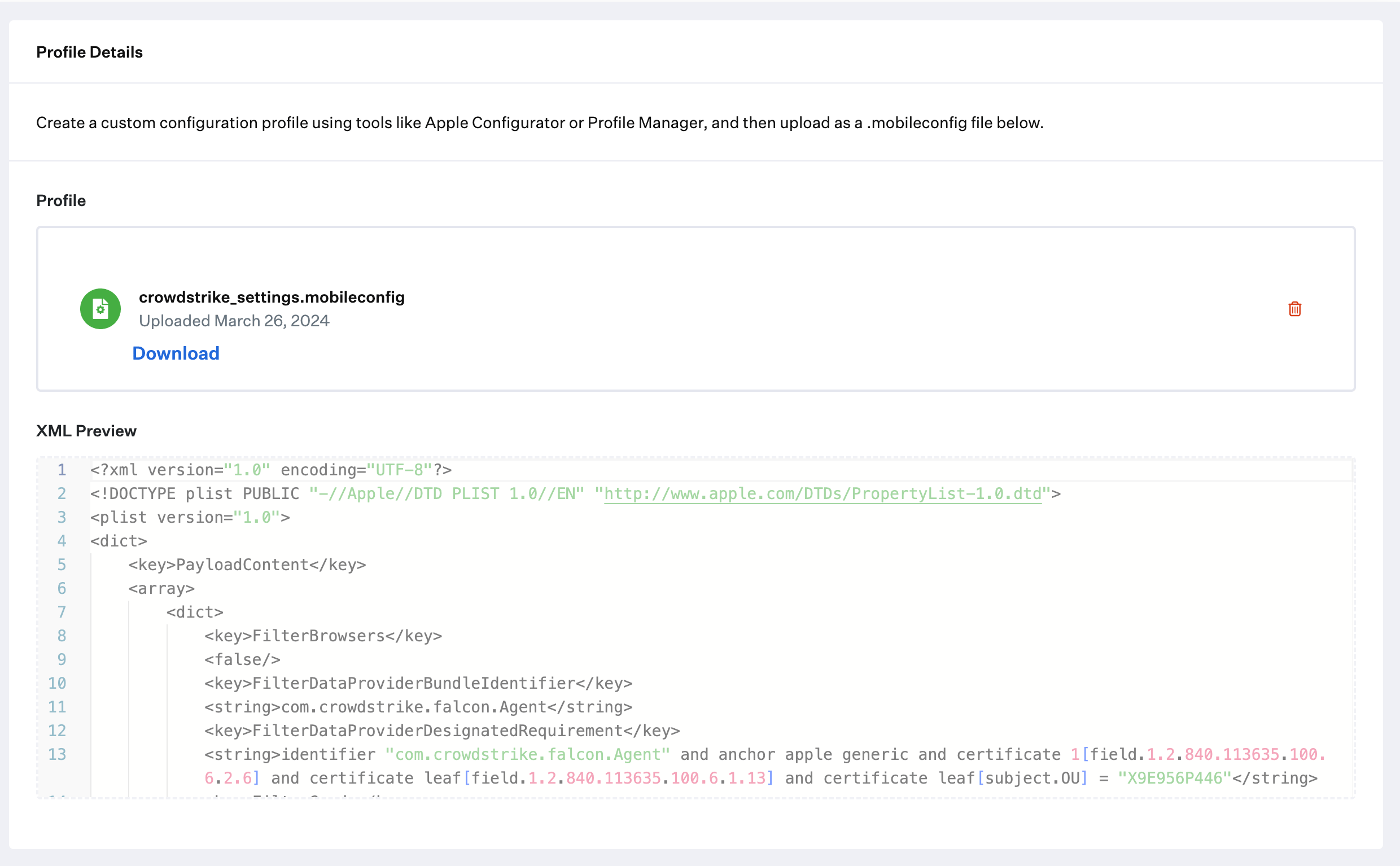 **保存** を選択します。
**crowdstrike\_settings\_macOS15** および **crowdstrike\_service\_management** プロファイルについて、このセクションの前の手順を繰り返します。
### Custom App を追加して構成する
この Library Item を Iru Endpoint Library に追加するには、[Library の概要](/ja/endpoint/library/library-items-profiles/library-overview)の記事に記載されている手順に従ってください。
Custom App に **名前** を付けます。必要に応じて、カスタムアイコンを追加します。
目的の [Blueprints](/ja/endpoint/getting-started/blueprints-and-library/configuring-blueprints) に割り当てます。
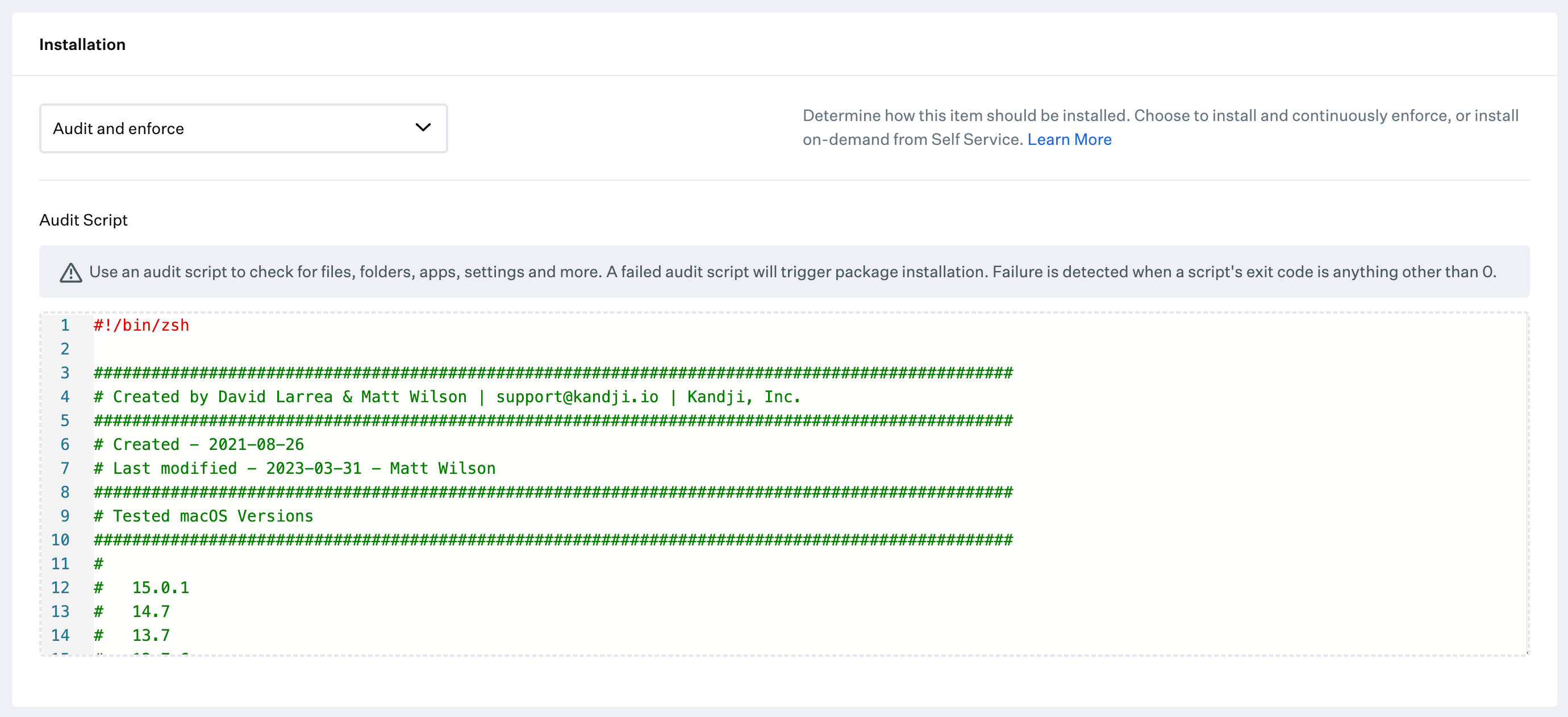
**Installation** を Audit and Enforce に変更します。
[前提条件](/ja/endpoint/library/deployment-guides/apple/deploy-crowdstrike-as-a-custom-app#prerequisites)の crowdstrike\_ae\_script.zsh スクリプトをコピーして、**Audit & Enforce** テキストボックスに貼り付けます。変更は不要です。
**保存** を選択します。
**crowdstrike\_settings\_macOS15** および **crowdstrike\_service\_management** プロファイルについて、このセクションの前の手順を繰り返します。
### Custom App を追加して構成する
この Library Item を Iru Endpoint Library に追加するには、[Library の概要](/ja/endpoint/library/library-items-profiles/library-overview)の記事に記載されている手順に従ってください。
Custom App に **名前** を付けます。必要に応じて、カスタムアイコンを追加します。
目的の [Blueprints](/ja/endpoint/getting-started/blueprints-and-library/configuring-blueprints) に割り当てます。
**Installation** を Audit and Enforce に変更します。
[前提条件](/ja/endpoint/library/deployment-guides/apple/deploy-crowdstrike-as-a-custom-app#prerequisites)の crowdstrike\_ae\_script.zsh スクリプトをコピーして、**Audit & Enforce** テキストボックスに貼り付けます。変更は不要です。
 展開タイプとして Installer **Package (install .pkg or .mpkg)** を選択します。
インストーラパッケージをアップロードします。
[前提条件](/ja/endpoint/library/deployment-guides/apple/deploy-crowdstrike-as-a-custom-app#prerequisites)に記載されている **Postinstall Script** を貼り付けます。
* ポストインストールスクリプトで、55 行目の **customerIDChecksum** 変数をカスタマー ID で更新します
* 必要に応じて、59 行目の **installToken** 変数内にインストールトークンを貼り付けます。それ以外の場合は空白のままにします
展開タイプとして Installer **Package (install .pkg or .mpkg)** を選択します。
インストーラパッケージをアップロードします。
[前提条件](/ja/endpoint/library/deployment-guides/apple/deploy-crowdstrike-as-a-custom-app#prerequisites)に記載されている **Postinstall Script** を貼り付けます。
* ポストインストールスクリプトで、55 行目の **customerIDChecksum** 変数をカスタマー ID で更新します
* 必要に応じて、59 行目の **installToken** 変数内にインストールトークンを貼り付けます。それ以外の場合は空白のままにします
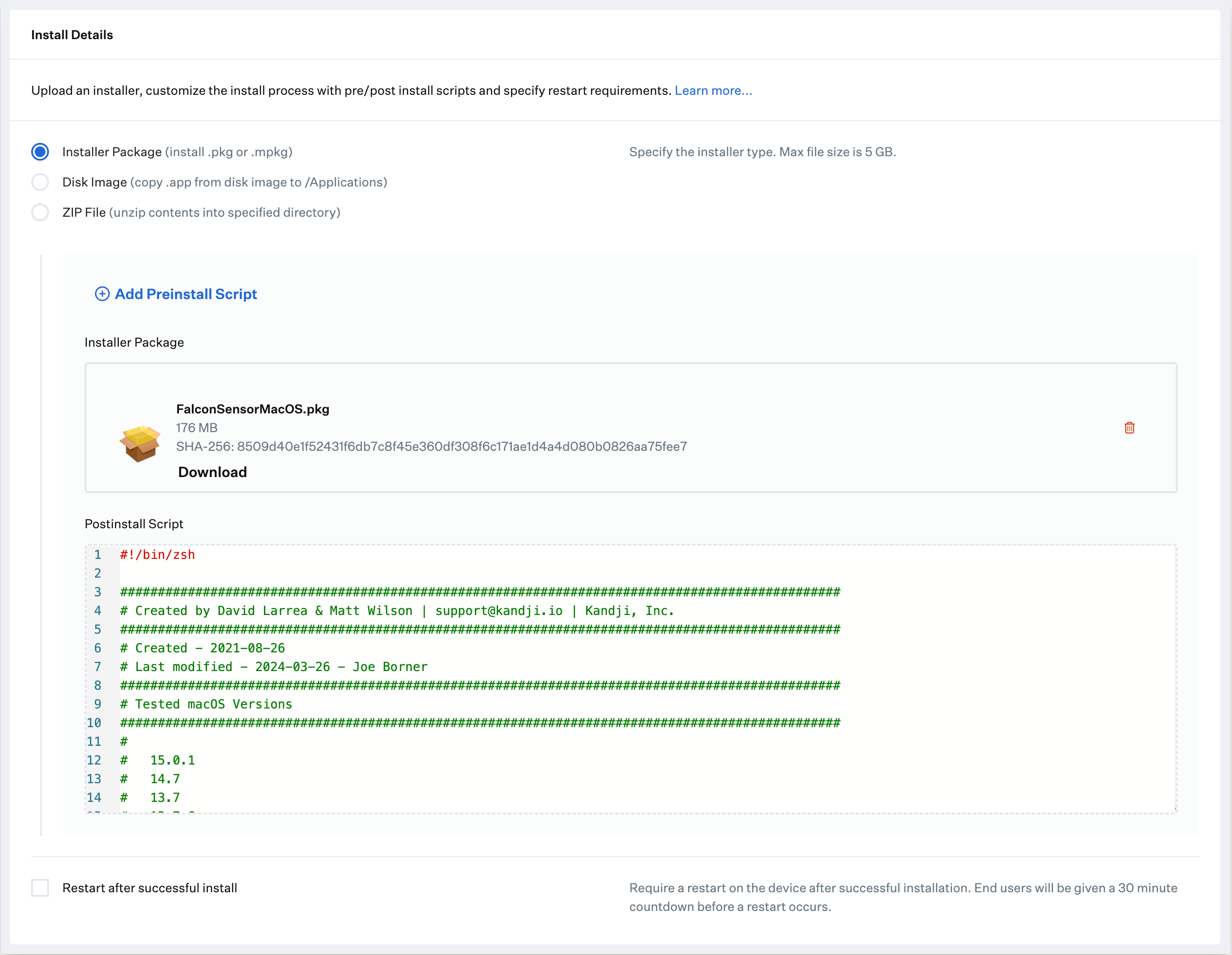 **保存** を選択します。
### Assignment Maps を使用して展開する
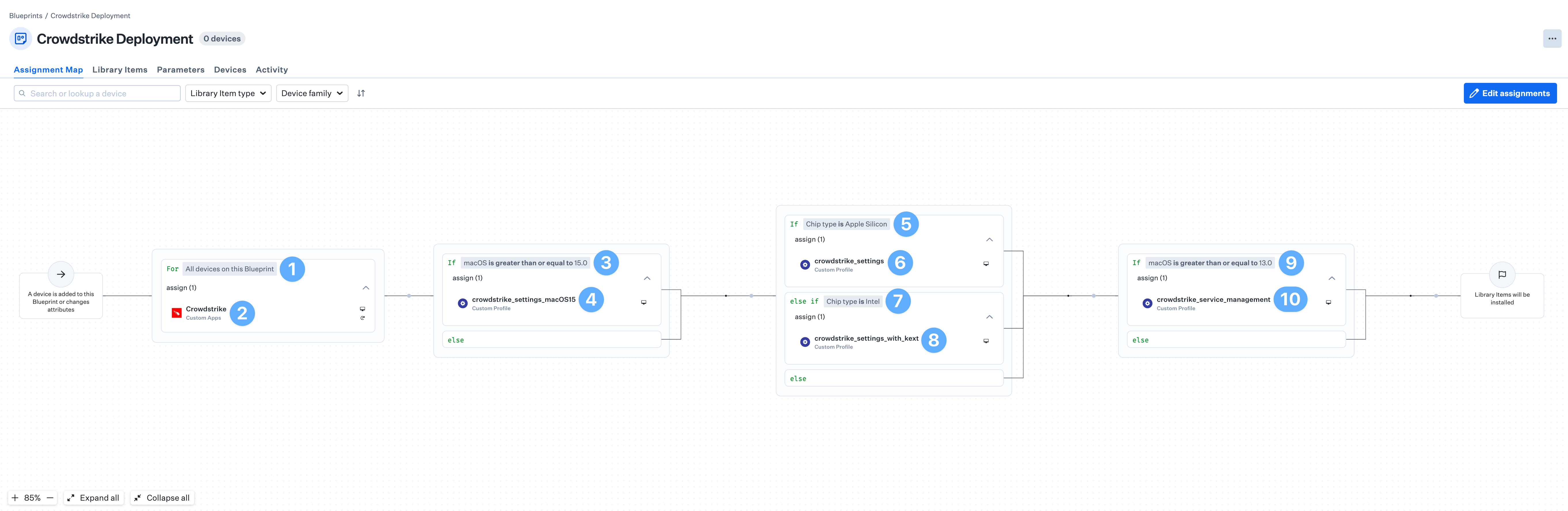
Crowdstrike の Custom Profile のうち 4 つは、正しいデバイスに展開されるように条件ロジックが必要です。Assignment Map を使用すると、すべてのデバイスを 1 つの便利なビューで簡単に管理できます。
[Blueprint の作成](/ja/endpoint/getting-started/blueprints-and-library/configuring-blueprints)および [Blueprint での条件ロジックの使用](/ja/endpoint/blueprints/assignment-maps/using-conditional-logic-in-blueprints)の記事を確認してください。
**For All devices on this Blueprint** 条件ブロックから始めます。
**Crowdstrike** Custom App をブロックに割り当てます。
複数の Custom Apps が必要な場合は、インストーラの異なるバージョンごとの条件を持つ条件ブロックを作成します。
条件ブロックの上部を **If** **macOS is greater than or equal to 15.0** に設定します。
**crowdstrike\_settings\_macOS15** Custom Profile を条件ブロックに割り当てます。
条件ブロックの上部を **If** **Chip type is Apple Silicon** に設定します。
**crowdstrike\_settings** Custom Profile を条件ブロックに割り当てます。
下部の条件ブロックを **else if Chip type is Intel** に設定します。
**crowdstrike\_settings\_with\_kext** Custom Profile を条件ブロックに割り当てます。
条件ブロックの上部を **If macOS is greater than or equal to 13.0** に設定します。
**crowdstrike\_service\_management** Custom Profile を条件ブロックに割り当てます。
**保存** を選択します。
### Assignment Maps を使用して展開する
Crowdstrike の Custom Profile のうち 4 つは、正しいデバイスに展開されるように条件ロジックが必要です。Assignment Map を使用すると、すべてのデバイスを 1 つの便利なビューで簡単に管理できます。
[Blueprint の作成](/ja/endpoint/getting-started/blueprints-and-library/configuring-blueprints)および [Blueprint での条件ロジックの使用](/ja/endpoint/blueprints/assignment-maps/using-conditional-logic-in-blueprints)の記事を確認してください。
**For All devices on this Blueprint** 条件ブロックから始めます。
**Crowdstrike** Custom App をブロックに割り当てます。
複数の Custom Apps が必要な場合は、インストーラの異なるバージョンごとの条件を持つ条件ブロックを作成します。
条件ブロックの上部を **If** **macOS is greater than or equal to 15.0** に設定します。
**crowdstrike\_settings\_macOS15** Custom Profile を条件ブロックに割り当てます。
条件ブロックの上部を **If** **Chip type is Apple Silicon** に設定します。
**crowdstrike\_settings** Custom Profile を条件ブロックに割り当てます。
下部の条件ブロックを **else if Chip type is Intel** に設定します。
**crowdstrike\_settings\_with\_kext** Custom Profile を条件ブロックに割り当てます。
条件ブロックの上部を **If macOS is greater than or equal to 13.0** に設定します。
**crowdstrike\_service\_management** Custom Profile を条件ブロックに割り当てます。