> ## Documentation Index
> Fetch the complete documentation index at: https://docs.iru.com/llms.txt
> Use this file to discover all available pages before exploring further.
# Iru Navigation and Interface
> Find your way around the Iru web app: top navigation, sidebar, Account Menu, and where features moved after the transition from Kandji.
The Iru web app uses a top navigation bar, a left sidebar you can customize by product area, and an [Account Menu](/en/iru/platform-overview/account-menu) for tenant-wide settings. This article covers where things live in the interface. For logo, app names, and device branding, see [Iru Brand Update](/en/iru/platform-overview/iru-brand-update). If you are upgrading from Kandji, see [Upgrade to Iru](/en/iru/platform-overview/upgrade-to-iru).
### Tenant domain
After you upgrade, the web app is at `{{subdomain}}.iru.com`. The Enrollment Portal is at `{{subdomain}}.iru.com/enroll`. Your previous Kandji domain (`{{subdomain}}.kandji.io`) redirects to the Iru domain.
### Top navigation
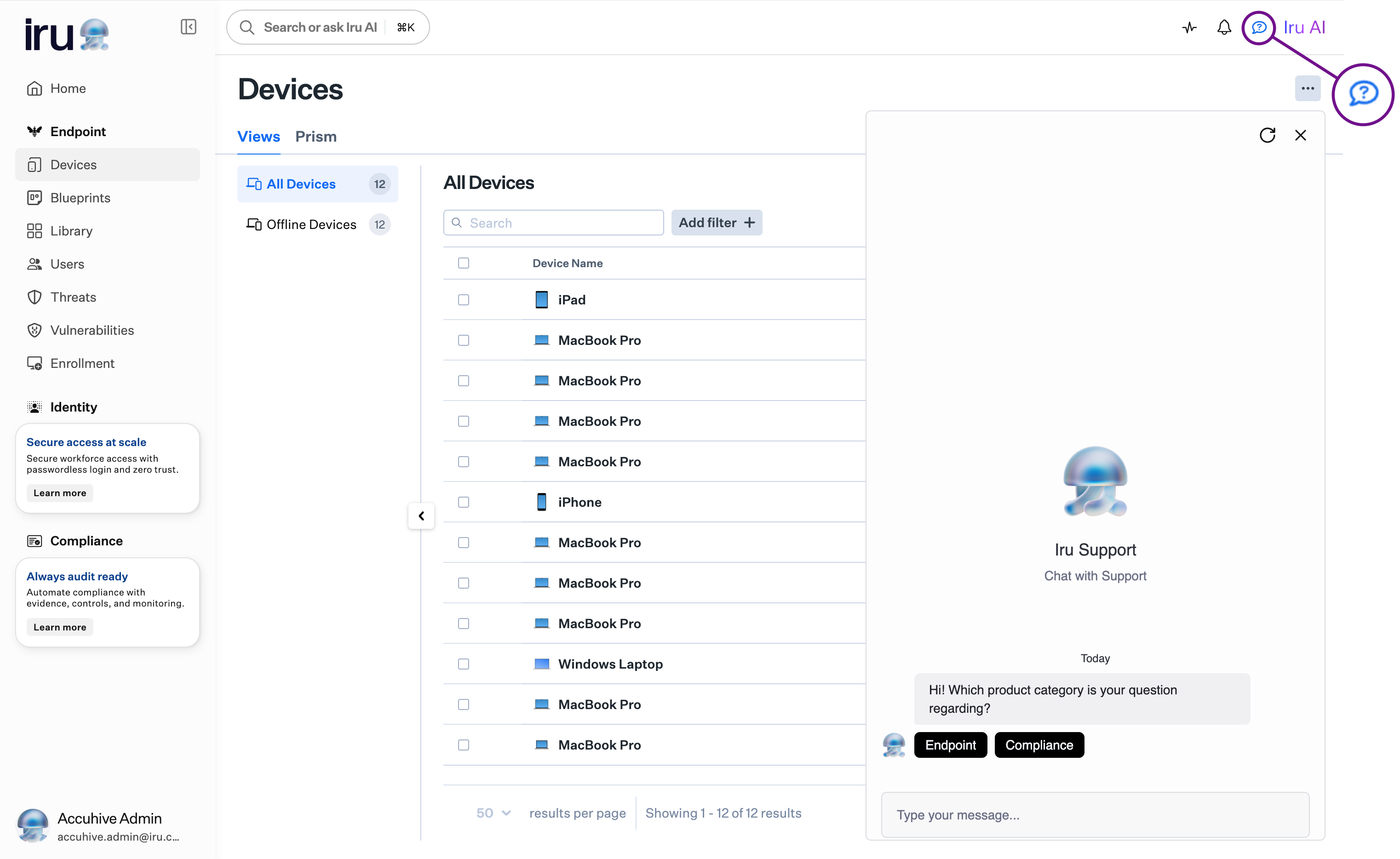
The top navigation bar includes **Search or ask Iru AI**, with keyboard shortcut support (⌘K). **Iru Support Chat** is available from the chat bubble icon in the upper right, next to Iru AI. The Support Knowledge Base is at [docs.iru.com](https://docs.iru.com).
 ### Sidebar
The left sidebar includes Endpoint, Identity, and Compliance sections.
### Customize sidebar
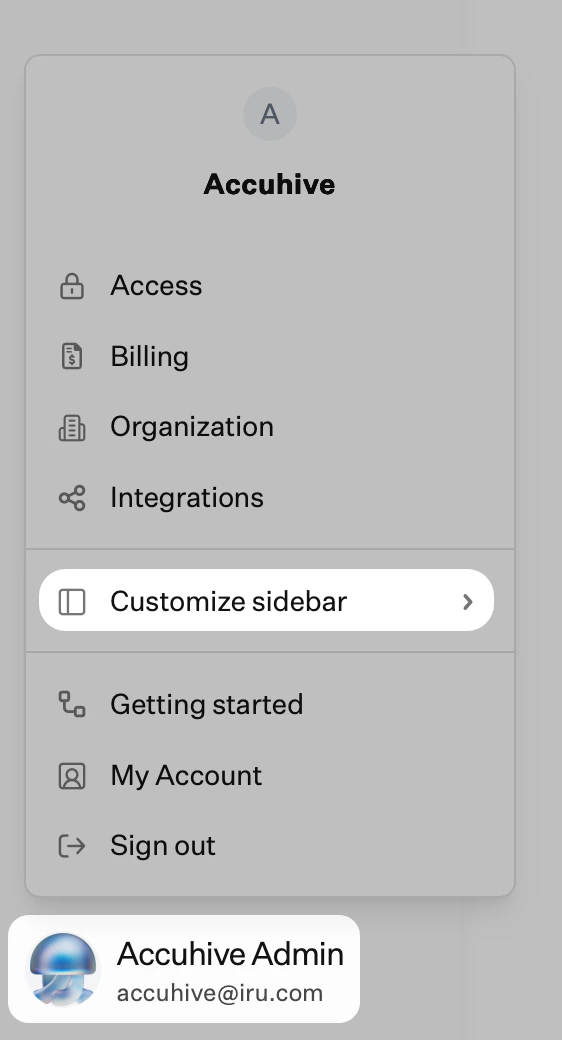
Hide or show Endpoint, Identity, and Compliance sections with **Customize sidebar** in the [Account Menu](/en/iru/platform-overview/account-menu).
### Sidebar
The left sidebar includes Endpoint, Identity, and Compliance sections.
### Customize sidebar
Hide or show Endpoint, Identity, and Compliance sections with **Customize sidebar** in the [Account Menu](/en/iru/platform-overview/account-menu).
 ### Account Menu
Tenant-wide settings such as **Access**, **Organization**, and **Integrations** are in the Account Menu. Select the [**Account Menu Button**](/en/iru/platform-overview/account-menu) at the bottom of the left navigation to open it. For every menu option, see [Account Menu](/en/iru/platform-overview/account-menu).
### Access
In **Access**, you manage authentication, connection settings, passkeys, session controls, and team members. The **API tokens** tab is also available here. After you [upgrade from Kandji](/en/iru/platform-overview/upgrade-to-iru), the Access page shows your new configuration. You manage connection settings (social login, native SSO, and SAML) and passkey registration. The upgrade card disappears once the upgrade to Iru is complete.
### Getting Started
**Getting Started** is an onboarding guide by product area. Open it from the Account Menu, then use the **Endpoint**, **Identity**, and **Compliance** tabs to see recommended tasks, listed as to do or done.
### Relocated features
These features moved in the Iru interface:
* **Activity**: Pulse icon in the top right navigation bar. See [Activity Page](/en/endpoint/devices/activity-page). **[Unified Activity](/en/iru/platform-overview/unified-activity)** is also available in Preview for a cross-product timeline.
* **Alerts**: Bell icon in the top right navigation bar. See [Global Alerts](/en/endpoint/devices/global-alerts).
* **Enrollment**: Bottom of the Endpoint menu in the left navigation. See [Getting Started](/en/endpoint/getting-started/getting-started) for enrollment setup.
* **Organization**: [**Account Menu Button**](/en/iru/platform-overview/account-menu) → **Organization**
* **Integrations** and **Apple platform settings**: [**Account Menu Button**](/en/iru/platform-overview/account-menu) → **Integrations**. See [SCIM Directory Integration](/en/endpoint/integrations/scim/scim-directory-integration) for the Integrations page and [Apple Integrations Overview](/en/endpoint/settings/apple-integrations/apple-integrations-overview) for Apple platform settings.
* **Self Service settings**: **Self Service Settings** tab on the Library page. See [Self Service Settings](/en/endpoint/settings/self-service/self-service-settings).
### Related articles
* [Upgrade to Iru](/en/iru/platform-overview/upgrade-to-iru): upgrade from Kandji, including authentication and domain changes.
* [Iru Brand Update](/en/iru/platform-overview/iru-brand-update): logo, app names, and branding on managed devices.
* [Account Menu](/en/iru/platform-overview/account-menu): tenant-wide settings at the bottom of the sidebar.
* [Unified Activity](/en/iru/platform-overview/unified-activity): cross-product activity timeline.
### Account Menu
Tenant-wide settings such as **Access**, **Organization**, and **Integrations** are in the Account Menu. Select the [**Account Menu Button**](/en/iru/platform-overview/account-menu) at the bottom of the left navigation to open it. For every menu option, see [Account Menu](/en/iru/platform-overview/account-menu).
### Access
In **Access**, you manage authentication, connection settings, passkeys, session controls, and team members. The **API tokens** tab is also available here. After you [upgrade from Kandji](/en/iru/platform-overview/upgrade-to-iru), the Access page shows your new configuration. You manage connection settings (social login, native SSO, and SAML) and passkey registration. The upgrade card disappears once the upgrade to Iru is complete.
### Getting Started
**Getting Started** is an onboarding guide by product area. Open it from the Account Menu, then use the **Endpoint**, **Identity**, and **Compliance** tabs to see recommended tasks, listed as to do or done.
### Relocated features
These features moved in the Iru interface:
* **Activity**: Pulse icon in the top right navigation bar. See [Activity Page](/en/endpoint/devices/activity-page). **[Unified Activity](/en/iru/platform-overview/unified-activity)** is also available in Preview for a cross-product timeline.
* **Alerts**: Bell icon in the top right navigation bar. See [Global Alerts](/en/endpoint/devices/global-alerts).
* **Enrollment**: Bottom of the Endpoint menu in the left navigation. See [Getting Started](/en/endpoint/getting-started/getting-started) for enrollment setup.
* **Organization**: [**Account Menu Button**](/en/iru/platform-overview/account-menu) → **Organization**
* **Integrations** and **Apple platform settings**: [**Account Menu Button**](/en/iru/platform-overview/account-menu) → **Integrations**. See [SCIM Directory Integration](/en/endpoint/integrations/scim/scim-directory-integration) for the Integrations page and [Apple Integrations Overview](/en/endpoint/settings/apple-integrations/apple-integrations-overview) for Apple platform settings.
* **Self Service settings**: **Self Service Settings** tab on the Library page. See [Self Service Settings](/en/endpoint/settings/self-service/self-service-settings).
### Related articles
* [Upgrade to Iru](/en/iru/platform-overview/upgrade-to-iru): upgrade from Kandji, including authentication and domain changes.
* [Iru Brand Update](/en/iru/platform-overview/iru-brand-update): logo, app names, and branding on managed devices.
* [Account Menu](/en/iru/platform-overview/account-menu): tenant-wide settings at the bottom of the sidebar.
* [Unified Activity](/en/iru/platform-overview/unified-activity): cross-product activity timeline.