> ## Documentation Index
> Fetch the complete documentation index at: https://docs.iru.com/llms.txt
> Use this file to discover all available pages before exploring further.
# Account Menu
> Open the Account Menu Button at the bottom of the Iru sidebar to reach Access, Organization, Integrations, Billing, My Account, and other tenant settings.
### About the Account Menu
The **Account Menu Button** is at the bottom of the left sidebar in the Iru web app. It shows your name and email. Click it to open a menu of tenant-wide settings and account options that are not tied to a single product area (Endpoint, Identity, or Compliance).
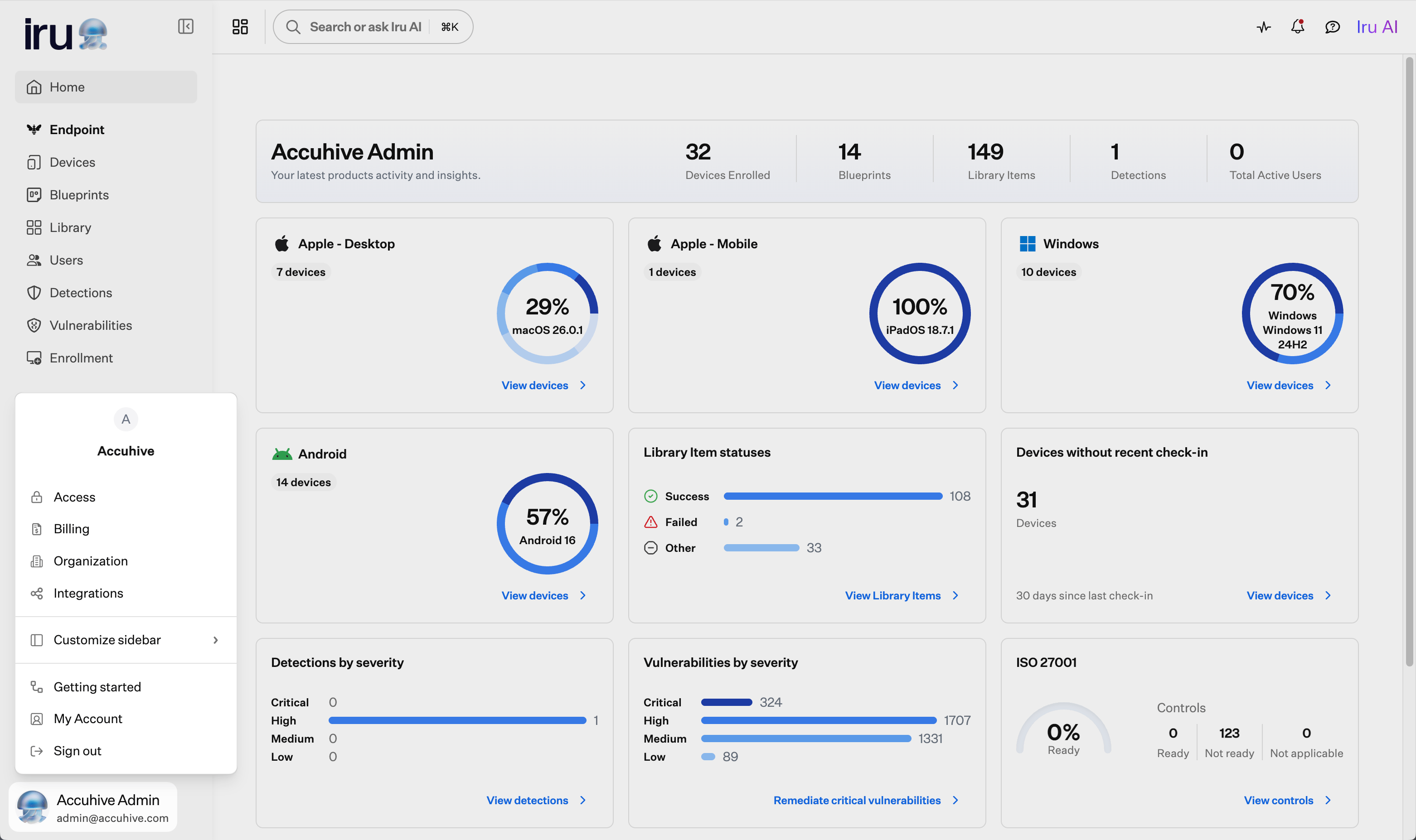 Throughout this documentation, paths such as **Account Menu Button → Access** mean: click the **Account Menu Button**, then select **Access** from the menu.
### How to Open the Account Menu
In the sidebar, click the **Account Menu Button** at the bottom of the left navigation.
### Menu Options
| Menu item | What it opens |
| --------------------- | ----------------------------------------------------------------------------------------------------------------------------------------------------------------------------------------------------------------------------------------------------------------------------------------------- |
| **Access** | Authentication, SSO, passkeys, team members, and API tokens. See [SSO Setup](/en/endpoint/getting-started/foundation/sso-setup) and [Passkeys & Social Login](/en/iru/access/passkeys-and-social-login). |
| **Organization** | Tenant profile, device domains, Endpoint platform settings, and organization resources. See [Getting Started with Compliance](/en/compliance/getting-started-with-compliance) and [Using Iru on Enterprise Networks](/en/iru/requirements/using-iru-on-enterprise-networks). |
| **Integrations** | Directory services, SSO integrations, Apple platform settings, and third-party connectors. See [SCIM Directory Integration](/en/endpoint/integrations/scim/scim-directory-integration) and [Apple Integrations Overview](/en/endpoint/settings/apple-integrations/apple-integrations-overview). |
| **Billing** | License counts, usage, and plan details. See [Billing Page](/en/iru/platform-overview/billing-page). |
| **Customize sidebar** | Show or hide Endpoint, Identity, and Compliance sections in the left navigation. See [Customize Sidebar](/en/iru/platform-overview/upgrade-to-iru#customize-sidebar). |
| **Getting started** | Onboarding tasks by product area. See [Getting Started](/en/endpoint/getting-started/getting-started) and [Getting Started with Compliance](/en/compliance/getting-started-with-compliance). |
| **My Account** | Your profile, authenticators, and notification preferences. See [My Account Profile Settings](/en/endpoint/settings/user-preferences/my-account-profile-settings). |
| **Sign out** | End your current session. |
Depending on your permissions, you may not see **Access**, **Organization**, **Integrations**, or **Billing** in the account menu. Those options are not available to every team member. See [Team Member Role Permissions](/en/iru/access/team-member-role-permissions) for which roles can open each option.
### Related Navigation
Some features moved out of the account menu in the Iru interface. You can find them here instead:
* **Activity**: Pulse icon in the top right navigation bar. See [Activity Page](/en/endpoint/devices/activity-page) and [Unified Activity](/en/iru/platform-overview/unified-activity).
* **Alerts**: Bell icon in the top right navigation bar. See [Global Alerts](/en/endpoint/devices/global-alerts).
* **Enrollment**: Bottom of the Endpoint section in the left sidebar. See [Getting Started](/en/endpoint/getting-started/getting-started).
For a full list of interface changes after the Kandji-to-Iru transition, see [Upgrade to Iru](/en/iru/platform-overview/upgrade-to-iru).
Throughout this documentation, paths such as **Account Menu Button → Access** mean: click the **Account Menu Button**, then select **Access** from the menu.
### How to Open the Account Menu
In the sidebar, click the **Account Menu Button** at the bottom of the left navigation.
### Menu Options
| Menu item | What it opens |
| --------------------- | ----------------------------------------------------------------------------------------------------------------------------------------------------------------------------------------------------------------------------------------------------------------------------------------------- |
| **Access** | Authentication, SSO, passkeys, team members, and API tokens. See [SSO Setup](/en/endpoint/getting-started/foundation/sso-setup) and [Passkeys & Social Login](/en/iru/access/passkeys-and-social-login). |
| **Organization** | Tenant profile, device domains, Endpoint platform settings, and organization resources. See [Getting Started with Compliance](/en/compliance/getting-started-with-compliance) and [Using Iru on Enterprise Networks](/en/iru/requirements/using-iru-on-enterprise-networks). |
| **Integrations** | Directory services, SSO integrations, Apple platform settings, and third-party connectors. See [SCIM Directory Integration](/en/endpoint/integrations/scim/scim-directory-integration) and [Apple Integrations Overview](/en/endpoint/settings/apple-integrations/apple-integrations-overview). |
| **Billing** | License counts, usage, and plan details. See [Billing Page](/en/iru/platform-overview/billing-page). |
| **Customize sidebar** | Show or hide Endpoint, Identity, and Compliance sections in the left navigation. See [Customize Sidebar](/en/iru/platform-overview/upgrade-to-iru#customize-sidebar). |
| **Getting started** | Onboarding tasks by product area. See [Getting Started](/en/endpoint/getting-started/getting-started) and [Getting Started with Compliance](/en/compliance/getting-started-with-compliance). |
| **My Account** | Your profile, authenticators, and notification preferences. See [My Account Profile Settings](/en/endpoint/settings/user-preferences/my-account-profile-settings). |
| **Sign out** | End your current session. |
Depending on your permissions, you may not see **Access**, **Organization**, **Integrations**, or **Billing** in the account menu. Those options are not available to every team member. See [Team Member Role Permissions](/en/iru/access/team-member-role-permissions) for which roles can open each option.
### Related Navigation
Some features moved out of the account menu in the Iru interface. You can find them here instead:
* **Activity**: Pulse icon in the top right navigation bar. See [Activity Page](/en/endpoint/devices/activity-page) and [Unified Activity](/en/iru/platform-overview/unified-activity).
* **Alerts**: Bell icon in the top right navigation bar. See [Global Alerts](/en/endpoint/devices/global-alerts).
* **Enrollment**: Bottom of the Endpoint section in the left sidebar. See [Getting Started](/en/endpoint/getting-started/getting-started).
For a full list of interface changes after the Kandji-to-Iru transition, see [Upgrade to Iru](/en/iru/platform-overview/upgrade-to-iru).