> ## Documentation Index
> Fetch the complete documentation index at: https://docs.iru.com/llms.txt
> Use this file to discover all available pages before exploring further.
# Schema
> The schema behind every user profile: built-in fields, the custom attributes you define, and how attributes feed Auto Groups and app mappings.
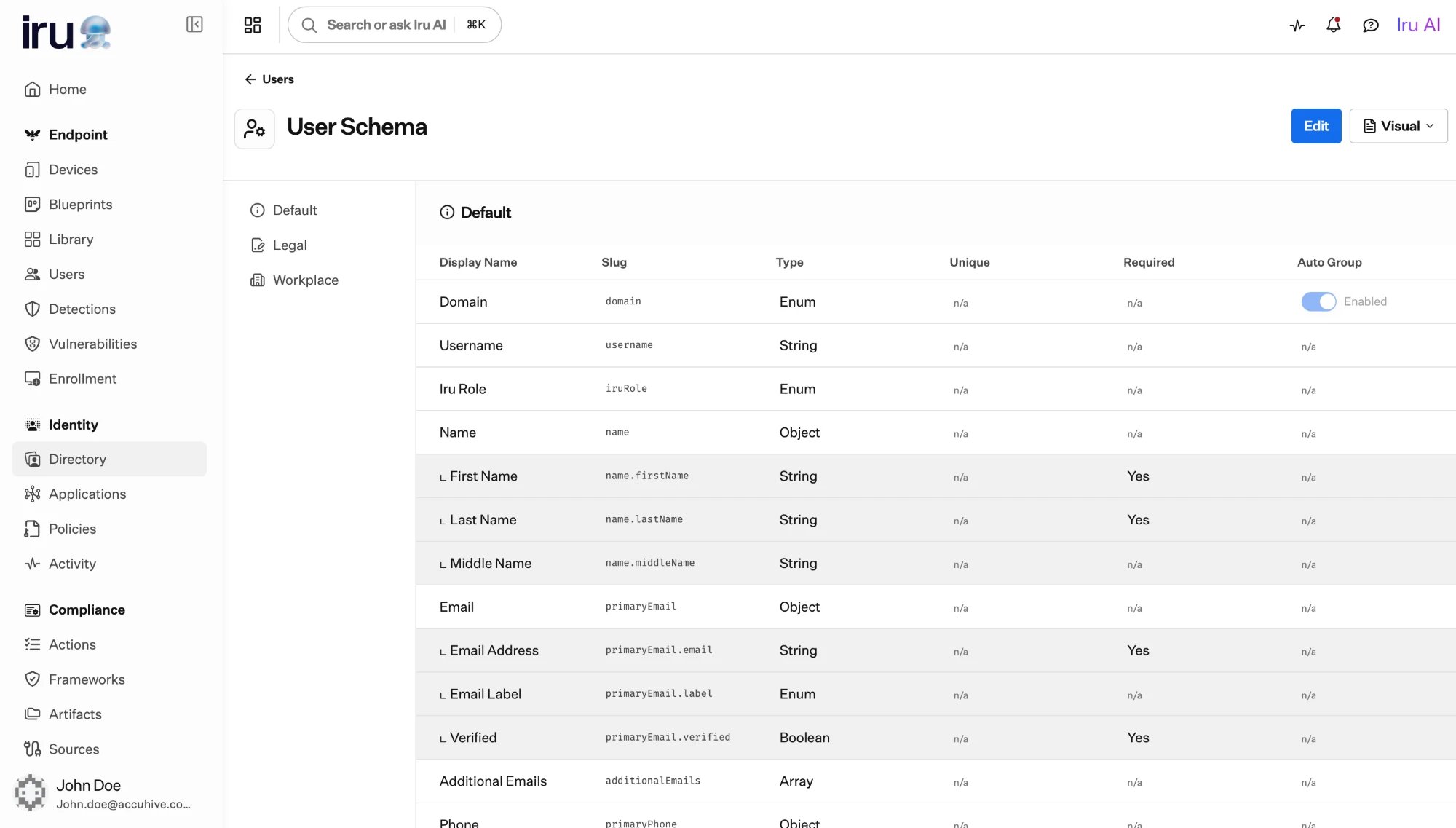
Every user profile is shaped by your **schema**: the set of attributes a profile
can hold. The schema starts with built-in fields that exist for everyone, and
you extend it with **custom attributes** tailored to your organization. You edit
the schema from **Directory → Users → Schema** (the schema control on the Users page is an icon button, not a text label).
Attributes are more than storage. They are the raw material that
[Auto Groups](/en/identity/directory/auto-groups) compute membership from
and that applications map into the identity details they receive, so the schema
you design here shapes access and automation across Iru Identity.
 ## Built-in fields
Every profile includes a set of built-in facets you don't have to define:
* **Name**, used to build the user's display name.
* **Emails**, **phone numbers**, and **addresses**, each entry carrying a
**label** such as work or personal.
* A **username** and **domain** that together form the sign-in identifier.
* A **role**, a **status**, and a **source**. The **role** applies across Iru
products, not only Identity.
These are described alongside the rest of the profile in
[Users](/en/identity/directory/users).
**Supporting more than one email domain.** The **domain** a user can have comes
from a fixed list of allowed values on the built-in domain field. If your
organization uses several domains (for example `example.com` and `example.io`),
add each one to that list in the schema; only domains defined there can be
chosen when you create or import a user.
## Custom attributes
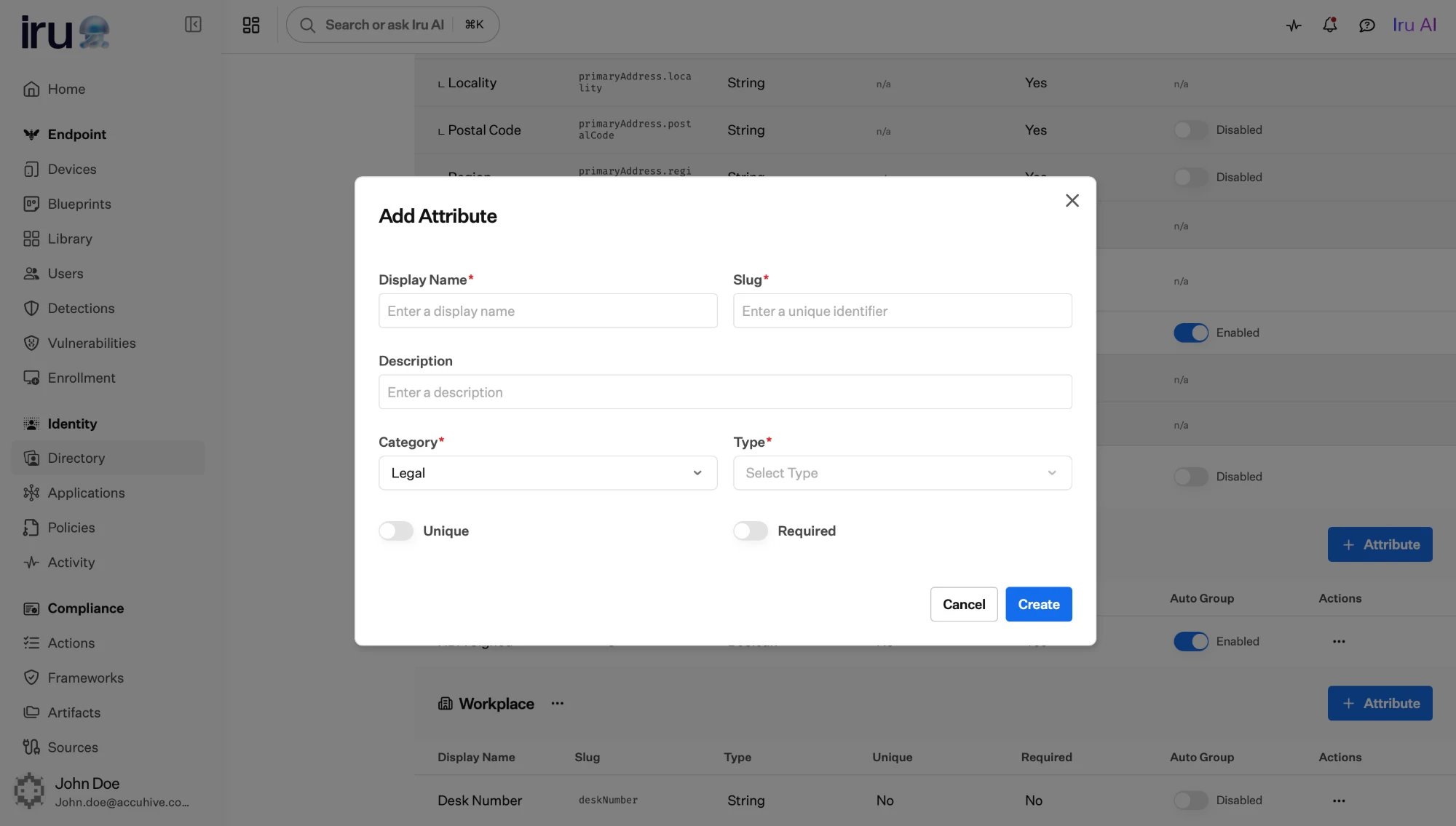
A custom attribute adds a field to every user profile. When you create one, you
give it:
| Property | What it does |
| ---------------- | ------------------------------------------------------------------------------------------ |
| **Display name** | The human-readable label shown on the profile. |
| **Slug** | A stable, machine-friendly identifier used when mapping the attribute into apps and rules. |
| **Type** | The kind of value it holds, chosen from the **attribute types** below. |
| **Description** | Optional guidance shown to admins editing the profile. |
| **Category** | The section of the profile the attribute appears under (see below). |
| **Required** | When on, a profile can't be saved without a value for this attribute. |
| **Unique** | When on, no two users may share the same value for this attribute. |
## Built-in fields
Every profile includes a set of built-in facets you don't have to define:
* **Name**, used to build the user's display name.
* **Emails**, **phone numbers**, and **addresses**, each entry carrying a
**label** such as work or personal.
* A **username** and **domain** that together form the sign-in identifier.
* A **role**, a **status**, and a **source**. The **role** applies across Iru
products, not only Identity.
These are described alongside the rest of the profile in
[Users](/en/identity/directory/users).
**Supporting more than one email domain.** The **domain** a user can have comes
from a fixed list of allowed values on the built-in domain field. If your
organization uses several domains (for example `example.com` and `example.io`),
add each one to that list in the schema; only domains defined there can be
chosen when you create or import a user.
## Custom attributes
A custom attribute adds a field to every user profile. When you create one, you
give it:
| Property | What it does |
| ---------------- | ------------------------------------------------------------------------------------------ |
| **Display name** | The human-readable label shown on the profile. |
| **Slug** | A stable, machine-friendly identifier used when mapping the attribute into apps and rules. |
| **Type** | The kind of value it holds, chosen from the **attribute types** below. |
| **Description** | Optional guidance shown to admins editing the profile. |
| **Category** | The section of the profile the attribute appears under (see below). |
| **Required** | When on, a profile can't be saved without a value for this attribute. |
| **Unique** | When on, no two users may share the same value for this attribute. |
 Choose **required** and **unique** deliberately. A required attribute must be
present on every user, including those created by import or HR sync, so a
record without it will fail to save. A unique attribute is a good fit for
identifiers like an employee number.
### Attribute types
When you add a custom attribute, you choose one of these types for the value it
holds:
| Type | What it holds |
| --------------- | ------------------------------------------------------------------- |
| **String** | Free-form text. |
| **Integer** | A whole number. |
| **Decimal** | A number that can have a fractional part. |
| **Boolean** | A true or false value. |
| **Enumeration** | A value chosen from a fixed list of options you define (see below). |
| **Date** | A date value. |
| **Binary** | A base64-encoded value. |
| **JSON** | A structured JSON value, for nested or composite data. |
A type is chosen when you create the attribute and **can't be changed later**.
**Unique** is not available for **Boolean** or **Enumeration** attributes, whose
values are meant to repeat across users. A **Binary** value is stored as base64
and isn't size-limited, so use it for **small** values such as a token or key,
not large files.
### Attributes with a fixed set of choices
Some attributes should only accept values from a known list (a department, a
location, an employment type. For these, give the attribute a fixed list of
**allowed values** (enumeration options). Each option has its own display name
and identifier.
Fixed-choice attributes are especially useful because they pair naturally with
[Auto Groups](/en/identity/directory/auto-groups): each allowed value can
become its own group, with membership computed automatically.
## Categories
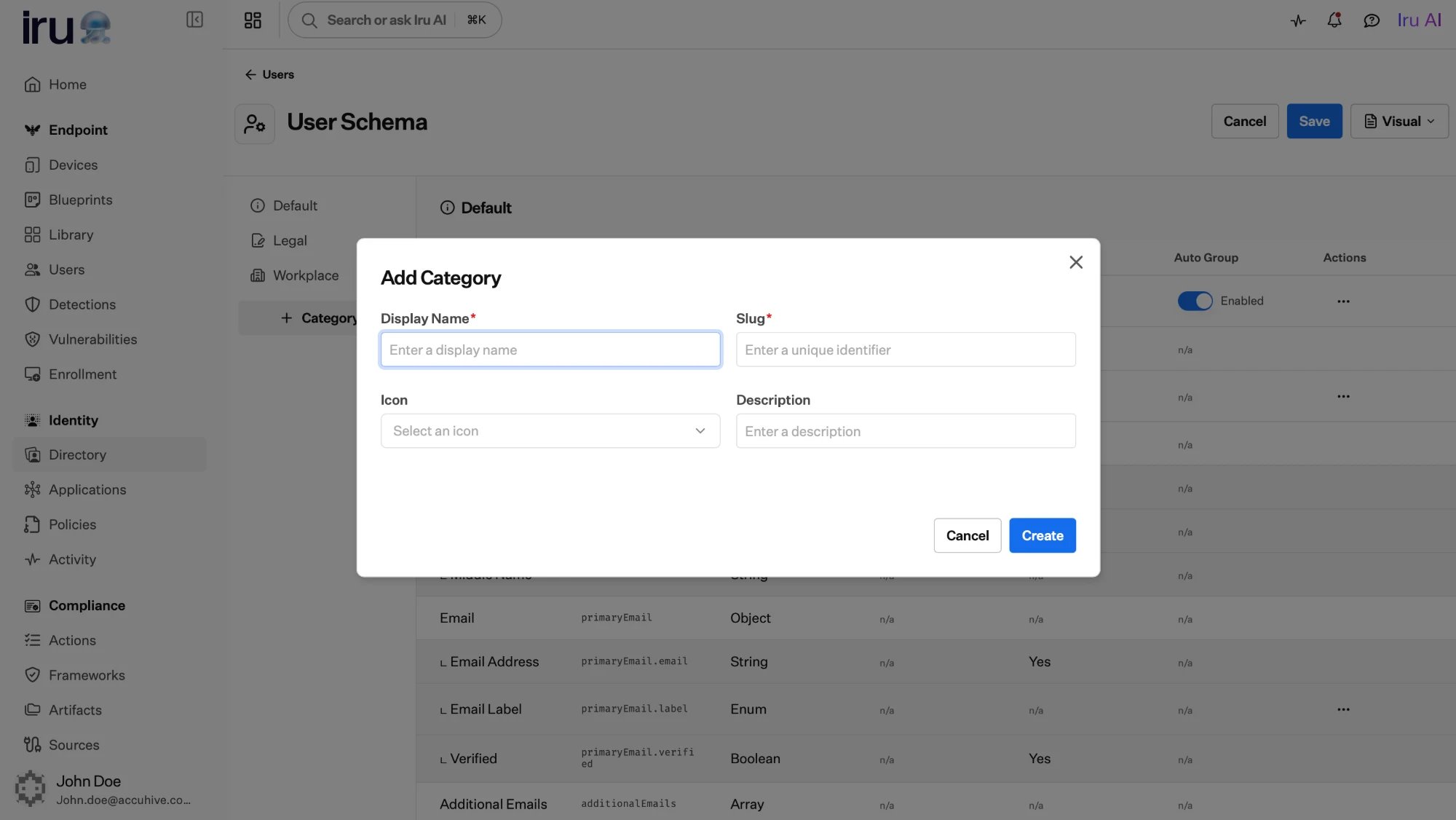
Attributes are organized into **categories**, the named sections a profile is
grouped into, such as "Employment" or "Contact." Each category has a display
name, an icon, and a position that controls its order on the profile. Grouping
related attributes keeps long profiles readable and makes the schema easier to
maintain.
Choose **required** and **unique** deliberately. A required attribute must be
present on every user, including those created by import or HR sync, so a
record without it will fail to save. A unique attribute is a good fit for
identifiers like an employee number.
### Attribute types
When you add a custom attribute, you choose one of these types for the value it
holds:
| Type | What it holds |
| --------------- | ------------------------------------------------------------------- |
| **String** | Free-form text. |
| **Integer** | A whole number. |
| **Decimal** | A number that can have a fractional part. |
| **Boolean** | A true or false value. |
| **Enumeration** | A value chosen from a fixed list of options you define (see below). |
| **Date** | A date value. |
| **Binary** | A base64-encoded value. |
| **JSON** | A structured JSON value, for nested or composite data. |
A type is chosen when you create the attribute and **can't be changed later**.
**Unique** is not available for **Boolean** or **Enumeration** attributes, whose
values are meant to repeat across users. A **Binary** value is stored as base64
and isn't size-limited, so use it for **small** values such as a token or key,
not large files.
### Attributes with a fixed set of choices
Some attributes should only accept values from a known list (a department, a
location, an employment type. For these, give the attribute a fixed list of
**allowed values** (enumeration options). Each option has its own display name
and identifier.
Fixed-choice attributes are especially useful because they pair naturally with
[Auto Groups](/en/identity/directory/auto-groups): each allowed value can
become its own group, with membership computed automatically.
## Categories
Attributes are organized into **categories**, the named sections a profile is
grouped into, such as "Employment" or "Contact." Each category has a display
name, an icon, and a position that controls its order on the profile. Grouping
related attributes keeps long profiles readable and makes the schema easier to
maintain.
 ## How attributes are used
```mermaid theme={null}
flowchart LR
attr["Profile attribute"]
attr -->|"computes membership for"| dyn["Auto Groups"]
attr -->|"mapped into"| apps["Application sign-on
## How attributes are used
```mermaid theme={null}
flowchart LR
attr["Profile attribute"]
attr -->|"computes membership for"| dyn["Auto Groups"]
attr -->|"mapped into"| apps["Application sign-on
(assertions and tokens)"]
attr -->|"can be a condition in"| pol["Authentication policies"]
```
Flag an attribute to power **Auto Groups**, and Iru turns its values into
groups whose membership updates as profiles change.
Applications map profile attributes into the assertion or token they
receive, so each app gets the identity details it expects.
Design the schema before you bring users in at scale. Deciding which
attributes are required, unique, and fixed-choice up front means imports and HR
syncs land cleanly and your Auto Groups behave the way you expect.
## Next steps
Turn an attribute into groups that maintain themselves.
See attributes in action on individual profiles.