> ## Documentation Index
> Fetch the complete documentation index at: https://docs.iru.com/llms.txt
> Use this file to discover all available pages before exploring further.
# Application mapping
> Shape the identity statement an application receives (the SAML assertion or OIDC token) by mapping profile attributes into it with IQL.
When someone signs in to an application through Iru, the app receives a signed
**identity statement** (a **SAML assertion** or an **OIDC ID token**) that says
who they are. **Application mapping** is how you decide what goes into that
statement: for each field the app expects, you map a value drawn from the user's
[profile](/en/identity/directory/schema).
Every mapped value is written in
**[IQL](/en/identity/getting-started/iql-expressions)** (Iru Query Language),
the same expression language used for
[Directory Sync attribute mapping](/en/identity/directory/attribute-mapping) and
[Auto Group](/en/identity/directory/auto-groups) rules. A value can be a single
profile field (`user.email`) or an expression that reshapes one
(`user.email.lowerAscii()`).
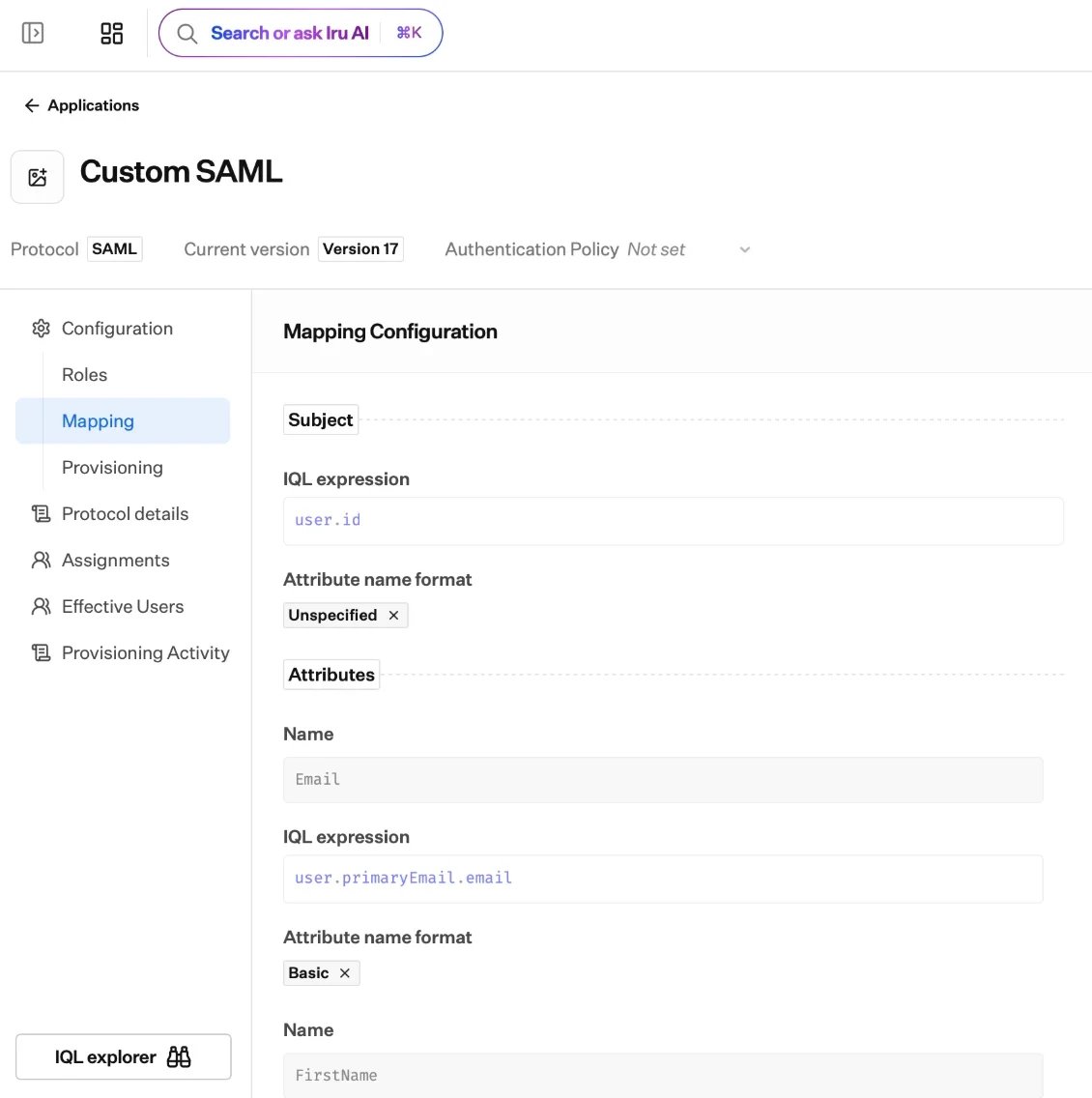 ## What a mapping contains
Every application maps two things into the statement it sends:
* **The subject:** the primary identifier for the signed-in user.
* **Attributes or claims:** any additional fields the app expects.
```mermaid theme={null}
flowchart LR
profile["User profile
## What a mapping contains
Every application maps two things into the statement it sends:
* **The subject:** the primary identifier for the signed-in user.
* **Attributes or claims:** any additional fields the app expects.
```mermaid theme={null}
flowchart LR
profile["User profile
attributes"] --> expr["IQL expression"]
expr --> subject["Subject"]
expr --> attrs["Attributes / claims"]
subject --> stmt["Signed assertion / token"]
attrs --> stmt
stmt --> app["Your application"]
```
### The subject
The subject identifies the signed-in user. Its default depends on the protocol:
| Protocol | Subject | Default value |
| -------- | ------------------- | --------------- |
| **SAML** | The **NameID** | `user.username` |
| **OIDC** | The **`sub`** claim | `user.id` |
You can change the value it draws from, and for SAML choose a **NameID format**.
See [SAML applications](/en/identity/applications/saml-applications) and
[OIDC applications](/en/identity/applications/oidc-applications) for the
protocol-specific options.
### Attributes and claims
Beyond the subject, add each field the app needs. For every one you set its
**name** (what the app expects), its **value** (the IQL expression that produces
it), a protocol detail (an **attribute name format** for SAML, or a **scope** for
OIDC), and whether it is **enabled**.
## How you build a mapping
Mapping lives in the application's **draft**, alongside its protocol settings.
For the subject and each attribute or claim, write an
[IQL](/en/identity/getting-started/iql-expressions) expression. The editor
suggests the available `user` fields and functions as you type and checks the
expression, so mistakes surface before you publish.
A live **preview** renders the exact assertion or token Iru will send, so you
can confirm its shape before going live.
Set the draft as **current** to make the mapping live. See
[Applications overview](/en/identity/applications/applications-overview) for the
version model.
Map only what the app needs. Each app receives exactly the attributes you map
into it, so a given service sees only the profile details required to identify
the user.
## Mapping for provisioning
Mapping shapes more than sign-on. For apps with
[provisioning](/en/identity/applications/provisioning), the mapping also has a
**provisioning view** that controls which profile attributes Iru sends when it
creates or updates the account in the app.
## Where to go next
The full IQL reference: fields, operators, functions, and examples.
NameID formats and attribute mapping for SAML apps.
Subject and claim mapping for OIDC apps.
Map the attributes Iru sends when it creates and updates accounts in an app.