> ## Documentation Index
> Fetch the complete documentation index at: https://docs.iru.com/llms.txt
> Use this file to discover all available pages before exploring further.
# Installing Rosetta 2 on Mac Computers with Apple Silicon
> Learn how Iru Endpoint handles Rosetta 2 installation for Intel-based apps on Mac computers with Apple silicon. Auto App and custom app compatibility.
This guide applies to Mac computers
Apple silicon processors are built on the arm64 Apple silicon CPU architecture, which differs greatly from the x86\_64 Intel architecture. Software applications must be recompiled to run on the new architecture and can then be distributed as universal binary packages that include both the new Apple silicon version and the Intel version. Some software titles have not been updated to include an Apple silicon version in a universal binary package and include only the Intel version of the application.
Mac computers with Apple silicon are still capable of running software built for Intel processors using the [Rosetta 2 translation environment](https://developer.apple.com/documentation/apple_silicon/about_the_rosetta_translation_environment). This translation technology is not pre-installed on computers with Apple silicon but can be installed by the user or with the *softwareupdate* command-line tool.
### Automatic Rosetta 2 Installation for Auto Apps
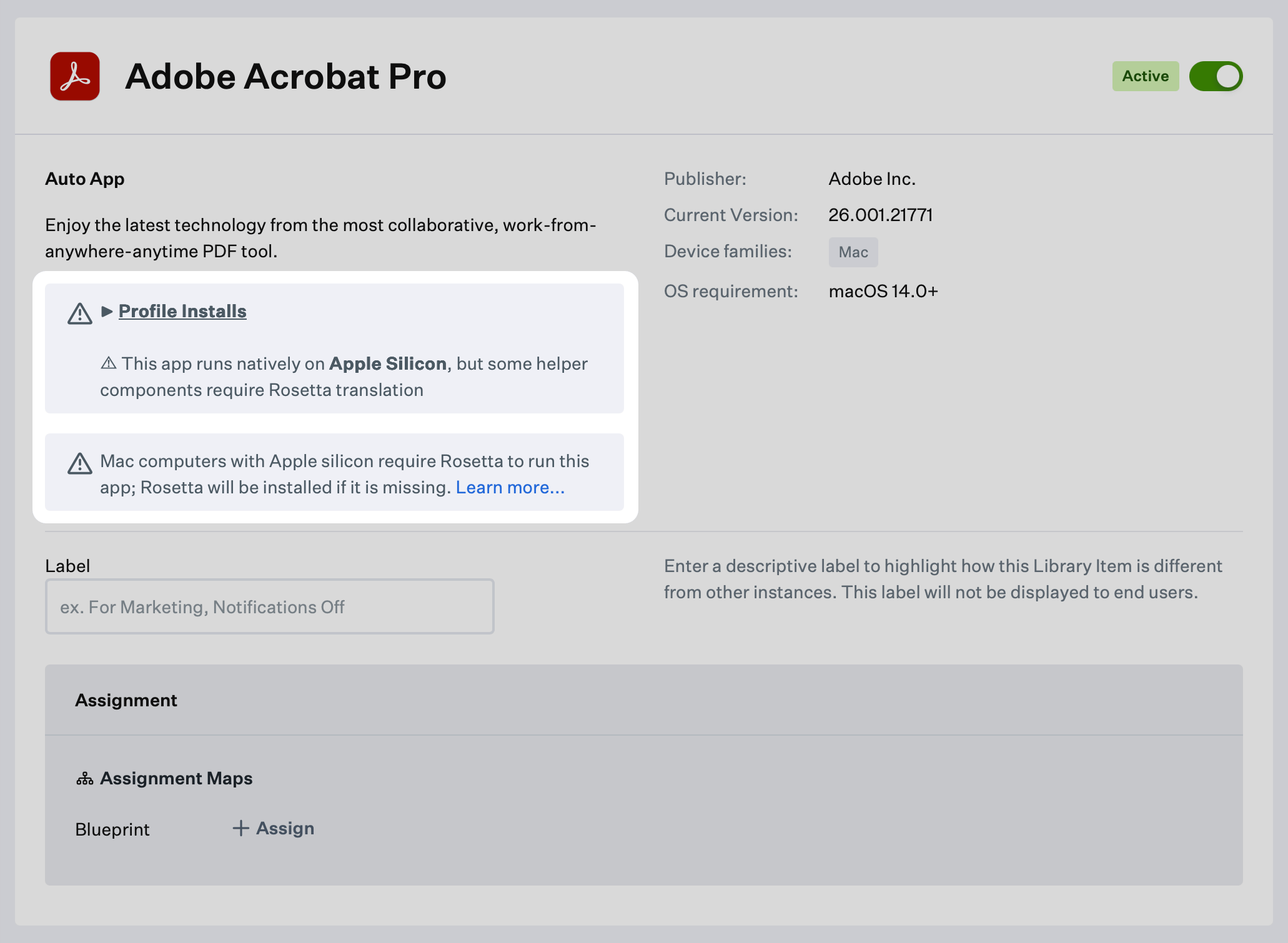
When an Auto App requires Rosetta 2 to run on a Mac computer with Apple silicon, you will see the warning below on the Library Item. In this event, the Iru Agent will automatically check for and install Rosetta 2 as needed. Please note that these banners may be removed without notice as developers shift to universal binaries.
 ### Intel-based Custom Apps Require Rosetta 2
As of November 2020, when [Apple first introduced computers with Apple silicon](https://support.apple.com/en-us/HT211814), many of the Auto Apps from Iru Endpoint were available only as Intel-based software applications. When a computer with Apple silicon detects an installer package for Intel-based software, it will send that package to the Rosetta 2 translation environment for processing. If Rosetta 2 is not already installed, then one of two things will happen.
* If the user opens the installer package, [the user will be prompted by the system to install Rosetta 2](https://support.apple.com/en-us/HT211861).
* If Iru Endpoint runs the installer package, the installation will stop because Rosetta 2 is unavailable on the system.
To prevent a failed installation, or a prompt for the end user when deploying a Custom App that requires Rosetta 2, the Rosetta 2 translation environment must be installed on the Mac via Iru Endpoint. Below is a script that will allow the system to install the Rosetta 2 translation environment, if it is not already present, on a computer with Apple silicon.
### Install Rosetta 2 with Iru Endpoint
To install Intel-based Custom Apps on a computer with Apple silicon, the Iru Endpoint Blueprint for that computer will need to install Rosetta 2 first. This can be accomplished by adding a custom script to your Blueprint. You should name this script *00 Install Rosetta 2 for Apple Silicon* to ensure that it runs first before any other items. You can follow the steps below to create this custom script in your Iru Endpoint tenant.
To add this Library Item to your Iru Endpoint Library, follow the steps outlined in the [Library Overview](/en/endpoint/library/library-items-profiles/library-overview) article.
Set the script's name to *00 Install Rosetta 2 for Apple Silicon*.
Assign the item to the Blueprints as necessary.
Set the execution frequency to **Once per device**.
In the script details, paste in the script block that appears below.
Click **Save** to complete the Custom Script setup.
### Rosetta 2 Installation Script
The [Install Rosetta 2 script](https://github.com/kandji-inc/support/blob/main/Scripts/InstallRosetta2.sh) is maintained in the [Iru Endpoint Support GitHub repo](https://github.com/kandji-inc/support/).
### Intel-based Custom Apps Require Rosetta 2
As of November 2020, when [Apple first introduced computers with Apple silicon](https://support.apple.com/en-us/HT211814), many of the Auto Apps from Iru Endpoint were available only as Intel-based software applications. When a computer with Apple silicon detects an installer package for Intel-based software, it will send that package to the Rosetta 2 translation environment for processing. If Rosetta 2 is not already installed, then one of two things will happen.
* If the user opens the installer package, [the user will be prompted by the system to install Rosetta 2](https://support.apple.com/en-us/HT211861).
* If Iru Endpoint runs the installer package, the installation will stop because Rosetta 2 is unavailable on the system.
To prevent a failed installation, or a prompt for the end user when deploying a Custom App that requires Rosetta 2, the Rosetta 2 translation environment must be installed on the Mac via Iru Endpoint. Below is a script that will allow the system to install the Rosetta 2 translation environment, if it is not already present, on a computer with Apple silicon.
### Install Rosetta 2 with Iru Endpoint
To install Intel-based Custom Apps on a computer with Apple silicon, the Iru Endpoint Blueprint for that computer will need to install Rosetta 2 first. This can be accomplished by adding a custom script to your Blueprint. You should name this script *00 Install Rosetta 2 for Apple Silicon* to ensure that it runs first before any other items. You can follow the steps below to create this custom script in your Iru Endpoint tenant.
To add this Library Item to your Iru Endpoint Library, follow the steps outlined in the [Library Overview](/en/endpoint/library/library-items-profiles/library-overview) article.
Set the script's name to *00 Install Rosetta 2 for Apple Silicon*.
Assign the item to the Blueprints as necessary.
Set the execution frequency to **Once per device**.
In the script details, paste in the script block that appears below.
Click **Save** to complete the Custom Script setup.
### Rosetta 2 Installation Script
The [Install Rosetta 2 script](https://github.com/kandji-inc/support/blob/main/Scripts/InstallRosetta2.sh) is maintained in the [Iru Endpoint Support GitHub repo](https://github.com/kandji-inc/support/).