> ## Documentation Index
> Fetch the complete documentation index at: https://docs.iru.com/llms.txt
> Use this file to discover all available pages before exploring further.
# Deploy CrowdStrike as a Custom App
> Deploy the CrowdStrike Falcon sensor to Mac computers as a custom app in Iru Endpoint. Package the installer, add the customer ID, and approve extensions.
This guide applies to Mac computers
### Prerequisites
Intel-based Mac computers require the KEXT version of the Crowdstrike settings profile when using Crowdstrike's Firmware Analysis feature. If you are not using Firmware Analysis, we recommend using the non-KEXT versions of the custom settings below.
* CrowdStrike installer from the vendor (Hosts > Sensor Downloads)
* Crowdstrike Custom Settings
* **All Mac Architectures**
* macOS 15 (Sequoia) and later ([GitHub Link](https://github.com/kandji-inc/support/blob/main/custom-apps/crowdstrike/crowdstrike_settings_macOS15.mobileconfig))
* **Apple Silicon**
* All macOS Versions ([GitHub Link](https://github.com/kandji-inc/support/blob/main/custom-apps/crowdstrike/crowdstrike_settings.mobileconfig))
* **Intel with KEXT**
* All macOS Versions ([GitHub Link](https://github.com/kandji-inc/support/blob/main/custom-apps/crowdstrike/crowdstrike_settings_with_kext.mobileconfig))
* CrowdStrike Service Management Profile
* macOS 13 (Ventura) and later ([GitHub Link](https://github.com/kandji-inc/support/blob/main/custom-apps/crowdstrike/crowdstrike_service_management.mobileconfig))
* CrowdStrike Audit Script ([GitHub Link](https://github.com/kandji-inc/support/tree/main/custom-apps/crowdstrike/crowdstrike_falcon_ae_script.zsh))
* CrowdStrike Postinstall script ([GitHub Link](https://github.com/kandji-inc/support/tree/main/custom-apps/crowdstrike/crowdstrike_falcon_postinstall_script.zsh))
### Considerations
* The **CrowdStrike Settings Profiles** are designed to facilitate the approval of CrowdStrike across all network content filters, kernel extensions, system extensions, PPPC, and web-filtering requirements. This profile is compatible with both the older Falcon agent using kernel extensions and the latest version using system extensions
* You will need to deploy both the **crowdstrike\_settings\_macOS15** and **crowdstrike\_settings** profiles following the steps in the [Deploying with Assignment Maps](/en/endpoint/library/deployment-guides/apple/deploy-crowdstrike-as-a-custom-app#deploying-with-assignment-maps) section to assign them correctly
* The **CrowdStrike Service Management Profile** handles essential login and background processes
* If you require it, the **Legacy System Extension (KEXT) Settings Profile** can be accessed via this [GitHub link](https://github.com/kandji-inc/support/tree/main/custom-apps/crowdstrike/crowdstrike_settings_with_kext.mobileconfig)
* This profile supports both the Falcon agent with kernel extensions and the newer version with system extensions
* The KEXT payload is necessary only when using the CrowdStrike Firmware Analysis feature on Intel-based Mac computers
* Please note that depending on the specific CrowdStrike product and version you have installed, there may be variations in app paths, privacy access settings, and kernel or system extension requirements. As with any Custom App, we strongly recommend thorough testing before deploying it to a production Mac
### Add and Configure the Custom Profiles
The service management profile for Crowdstrike Falcon is compatible with macOS 13 Ventura and later. For macOS Monterey 12 and earlier, an Assignment Map must be used for advanced scoping to prevent the service management profile from being assigned to those devices. To learn more about deploying Crowdstrike in Assignment Maps, follow the [Deploying with Assignment Maps](/en/endpoint/library/deployment-guides/apple/deploy-crowdstrike-as-a-custom-app#deploying-with-assignment-maps) section.
To add this Library Item to your Iru Endpoint Library, follow the steps outlined in the [Library Overview](/en/endpoint/library/library-items-profiles/library-overview) article.
Give your Custom Profile a **Name**.
For **Install on**, select Mac.
Assign to your desired [Blueprints](/en/endpoint/getting-started/blueprints-and-library/configuring-blueprints).
Upload the CrowdStrike Settings Profile (or Legacy System Extension (KEXT) settings profile).
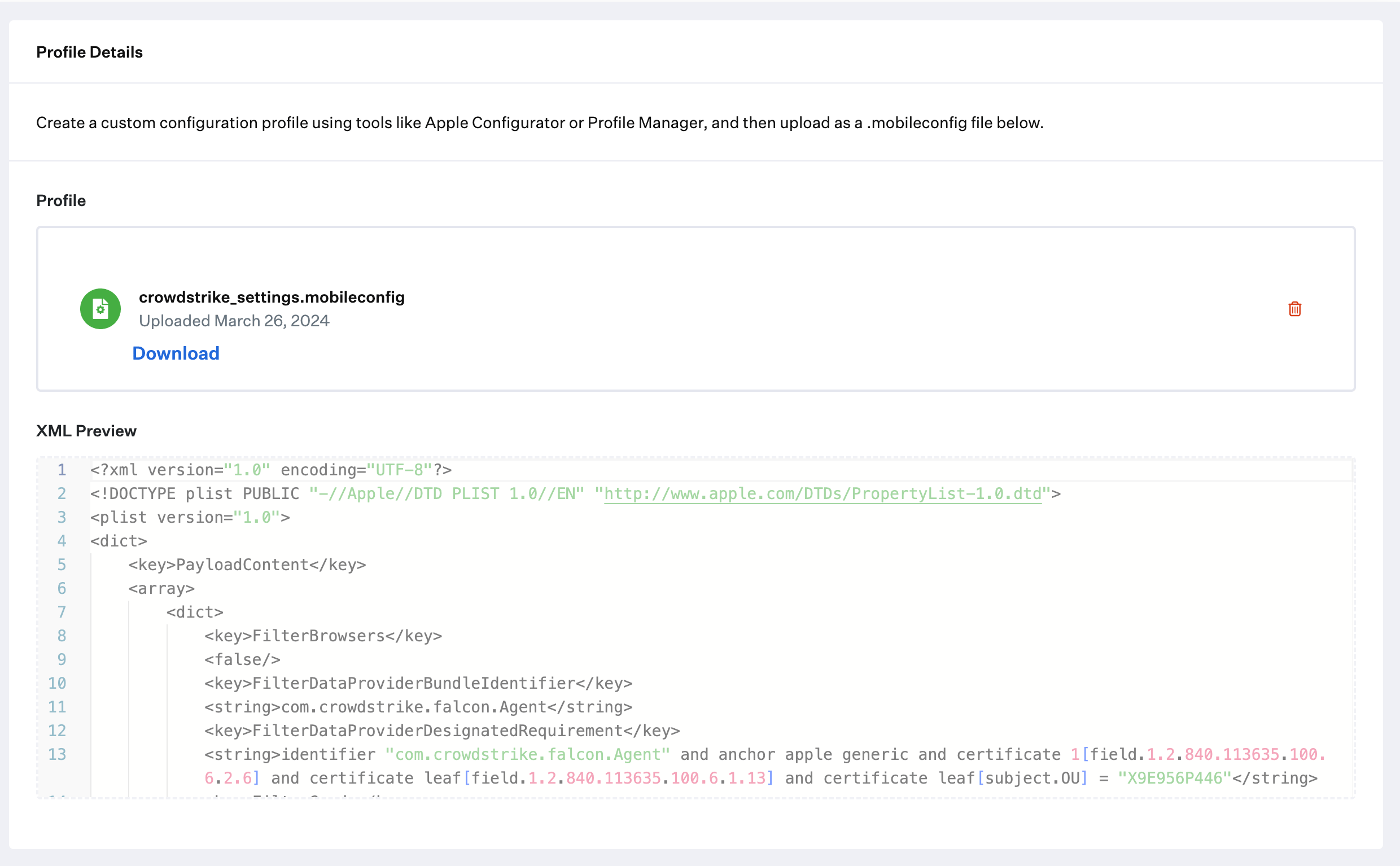 Click **Save**.
Repeat the previous steps in this section for the **crowdstrike\_settings\_macOS15** and **crowdstrike\_service\_management** profiles.
### Add and Configure the Custom App
To add this Library Item to your Iru Endpoint Library, follow the steps outlined in the [Library Overview](/en/endpoint/library/library-items-profiles/library-overview) article.
Give the Custom App a **Name**. Optionally, add a custom icon.
Assign to your desired [Blueprints](/en/endpoint/getting-started/blueprints-and-library/configuring-blueprints).
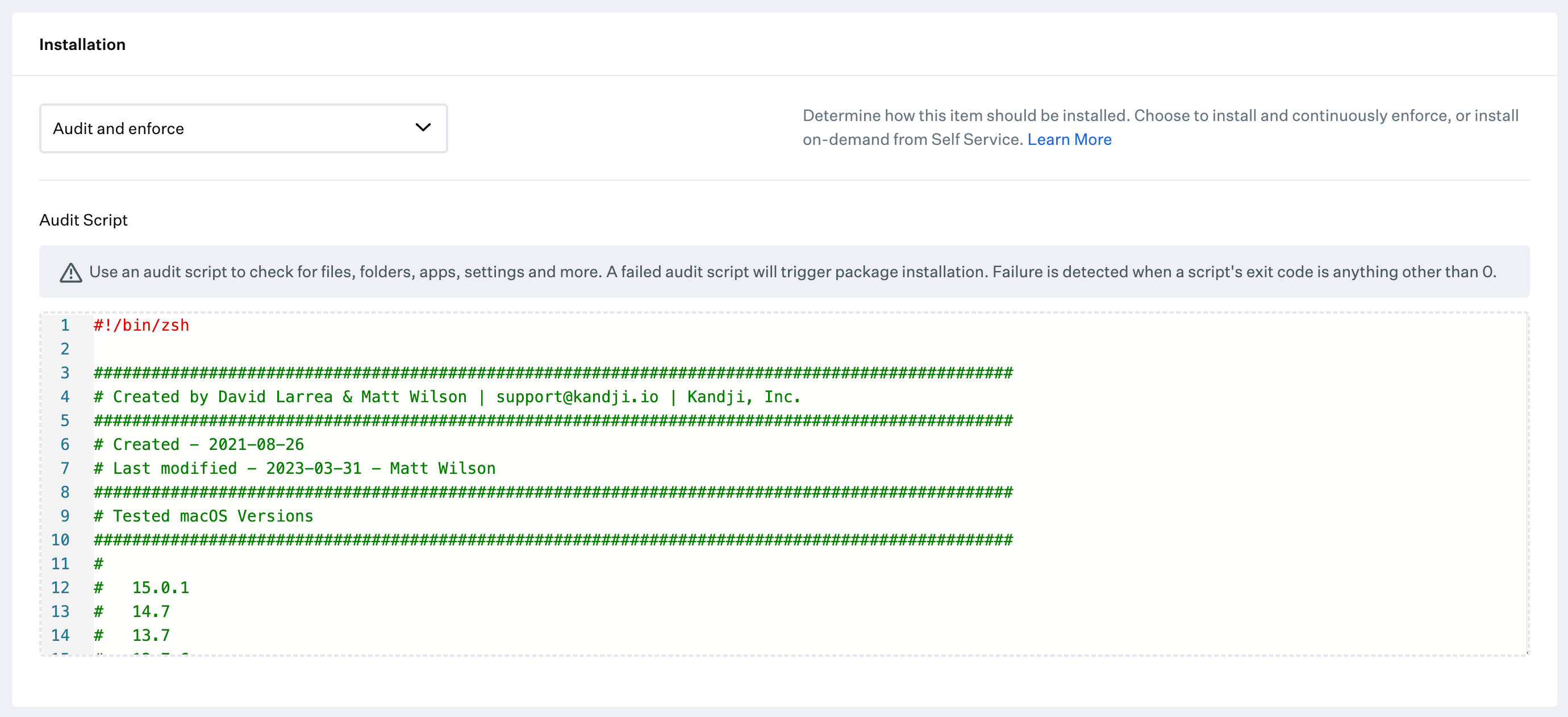
Change the **Installation** to Audit and Enforce.
Copy and paste the crowdstrike\_ae\_script.zsh script from the [prerequisites](/en/endpoint/library/deployment-guides/apple/deploy-crowdstrike-as-a-custom-app#prerequisites) into the **Audit & Enforce** text box. No modification is required.
Click **Save**.
Repeat the previous steps in this section for the **crowdstrike\_settings\_macOS15** and **crowdstrike\_service\_management** profiles.
### Add and Configure the Custom App
To add this Library Item to your Iru Endpoint Library, follow the steps outlined in the [Library Overview](/en/endpoint/library/library-items-profiles/library-overview) article.
Give the Custom App a **Name**. Optionally, add a custom icon.
Assign to your desired [Blueprints](/en/endpoint/getting-started/blueprints-and-library/configuring-blueprints).
Change the **Installation** to Audit and Enforce.
Copy and paste the crowdstrike\_ae\_script.zsh script from the [prerequisites](/en/endpoint/library/deployment-guides/apple/deploy-crowdstrike-as-a-custom-app#prerequisites) into the **Audit & Enforce** text box. No modification is required.
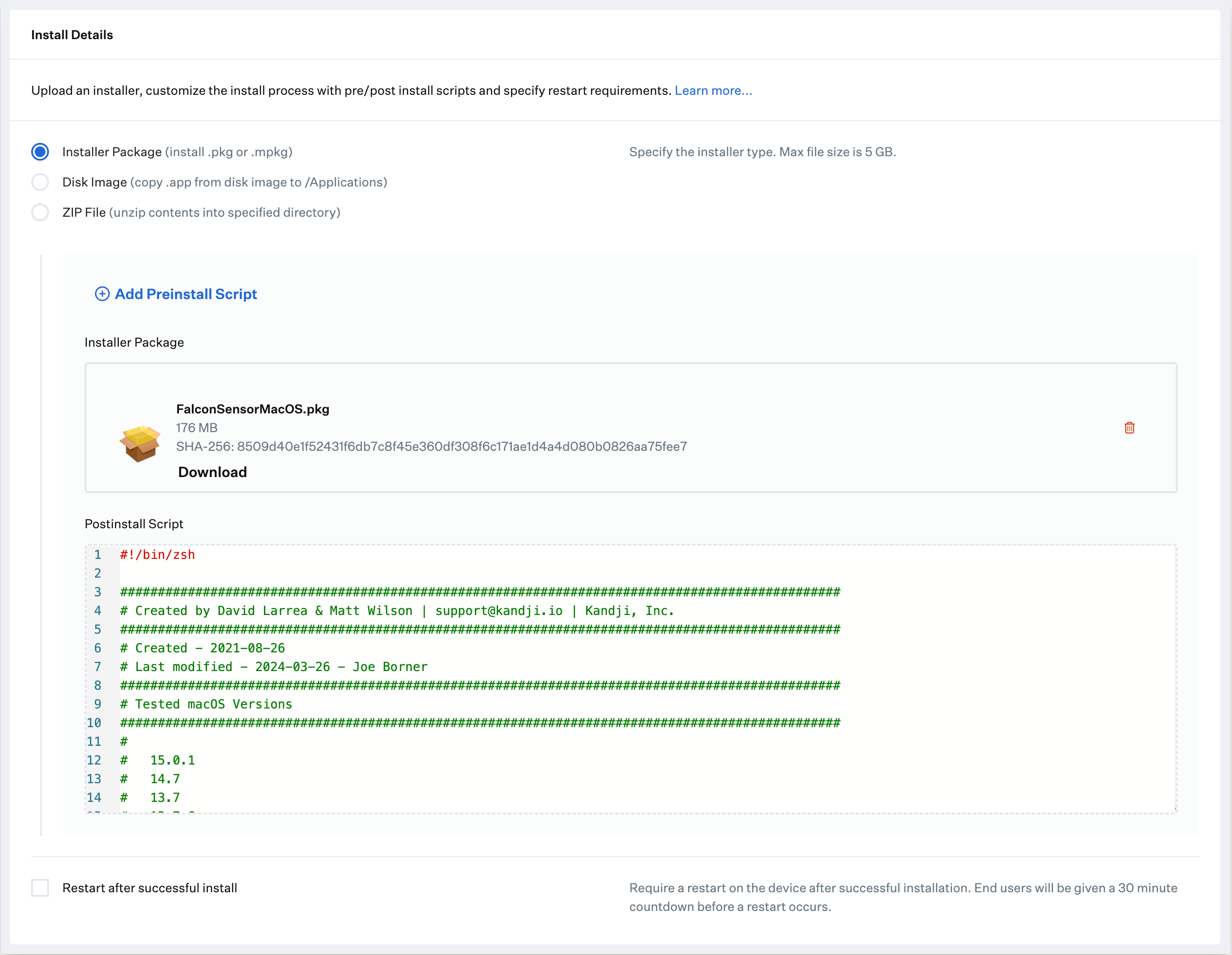
 Select Installer **Package (install .pkg or .mpkg)** as the deployment type.
Upload the installer package.
Paste the **Postinstall Script** referenced in the [Prerequisites](/en/endpoint/library/deployment-guides/apple/deploy-crowdstrike-as-a-custom-app#prerequisites).
* In the Post-Install script, update the **customerIDChecksum** variable on line 55 with your Customer ID
* Optionally, paste your install token on line 59 inside the **installToken** variable; otherwise, leave it blank
Select Installer **Package (install .pkg or .mpkg)** as the deployment type.
Upload the installer package.
Paste the **Postinstall Script** referenced in the [Prerequisites](/en/endpoint/library/deployment-guides/apple/deploy-crowdstrike-as-a-custom-app#prerequisites).
* In the Post-Install script, update the **customerIDChecksum** variable on line 55 with your Customer ID
* Optionally, paste your install token on line 59 inside the **installToken** variable; otherwise, leave it blank
 Click **Save**.
### Deploying with Assignment Maps
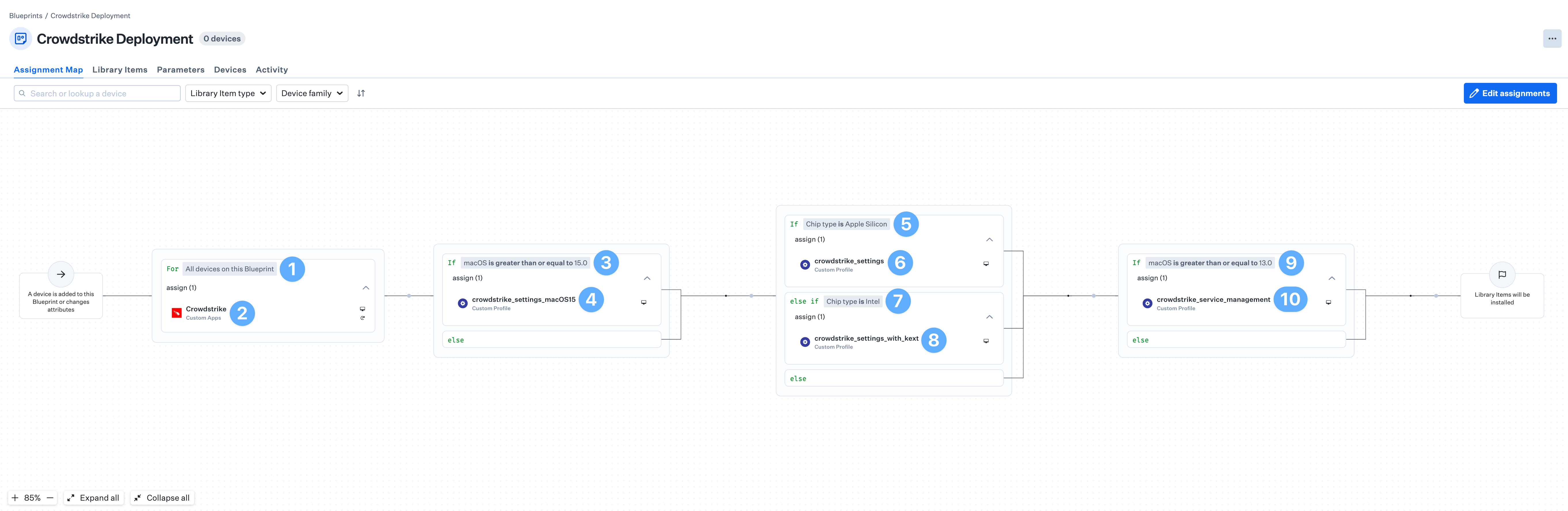
There are four Crowdstrike Custom Profiles that need conditional logic to ensure they are deployed to the correct devices. An Assignment Map provides an easy solution for all of your devices in one convenient view.
Please review our [Creating a Blueprint](/en/endpoint/getting-started/blueprints-and-library/configuring-blueprints) and [Using Conditional Logic in Blueprints](/en/endpoint/blueprints/assignment-maps/using-conditional-logic-in-blueprints) articles.
Start with the **For All devices on this Blueprint** conditional block.
Assign the **Crowdstrike** Custom App to the block.
If multiple Custom Apps are needed, create a conditional block with conditions for the different versions of the installer.
Set the top of the conditional block to **If** **macOS is greater than or equal to 15.0**.
Assign the **crowdstrike\_settings\_macOS15** Custom Profile to the conditional block.
Set the top of the conditional block to **If** **Chip type is Apple Silicon**.
Assign the **crowdstrike\_settings** Custom Profile to the conditional block.
Set the bottom conditional block to **else if Chip type is Intel**.
Assign the **crowdstrike\_settings\_with\_kext** Custom Profile to the conditional block.
Set the top of the conditional block to **If macOS is greater than or equal to 13.0**.
Assign the **crowdstrike\_service\_management** Custom Profile to the conditional block.
Click **Save**.
### Deploying with Assignment Maps
There are four Crowdstrike Custom Profiles that need conditional logic to ensure they are deployed to the correct devices. An Assignment Map provides an easy solution for all of your devices in one convenient view.
Please review our [Creating a Blueprint](/en/endpoint/getting-started/blueprints-and-library/configuring-blueprints) and [Using Conditional Logic in Blueprints](/en/endpoint/blueprints/assignment-maps/using-conditional-logic-in-blueprints) articles.
Start with the **For All devices on this Blueprint** conditional block.
Assign the **Crowdstrike** Custom App to the block.
If multiple Custom Apps are needed, create a conditional block with conditions for the different versions of the installer.
Set the top of the conditional block to **If** **macOS is greater than or equal to 15.0**.
Assign the **crowdstrike\_settings\_macOS15** Custom Profile to the conditional block.
Set the top of the conditional block to **If** **Chip type is Apple Silicon**.
Assign the **crowdstrike\_settings** Custom Profile to the conditional block.
Set the bottom conditional block to **else if Chip type is Intel**.
Assign the **crowdstrike\_settings\_with\_kext** Custom Profile to the conditional block.
Set the top of the conditional block to **If macOS is greater than or equal to 13.0**.
Assign the **crowdstrike\_service\_management** Custom Profile to the conditional block.