> ## Documentation Index
> Fetch the complete documentation index at: https://docs.iru.com/llms.txt
> Use this file to discover all available pages before exploring further.
# Iru Agent Command Line Interface
> Use the Iru Agent CLI to check status, trigger actions, and troubleshoot devices from the terminal on macOS and Windows managed endpoints.
This guide applies to Mac computers
### About the Iru Agent CLI
The Iru Agent offers a suite of powerful Terminal commands that give admins additional control and information for their fleet of devices. While some commands can only be executed locally on a device using Terminal, others can be deployed through a Custom Script Library Item for greater flexibility.
As of **April 8, 2026**, apps were updated from **Kandji** 
 to **Iru**
  branding. The **Agent** app name changed from **Kandji Agent** to **Iru Agent**. Please update **scripts, automations, and utilities** that still reference the old app names.
### Local-Only Commands
The following commands must be executed directly on a device in Terminal. They cannot be deployed via a Custom Script or a Custom App Library Item.
#### Interactive Mode (TUI)
Run **`sudo iru`** with **no subcommand and no options** to open a **terminal user interface** (TUI): a full-screen, menu-driven flow in Terminal so you can browse and trigger common agent actions without typing full commands and flags.
```bash Terminal icon="terminal" theme={null}
sudo iru
```
#### Run
The agent will run and check in immediately. Normally, the agent checks in every 15 minutes. Without an internet connection, the agent will run in offline mode.
```bash Terminal icon="terminal" theme={null}
sudo iru run
```
Adding --reset-daily to the run command will run all Parameters, including those that are run only once per day.
```bash Terminal icon="terminal" theme={null}
sudo iru run --reset-daily
```
### Run Daily MDM Inventory Update
The agent will request the MDM server to initiate its daily MDM commands, such as validating Apps & Books from Apple Business or Apple School Manager, as well as querying certain device information.
```bash Terminal icon="terminal" theme={null}
sudo iru update-mdm
```
### Collect Apps
Collects full application inventory from the Mac.
```bash Terminal icon="terminal" theme={null}
sudo iru collect-apps
```
### Run Library Items
Checks for library items to execute.
```bash Terminal icon="terminal" theme={null}
sudo iru library
```
Available *library* command options:
| **Option** | **Description** |
| ----------------------------------------- | -------------------------------------------------------------------------------------------- |
| `--list` | List all of the library items assigned to the computer. |
| `--state` | Get the current state of the Iru Agent library manager. |
| `--item` | Run a specific library item by name or library item ID; specify *-F* to force the execution. |
| `--cancel` | Cancel the currently running library item and clears the current queue. |
### Print Iru Agent Logs
Prints log entries for the Iru Agent subsystem from the unified logging system. The `--last` option is **required** and specifies the number of previous seconds to print logs from. Replace \ with a number, like 300. (Actual results displayed are limited based on available unified log storage.)
Redirect the output of the command using > to save to an external log file.
```bash Terminal icon="terminal" theme={null}
sudo iru logs --last
```
Available *logs* command options:
| **Option** | **Description** |
| ----------------------------------------- | --------------------------------------------------------------- |
| `--no-format` | Print log entries without ANSI color formatting. |
| `--debug` | Includes debug level logs, debug logging must be enabled prior. |
**Unified Logging** is separate from product branding: subsystem identifiers on the Mac still use the **`io.kandji`** prefix in `log show` predicates and in `log config --subsystem`, as in the examples below. Use those strings so commands match what the system records.
Enable debug logging for a subsystem, which are listed in the **Logging Subsystems** section.
```bash Terminal icon="terminal" theme={null}
sudo log config --mode "level:debug" --subsystem io.kandji.installer
```
Example debug logging command usage.
```bash Terminal icon="terminal" theme={null}
sudo iru logs --no-format --debug --last 10000 > ~/Desktop/iru.log
```
**Logging Subsystems**
The logging subsystems available in the Iru Agent offer granular and targeted logging.
Subsystem predicate log command.
```bash Terminal icon="terminal" theme={null}
sudo log show --predicate 'subsystem beginsWith "io.kandji"'
```
Available predicate log command options:
| **Option** | **Description** |
| ----------------------------------------- | --------------------------------------------------------------- |
| `--info` | Includes info level logs when available. |
| `--debug` | Includes debug level logs, debug logging must be enabled prior. |
| `--help` | Displays a complete list of available options. |
Subsystem predicate log command with options.
```bash Terminal icon="terminal" theme={null}
sudo log show --predicate 'subsystem beginsWith "io.kandji.daemon"' --info --debug
```
Available logging subsystems:
* io.kandji.beekeeper
* io.kandji.cli
* io.kandji.daemon
* io.kandji.installer
* io.kandji.library-manager
* io.kandji.menu
* io.kandji.passport
* io.kandji.parameter-agent
* io.kandji.self-service
* io.kandji.liftoff
### EDR
List quarantined files.
```bash Terminal icon="terminal" theme={null}
sudo iru avert --list-quarantine
```
Delete quarantined files.
```bash Terminal icon="terminal" theme={null}
sudo iru avert --delete-quarantine
```
### Scriptable Commands
These commands can be executed through a Custom Script or a Custom App Library Item. They can also be run locally on a Mac in Terminal.
When using the scriptable options below, such as within a Custom Script Library Item, you must replace **sudo iru** with the full path to the binary: /usr/local/bin/iru
### Reboot
This option can be used in scripted workflows to force a reboot leveraging the Iru Agent and menu bar application. It's visually similar to the reboot forced during FileVault enablement or a Managed OS upgrade.
This initiates a restart by prompting the logged-in user with a countdown timer. If no delay is specified, the default 1800 (30 minutes) will be used. If no user is logged in, the delay will be ignored, and the Mac will restart immediately.
Replace `` with the countdown length in seconds (for example `300` for five minutes).
```bash Terminal icon="terminal" theme={null}
sudo iru reboot --delaySeconds
```
Forces a restart without giving users the option to delay.
```bash Terminal icon="terminal" theme={null}
sudo iru reboot --no-deferral
```
### Dock
This option can be used in scripted workflows to add items to the end of the macOS Dock or remove items from the macOS Dock of the currently logged-in user.
The application referred to by the bundle identifier must be in the /Applications folder.
Optionally specifying the *--all* option adds the icon to the end of the Dock for all user accounts.
```bash Terminal icon="terminal" theme={null}
sudo iru dock [--add ] [--remove ] [--all]
```
If using multiple options at a time, use a single command, and separate options using quotes and separating spaces, as shown in the example below.
```bash Terminal icon="terminal" theme={null}
/usr/local/bin/iru dock --add "com.google.Chrome us.zoom.xos com.tinyspeck.slackmacgap"
```
### Alert
This command can be used in scripted workflows to present an alert to users.
```bash Terminal icon="terminal" theme={null}
sudo iru display-alert [--title ] [--message ] [--icon ] [--suppression-key ] [--help-url ] [--no-wait]
```
It has several options, outlined below.
| **Option** | **Description** | **Default if not provided** |
| ----------------------------------------- | ------------------------------------------------------------------------------------------------------------------------------------------------------------------------------------------------------------- | ------------------------------------------------------------------------------------------------------------------- |
| `--title` | Specifies a custom title for the alert window | "Alert" |
| `--message` | Specifies a custom message for the alert window | No default value |
| `--icon` | Specifies a custom icon for the alert window. It is recommended to use .jpg, .png, or .icns files | Iru Agent icon |
| `--suppression-key` | If provided, it will show an option to the user: "Do not show this message again." If this suppression key is provided in a future alert, and the user opts not to see it again, the alert will not be shown. | No default value. If no suppression key is specified, the "Do not show this message again" option is not displayed. |
| `--help-url` | Allows for specifying a custom URL for the alert Help button. Must be an HTTPS URL. | No default value. If no URL is specified, the Help button is not displayed. |
| `--no-wait` | Allows the alert to show but keeps the remainder of the script running without waiting for user interaction on the alert | Alert will show and wait for interaction from the user before the script proceeds. |
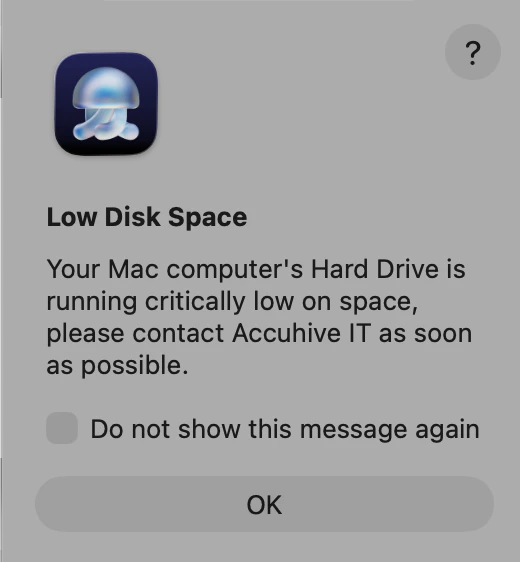
Below is an example of the underlying command for an alert and the resulting experience in macOS Tahoe:
```bash Terminal icon="terminal" wrap lines theme={null}
sudo /usr/local/bin/iru display-alert --title "Low Disk Space" --message "Your Mac computer's Hard Drive is running critically low on space, please contact Accuhive IT as soon as possible." --suppression-key accuhive --help-url https://iru.com --no-wait
```
branding. The **Agent** app name changed from **Kandji Agent** to **Iru Agent**. Please update **scripts, automations, and utilities** that still reference the old app names.
### Local-Only Commands
The following commands must be executed directly on a device in Terminal. They cannot be deployed via a Custom Script or a Custom App Library Item.
#### Interactive Mode (TUI)
Run **`sudo iru`** with **no subcommand and no options** to open a **terminal user interface** (TUI): a full-screen, menu-driven flow in Terminal so you can browse and trigger common agent actions without typing full commands and flags.
```bash Terminal icon="terminal" theme={null}
sudo iru
```
#### Run
The agent will run and check in immediately. Normally, the agent checks in every 15 minutes. Without an internet connection, the agent will run in offline mode.
```bash Terminal icon="terminal" theme={null}
sudo iru run
```
Adding --reset-daily to the run command will run all Parameters, including those that are run only once per day.
```bash Terminal icon="terminal" theme={null}
sudo iru run --reset-daily
```
### Run Daily MDM Inventory Update
The agent will request the MDM server to initiate its daily MDM commands, such as validating Apps & Books from Apple Business or Apple School Manager, as well as querying certain device information.
```bash Terminal icon="terminal" theme={null}
sudo iru update-mdm
```
### Collect Apps
Collects full application inventory from the Mac.
```bash Terminal icon="terminal" theme={null}
sudo iru collect-apps
```
### Run Library Items
Checks for library items to execute.
```bash Terminal icon="terminal" theme={null}
sudo iru library
```
Available *library* command options:
| **Option** | **Description** |
| ----------------------------------------- | -------------------------------------------------------------------------------------------- |
| `--list` | List all of the library items assigned to the computer. |
| `--state` | Get the current state of the Iru Agent library manager. |
| `--item` | Run a specific library item by name or library item ID; specify *-F* to force the execution. |
| `--cancel` | Cancel the currently running library item and clears the current queue. |
### Print Iru Agent Logs
Prints log entries for the Iru Agent subsystem from the unified logging system. The `--last` option is **required** and specifies the number of previous seconds to print logs from. Replace \ with a number, like 300. (Actual results displayed are limited based on available unified log storage.)
Redirect the output of the command using > to save to an external log file.
```bash Terminal icon="terminal" theme={null}
sudo iru logs --last
```
Available *logs* command options:
| **Option** | **Description** |
| ----------------------------------------- | --------------------------------------------------------------- |
| `--no-format` | Print log entries without ANSI color formatting. |
| `--debug` | Includes debug level logs, debug logging must be enabled prior. |
**Unified Logging** is separate from product branding: subsystem identifiers on the Mac still use the **`io.kandji`** prefix in `log show` predicates and in `log config --subsystem`, as in the examples below. Use those strings so commands match what the system records.
Enable debug logging for a subsystem, which are listed in the **Logging Subsystems** section.
```bash Terminal icon="terminal" theme={null}
sudo log config --mode "level:debug" --subsystem io.kandji.installer
```
Example debug logging command usage.
```bash Terminal icon="terminal" theme={null}
sudo iru logs --no-format --debug --last 10000 > ~/Desktop/iru.log
```
**Logging Subsystems**
The logging subsystems available in the Iru Agent offer granular and targeted logging.
Subsystem predicate log command.
```bash Terminal icon="terminal" theme={null}
sudo log show --predicate 'subsystem beginsWith "io.kandji"'
```
Available predicate log command options:
| **Option** | **Description** |
| ----------------------------------------- | --------------------------------------------------------------- |
| `--info` | Includes info level logs when available. |
| `--debug` | Includes debug level logs, debug logging must be enabled prior. |
| `--help` | Displays a complete list of available options. |
Subsystem predicate log command with options.
```bash Terminal icon="terminal" theme={null}
sudo log show --predicate 'subsystem beginsWith "io.kandji.daemon"' --info --debug
```
Available logging subsystems:
* io.kandji.beekeeper
* io.kandji.cli
* io.kandji.daemon
* io.kandji.installer
* io.kandji.library-manager
* io.kandji.menu
* io.kandji.passport
* io.kandji.parameter-agent
* io.kandji.self-service
* io.kandji.liftoff
### EDR
List quarantined files.
```bash Terminal icon="terminal" theme={null}
sudo iru avert --list-quarantine
```
Delete quarantined files.
```bash Terminal icon="terminal" theme={null}
sudo iru avert --delete-quarantine
```
### Scriptable Commands
These commands can be executed through a Custom Script or a Custom App Library Item. They can also be run locally on a Mac in Terminal.
When using the scriptable options below, such as within a Custom Script Library Item, you must replace **sudo iru** with the full path to the binary: /usr/local/bin/iru
### Reboot
This option can be used in scripted workflows to force a reboot leveraging the Iru Agent and menu bar application. It's visually similar to the reboot forced during FileVault enablement or a Managed OS upgrade.
This initiates a restart by prompting the logged-in user with a countdown timer. If no delay is specified, the default 1800 (30 minutes) will be used. If no user is logged in, the delay will be ignored, and the Mac will restart immediately.
Replace `` with the countdown length in seconds (for example `300` for five minutes).
```bash Terminal icon="terminal" theme={null}
sudo iru reboot --delaySeconds
```
Forces a restart without giving users the option to delay.
```bash Terminal icon="terminal" theme={null}
sudo iru reboot --no-deferral
```
### Dock
This option can be used in scripted workflows to add items to the end of the macOS Dock or remove items from the macOS Dock of the currently logged-in user.
The application referred to by the bundle identifier must be in the /Applications folder.
Optionally specifying the *--all* option adds the icon to the end of the Dock for all user accounts.
```bash Terminal icon="terminal" theme={null}
sudo iru dock [--add ] [--remove ] [--all]
```
If using multiple options at a time, use a single command, and separate options using quotes and separating spaces, as shown in the example below.
```bash Terminal icon="terminal" theme={null}
/usr/local/bin/iru dock --add "com.google.Chrome us.zoom.xos com.tinyspeck.slackmacgap"
```
### Alert
This command can be used in scripted workflows to present an alert to users.
```bash Terminal icon="terminal" theme={null}
sudo iru display-alert [--title ] [--message ] [--icon ] [--suppression-key ] [--help-url ] [--no-wait]
```
It has several options, outlined below.
| **Option** | **Description** | **Default if not provided** |
| ----------------------------------------- | ------------------------------------------------------------------------------------------------------------------------------------------------------------------------------------------------------------- | ------------------------------------------------------------------------------------------------------------------- |
| `--title` | Specifies a custom title for the alert window | "Alert" |
| `--message` | Specifies a custom message for the alert window | No default value |
| `--icon` | Specifies a custom icon for the alert window. It is recommended to use .jpg, .png, or .icns files | Iru Agent icon |
| `--suppression-key` | If provided, it will show an option to the user: "Do not show this message again." If this suppression key is provided in a future alert, and the user opts not to see it again, the alert will not be shown. | No default value. If no suppression key is specified, the "Do not show this message again" option is not displayed. |
| `--help-url` | Allows for specifying a custom URL for the alert Help button. Must be an HTTPS URL. | No default value. If no URL is specified, the Help button is not displayed. |
| `--no-wait` | Allows the alert to show but keeps the remainder of the script running without waiting for user interaction on the alert | Alert will show and wait for interaction from the user before the script proceeds. |
Below is an example of the underlying command for an alert and the resulting experience in macOS Tahoe:
```bash Terminal icon="terminal" wrap lines theme={null}
sudo /usr/local/bin/iru display-alert --title "Low Disk Space" --message "Your Mac computer's Hard Drive is running critically low on space, please contact Accuhive IT as soon as possible." --suppression-key accuhive --help-url https://iru.com --no-wait
```
 ### Submit Diagnostics
[Submit Diagnostics](/en/endpoint/agent/how-to-submit-iru-agent-diagnostics) to Iru Endpoint. Equivalent to the action menu (gear) item available in the Iru menu.
```bash Terminal icon="terminal" theme={null}
sudo iru submit-diagnostics [--comment ]
```
Available submit-diagnostics command option:
| **Option** | **Description** | **Default if not provided** |
| ----------------------------------------- | ------------------------------------------------------ | ---------------------------------------------------------- |
| `--comment` | Specifies a comment to be presented in the diagnostics | No default value |
### Version
Display the installed Iru Agent version.
```bash Terminal icon="terminal" theme={null}
sudo iru version
```
### Help
Display help text.
```bash Terminal icon="terminal" theme={null}
sudo iru help
```
### Submit Diagnostics
[Submit Diagnostics](/en/endpoint/agent/how-to-submit-iru-agent-diagnostics) to Iru Endpoint. Equivalent to the action menu (gear) item available in the Iru menu.
```bash Terminal icon="terminal" theme={null}
sudo iru submit-diagnostics [--comment ]
```
Available submit-diagnostics command option:
| **Option** | **Description** | **Default if not provided** |
| ----------------------------------------- | ------------------------------------------------------ | ---------------------------------------------------------- |
| `--comment` | Specifies a comment to be presented in the diagnostics | No default value |
### Version
Display the installed Iru Agent version.
```bash Terminal icon="terminal" theme={null}
sudo iru version
```
### Help
Display help text.
```bash Terminal icon="terminal" theme={null}
sudo iru help
```