> ## Documentation Index
> Fetch the complete documentation index at: https://docs.iru.com/llms.txt
> Use this file to discover all available pages before exploring further.
# Trust Center Management
> Manage the Iru Trust Center for sharing your security posture. Publish compliance documents, answer questionnaires, and manage viewer access.
### About Iru Trust Center
Iru Trust Center is a branded portal where you publish certifications, policies, and answers to common security questions. Visitors can request access to restricted documents; you approve accounts, enforce NDAs when needed, and revoke access from one place.
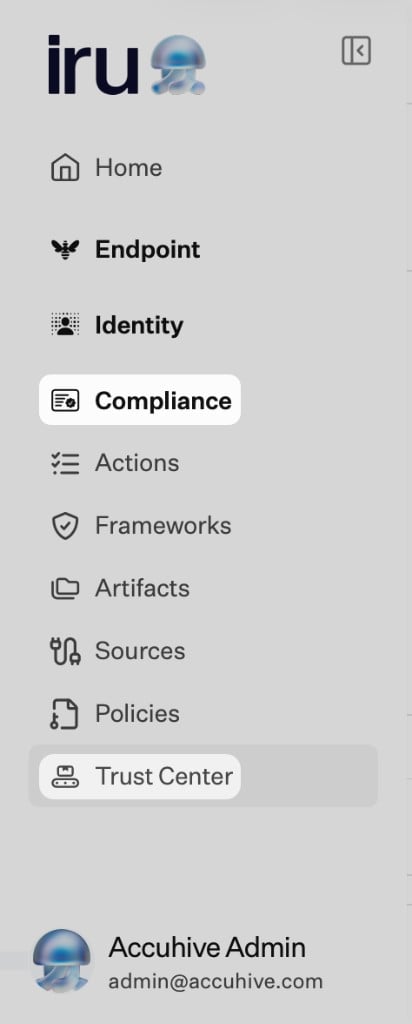
On the left navigation bar, expand **Compliance** and select **Trust Center**. The page uses tabs for **Accounts**, **Editor**, **Answers**, and **Questionnaires**.
 ### How It Works
You can run Trust Center alongside the full Compliance suite or on its own. Either way, you control branding, domains, which artifacts and answers are public, and who can sign in after approval.
Visitors open your portal, request access to restricted content when needed, sign an NDA if you require it, then read or download only what you published. Your admins use the **Editor**, **Accounts**, **Answers**, and **Questionnaires** tabs (see [Compliance Permissions](/en/compliance/compliance-permissions) for who can change each area).
Default hosting uses an Iru subdomain; you can add a **custom domain** with DNS verification. See [Trust Center Setup](/en/compliance/trust-center/trust-center-setup).
### Trust Center Capabilities
#### Accounts Management
Manage who can view and download your published compliance documents (**Accounts** tab).
* Review **Access requests** and approve or reject them
* View and manage approved accounts with granted access
* Click **Access rules** to open **Access request rules**. Turn **Access auto-approval** on or off depending on whether visitors with a signed NDA should be approved automatically.
* Review and verify signed NDAs before approval when your process requires it
* Revoke or delete access instantly
#### Editor
Customize and brand your public Trust Center to reflect your organization's identity (**Editor** tab).
* Use **Get started** in the section header when you are setting up the profile for the first time
* Complete **Your profile** (logo, company name, brand colors, tagline, description, domain, email, privacy policy URL)
* Set a **custom domain** (for example `trust.yourdomain.com`) with CNAME verification where supported
* Under **Certifications**, choose standard entries and add **custom certifications** as needed
* Use **Manage artifacts** to choose which evidence appears on the public page
* Under **NDA - Access requests**, upload a manual NDA PDF, or use the **DocuSign** card: turn the **toggle** on, then **Select template** once **DocuSign** shows as connected (until then the card shows **Not connected**).
* Enable **NDA protection** so users must sign before viewing restricted materials
#### Artifacts Integration
Publish approved compliance documents, reports, or policies directly to your Trust Center.
* Create and publish policies in [Policies Management](/en/compliance/policies-management), then share them through Trust Center
* Upload or select existing artifacts from the **Artifacts** module
* From the artifact's detail drawer, toggle **"Show in Trust Center"**
* Manage all published documents through the **Editor** tab for visibility and NDA settings
#### Answers
Create and manage a repository of pre-approved responses for security and compliance questionnaires (**Answers** tab).
* Add entries with **+ Add entry** or **+ Bulk entries**; use **Manage categories** to organize the library
* Include questions, answers, comments, categories, owners, and support links
* Toggle **Show in Trust Center** to make answers publicly visible
* Feed responses into Iru AI for automatic questionnaire completion
#### Questionnaires
Upload questionnaires from customers or vendors and let **Iru AI** automatically generate answers using your **Answers** library and **Trust Center artifacts** (**Questionnaires** tab).
* Start with **+ Upload questionnaire**. The flow accepts **CSV, XLSX, DOCX, and PDF** (shown in the modal).
* Optionally link **sources for generated answers** by selecting artifacts from the list
* Displays each questionnaire's progress and status
* Review, edit, approve, or mark questions as non-applicable
* Download or email the completed questionnaire to customers once approved
#### Public Trust Center Portal
A fully branded, secure webpage where approved users can view and download published compliance information.
* Public visitors can request access to restricted materials
* Approved users see certifications, artifacts, and published answers
* Access is gated behind NDA enforcement when enabled
* Supports a dual-domain experience: default Iru subdomain and optional custom URL
### Core Concepts
#### Trust Center
A branded portal for publishing and sharing compliance information securely with external stakeholders.
#### Accounts
The list of users or organizations that have requested or been granted access to the Trust Center.
#### Access Requests
Pending access requests that must be reviewed before approval.
#### Editor
The configuration section used for branding, domain setup, and publication of documents and certifications.
#### Artifacts
Compliance evidence, reports, or policies published from [Policies Management](/en/compliance/policies-management), **Artifacts**, or uploaded directly.
#### Answers
Pre-approved responses for recurring compliance or security questions.
#### Questionnaires
Uploaded security or compliance assessments that Iru AI can automatically populate with answers and evidence.
#### NDA Protection
A feature that enforces signing an NDA before access to sensitive materials is granted.
### Quick Start Guide
#### Set Up Your Trust Center
On the left navigation bar, expand **Compliance** and select **Trust Center**
Set up your company information, logo, and contact details
Set up your custom domain or use the default Iru subdomain
Upload your NDA document and enable protection if needed
#### Publish Your First Artifacts
Upload compliance documents, reports, or policies
Toggle **"Show in Trust Center"** for artifacts you want to publish
Check how artifacts appear on your public Trust Center
#### Set Up Answers Library
Add frequently asked security and compliance questions
Toggle **"Show in Trust Center"** for public answers
Upload a test questionnaire to verify AI auto-answering
### Related Articles
Once you've completed the quick start guide, explore these detailed guides:
Trust Center in context with Endpoint, Compliance, and Identity on one platform.
Create and publish security policies before sharing them on Trust Center.
Configure branding, domains, and NDA protection.
Access request management and account approval.
AI-powered questionnaire processing.
The external user experience.
Ensure all published content is accurate and up-to-date. Outdated compliance information can create legal and business risks.
### How It Works
You can run Trust Center alongside the full Compliance suite or on its own. Either way, you control branding, domains, which artifacts and answers are public, and who can sign in after approval.
Visitors open your portal, request access to restricted content when needed, sign an NDA if you require it, then read or download only what you published. Your admins use the **Editor**, **Accounts**, **Answers**, and **Questionnaires** tabs (see [Compliance Permissions](/en/compliance/compliance-permissions) for who can change each area).
Default hosting uses an Iru subdomain; you can add a **custom domain** with DNS verification. See [Trust Center Setup](/en/compliance/trust-center/trust-center-setup).
### Trust Center Capabilities
#### Accounts Management
Manage who can view and download your published compliance documents (**Accounts** tab).
* Review **Access requests** and approve or reject them
* View and manage approved accounts with granted access
* Click **Access rules** to open **Access request rules**. Turn **Access auto-approval** on or off depending on whether visitors with a signed NDA should be approved automatically.
* Review and verify signed NDAs before approval when your process requires it
* Revoke or delete access instantly
#### Editor
Customize and brand your public Trust Center to reflect your organization's identity (**Editor** tab).
* Use **Get started** in the section header when you are setting up the profile for the first time
* Complete **Your profile** (logo, company name, brand colors, tagline, description, domain, email, privacy policy URL)
* Set a **custom domain** (for example `trust.yourdomain.com`) with CNAME verification where supported
* Under **Certifications**, choose standard entries and add **custom certifications** as needed
* Use **Manage artifacts** to choose which evidence appears on the public page
* Under **NDA - Access requests**, upload a manual NDA PDF, or use the **DocuSign** card: turn the **toggle** on, then **Select template** once **DocuSign** shows as connected (until then the card shows **Not connected**).
* Enable **NDA protection** so users must sign before viewing restricted materials
#### Artifacts Integration
Publish approved compliance documents, reports, or policies directly to your Trust Center.
* Create and publish policies in [Policies Management](/en/compliance/policies-management), then share them through Trust Center
* Upload or select existing artifacts from the **Artifacts** module
* From the artifact's detail drawer, toggle **"Show in Trust Center"**
* Manage all published documents through the **Editor** tab for visibility and NDA settings
#### Answers
Create and manage a repository of pre-approved responses for security and compliance questionnaires (**Answers** tab).
* Add entries with **+ Add entry** or **+ Bulk entries**; use **Manage categories** to organize the library
* Include questions, answers, comments, categories, owners, and support links
* Toggle **Show in Trust Center** to make answers publicly visible
* Feed responses into Iru AI for automatic questionnaire completion
#### Questionnaires
Upload questionnaires from customers or vendors and let **Iru AI** automatically generate answers using your **Answers** library and **Trust Center artifacts** (**Questionnaires** tab).
* Start with **+ Upload questionnaire**. The flow accepts **CSV, XLSX, DOCX, and PDF** (shown in the modal).
* Optionally link **sources for generated answers** by selecting artifacts from the list
* Displays each questionnaire's progress and status
* Review, edit, approve, or mark questions as non-applicable
* Download or email the completed questionnaire to customers once approved
#### Public Trust Center Portal
A fully branded, secure webpage where approved users can view and download published compliance information.
* Public visitors can request access to restricted materials
* Approved users see certifications, artifacts, and published answers
* Access is gated behind NDA enforcement when enabled
* Supports a dual-domain experience: default Iru subdomain and optional custom URL
### Core Concepts
#### Trust Center
A branded portal for publishing and sharing compliance information securely with external stakeholders.
#### Accounts
The list of users or organizations that have requested or been granted access to the Trust Center.
#### Access Requests
Pending access requests that must be reviewed before approval.
#### Editor
The configuration section used for branding, domain setup, and publication of documents and certifications.
#### Artifacts
Compliance evidence, reports, or policies published from [Policies Management](/en/compliance/policies-management), **Artifacts**, or uploaded directly.
#### Answers
Pre-approved responses for recurring compliance or security questions.
#### Questionnaires
Uploaded security or compliance assessments that Iru AI can automatically populate with answers and evidence.
#### NDA Protection
A feature that enforces signing an NDA before access to sensitive materials is granted.
### Quick Start Guide
#### Set Up Your Trust Center
On the left navigation bar, expand **Compliance** and select **Trust Center**
Set up your company information, logo, and contact details
Set up your custom domain or use the default Iru subdomain
Upload your NDA document and enable protection if needed
#### Publish Your First Artifacts
Upload compliance documents, reports, or policies
Toggle **"Show in Trust Center"** for artifacts you want to publish
Check how artifacts appear on your public Trust Center
#### Set Up Answers Library
Add frequently asked security and compliance questions
Toggle **"Show in Trust Center"** for public answers
Upload a test questionnaire to verify AI auto-answering
### Related Articles
Once you've completed the quick start guide, explore these detailed guides:
Trust Center in context with Endpoint, Compliance, and Identity on one platform.
Create and publish security policies before sharing them on Trust Center.
Configure branding, domains, and NDA protection.
Access request management and account approval.
AI-powered questionnaire processing.
The external user experience.
Ensure all published content is accurate and up-to-date. Outdated compliance information can create legal and business risks.