> ## Documentation Index
> Fetch the complete documentation index at: https://docs.iru.com/llms.txt
> Use this file to discover all available pages before exploring further.
# Getting Started with Compliance
> Get started with Iru Compliance: frameworks, controls, actions, evidence, sources, and Trust Center. Follow the recommended setup order and core concepts.
Iru Compliance helps you run frameworks such as **SOC 2** or **ISO 27001**, collect evidence against controls, and publish a **Trust Center** for customers and auditors when your subscription includes it. Follow **Recommended setup** below: complete **Organization profile**, add frameworks, connect **Sources**, and work **Actions**. For who can add frameworks, connect integrations, edit Trust Center, and other tasks, see [Compliance Permissions](/en/compliance/compliance-permissions).
Need help with a step? [Contact Iru Support](/en/iru/iru-support/access-to-iru-support).
## About Iru Compliance
You can add standards such as **SOC 2**, **ISO 27001**, **ISO 42001**, and **HIPAA** in your tenant. Other catalogs (for example **GDPR**, **NIST CSF**) appear when your tenant makes them available. Open **Frameworks** to see what you can add.
Iru uses your **organization profile** (industry, company size, tech stack, and security tooling) so generated **controls** match how you work. After setup, when connected **Sources** or policy **artifacts** change, [Adaptive Compliance](/en/compliance/adaptive-compliance) can propose updates to control and action text so your frameworks stay aligned with how you operate. Use [Policies Management](/en/compliance/policies-management) to draft, publish, and track acknowledgement of security and compliance policies. **Trust Center** is optional: it publishes approved certifications and documents externally. See [Trust Center Management](/en/compliance/trust-center/trust-center-management).
## Recommended Setup
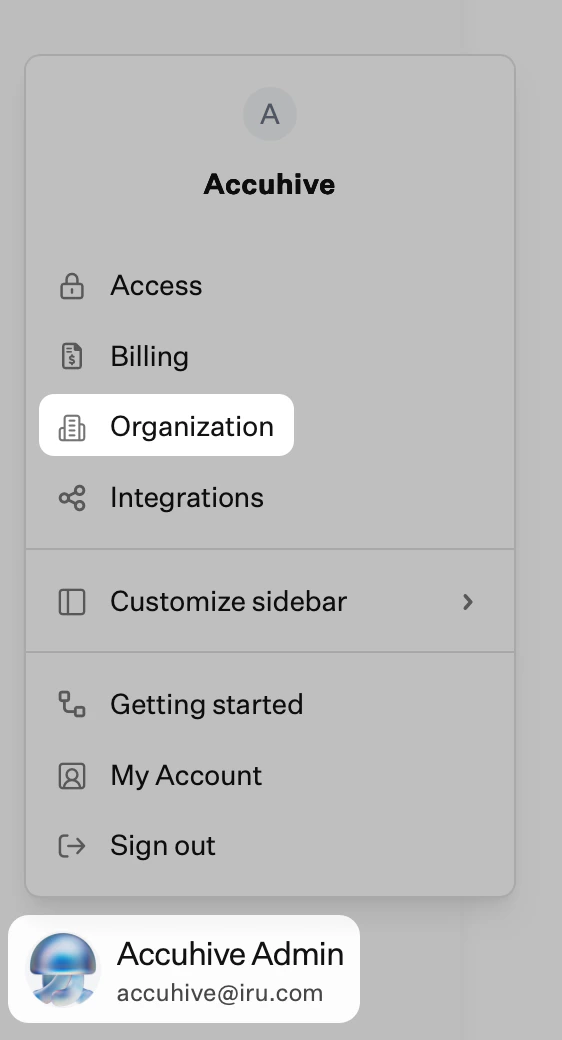
In the sidebar, click the [**Account Menu Button**](/en/iru/platform-overview/account-menu).
Select **Organization** to open **Organization profile**. Iru may prompt you while you add a framework.
 On **Organization profile**, click **Edit** at the top right.
Fill in the fields that apply. For example: **company logo**, **company name**, **business description**, **industry**, **business type**, **company size**, **company language**, whether you have an **IT department**, and **security team size**. Keep this information current as your environment changes.
Click **Save changes**.
On the left navigation bar, expand **Compliance** and select **Frameworks**. Use AI-assisted setup, CSV import, migration from a supported product, or a custom framework. See [Frameworks Management](/en/compliance/frameworks-management).
Expand **Compliance** and select **Sources**. Turn on the **toggle** for each integration that should supply evidence (identity, HR, cloud, code hosts, and others). See [Sources Management](/en/compliance/sources-management).
Expand **Compliance** and select **Actions**. Review **actions**, assign owners, set due dates, and attach or confirm evidence. See [Actions Management](/en/compliance/actions-management).
## Core Concepts
**Frameworks**\
Standards your organization tracks. You can run several at once; one piece of evidence can cover more than one obligation when requirements overlap.
**Controls**\
Requirements mapped to the framework. They may come from AI generation, import, or manual entry.
**Actions**\
Tasks linked to controls. Descriptions tell the product and connected **Sources** what evidence to collect.
**Artifacts**\
Files and records (policies, exports, screenshots, logs, reports) tied to actions and controls. See [Artifacts Management](/en/compliance/artifacts-management). For the **Policies** module (library templates, drafts, publishing, and workforce acknowledgement), see [Policies Management](/en/compliance/policies-management).
**Sources**\
Integrations that pull or attach evidence for the actions they support. See [Sources Management](/en/compliance/sources-management).
## What You Can Do Next
* Turn framework language into controls and actions with owners and due dates.
* Draft and publish security policies from the library or uploads; track workforce acknowledgement. See [Policies Management](/en/compliance/policies-management).
* Gather evidence manually or through **Sources**; validate artifacts where the product supports it.
* Track readiness from framework and action views.
* Review Iru AI control update recommendations when integrations or policies change. See [Adaptive Compliance](/en/compliance/adaptive-compliance).
* Publish selected content through **Trust Center** when your plan includes it.
## Related Articles
Add frameworks, imports, and migrations.
Policy library, publishing, acknowledgements, and linking policies to actions.
Review and approve Iru AI recommendations when controls should reflect new integrations or policies.
How profile, frameworks, sources, actions, and evidence connect.
Connector guides by category (use search and **Category** on **Sources**).
## Related Product Documentation
How Endpoint, Identity, Compliance, Trust Center, and Iru AI fit together.
Endpoint setup from foundation through platform setup, Blueprints and Library, and enrollment; pair with the Iru Endpoint Compliance source when controls need device evidence.
Connect Endpoint to Compliance for device evidence.
Organization roles (alongside Compliance Permissions).
On **Organization profile**, click **Edit** at the top right.
Fill in the fields that apply. For example: **company logo**, **company name**, **business description**, **industry**, **business type**, **company size**, **company language**, whether you have an **IT department**, and **security team size**. Keep this information current as your environment changes.
Click **Save changes**.
On the left navigation bar, expand **Compliance** and select **Frameworks**. Use AI-assisted setup, CSV import, migration from a supported product, or a custom framework. See [Frameworks Management](/en/compliance/frameworks-management).
Expand **Compliance** and select **Sources**. Turn on the **toggle** for each integration that should supply evidence (identity, HR, cloud, code hosts, and others). See [Sources Management](/en/compliance/sources-management).
Expand **Compliance** and select **Actions**. Review **actions**, assign owners, set due dates, and attach or confirm evidence. See [Actions Management](/en/compliance/actions-management).
## Core Concepts
**Frameworks**\
Standards your organization tracks. You can run several at once; one piece of evidence can cover more than one obligation when requirements overlap.
**Controls**\
Requirements mapped to the framework. They may come from AI generation, import, or manual entry.
**Actions**\
Tasks linked to controls. Descriptions tell the product and connected **Sources** what evidence to collect.
**Artifacts**\
Files and records (policies, exports, screenshots, logs, reports) tied to actions and controls. See [Artifacts Management](/en/compliance/artifacts-management). For the **Policies** module (library templates, drafts, publishing, and workforce acknowledgement), see [Policies Management](/en/compliance/policies-management).
**Sources**\
Integrations that pull or attach evidence for the actions they support. See [Sources Management](/en/compliance/sources-management).
## What You Can Do Next
* Turn framework language into controls and actions with owners and due dates.
* Draft and publish security policies from the library or uploads; track workforce acknowledgement. See [Policies Management](/en/compliance/policies-management).
* Gather evidence manually or through **Sources**; validate artifacts where the product supports it.
* Track readiness from framework and action views.
* Review Iru AI control update recommendations when integrations or policies change. See [Adaptive Compliance](/en/compliance/adaptive-compliance).
* Publish selected content through **Trust Center** when your plan includes it.
## Related Articles
Add frameworks, imports, and migrations.
Policy library, publishing, acknowledgements, and linking policies to actions.
Review and approve Iru AI recommendations when controls should reflect new integrations or policies.
How profile, frameworks, sources, actions, and evidence connect.
Connector guides by category (use search and **Category** on **Sources**).
## Related Product Documentation
How Endpoint, Identity, Compliance, Trust Center, and Iru AI fit together.
Endpoint setup from foundation through platform setup, Blueprints and Library, and enrollment; pair with the Iru Endpoint Compliance source when controls need device evidence.
Connect Endpoint to Compliance for device evidence.
Organization roles (alongside Compliance Permissions).