> ## Documentation Index
> Fetch the complete documentation index at: https://docs.iru.com/llms.txt
> Use this file to discover all available pages before exploring further.
# Frameworks Management
> Add, configure, and manage compliance frameworks in Iru. Map controls to actions, track progress, and maintain audit-ready documentation.
The **Frameworks** page is where you pick the standards your organization tracks, such as **SOC 2**, **ISO 27001**, **ISO 42001**, **HIPAA**, and others your tenant lists. Use **Add framework** and **Select your \[framework] starting point** to generate, import, or build **controls**. **Actions** and evidence collection follow. You can also import from another tool or upload a CSV when you migrate.
Need help with a step? [Contact Iru Support](/en/iru/iru-support/access-to-iru-support).
## How It Works
Pick a standard (or a custom framework), then generate tailored controls from your **organization profile**, import controls, or build them manually. Iru maps what you define to the framework’s requirements.
You can run built-in standards side by side with custom frameworks when you need internal policies that are not in the catalog.
When your integrations or policy artifacts change, Iru AI may surface **Control Update** recommendations on framework cards, on the framework detail page, or in **Home** → **Insights**. Publish and update policies in [Policies Management](/en/compliance/policies-management). You review side-by-side diffs and approve what to apply; nothing changes until you confirm. See [Adaptive Compliance](/en/compliance/adaptive-compliance).
## Capabilities
#### Add a Framework
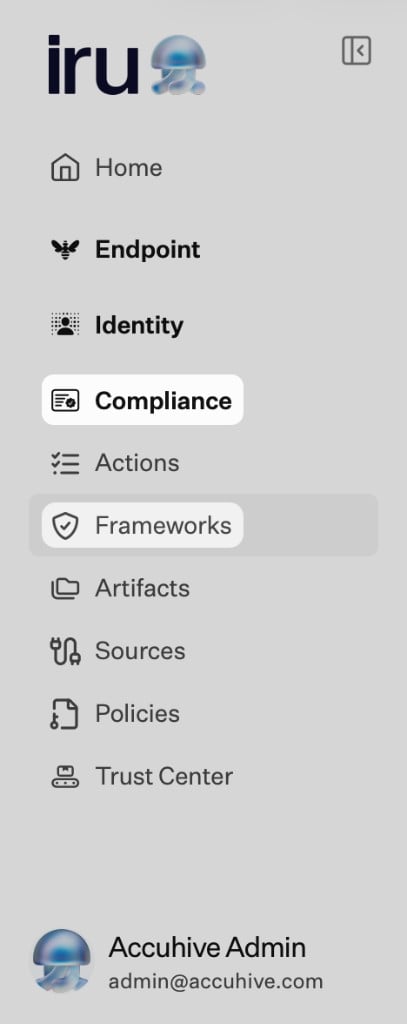
On the left navigation bar, expand **Compliance** and select **Frameworks**.
 The main area is titled **Frameworks**. Use **+ Add framework** (top right) when you are ready to add a program (next step). Each framework already in scope appears as a **card** with the framework **name**, a short **description**, **Select audit period** for the audit window, **artifacts mapped**, and how **controls** roll up. For **SOC 2**, the card can show counts by **Trust Services Criteria** (**Security**, **Availability**, **Confidentiality**, **Processing integrity**, **Privacy**); other frameworks may show a single **controls** total and progress. **View controls** opens that framework’s detail work. The **…** (**More**) menu on a card lists **Additional actions**: **Edit audit details** and **Delete framework**.
 Click **Add framework** to open the **Add a new framework** modal.
In **Add a new framework**, pick from **Active** frameworks you can add now. Additional frameworks may appear under **Coming soon** until they are available for your tenant.
After you choose a framework, **Select your \[framework] starting point** opens. The title includes the framework you picked (for example **Select your ISO 27001 starting point**). Pick how to build your control set:
* **Iru AI**: **Generate tailored controls** (labeled **Recommended**). Answer questions about your company, goals, and context so Iru generates controls.
* **Migrate**: **Migrate from Vanta** (and similar options when your tenant lists them). Import controls you already maintain in Vanta.
* **Manual**: **Use a generic control framework**, **Upload pre-filled CSV**, or **Start from scratch**.
Click **Back** to return and pick a different framework or path.
#### Tailor with AI
When you choose **Generate tailored controls** in **Select your \[framework] starting point**, work through the prompts (company profile, goals, stack, and other questions Iru asks for that framework). Iru then generates **tailored controls** and actions mapped to the framework’s requirements.
#### Import Frameworks or Controls
Use this section when you pick **Upload pre-filled CSV**, **Migrate from Vanta**, or **Use a generic control framework** in **Select your \[framework] starting point**, or when you open **Frameworks** → **Import** and your tenant lists additional providers (for example **Drata**, **Secureframe**, or **Sprinto**).
* Imported data is normalized to align with Iru mappings where the integration supports it.
* **Upload pre-filled CSV:** Download the CSV template, fill it out, and upload; you can add, edit, or delete controls afterward.
* **Migrate from another tool:** Requires an API key from the source product where applicable:
* **Vanta:** [Vanta API access](https://developer.vanta.com/docs/api-access-setup)
* **Drata:** [Drata public API](https://help.drata.com/en/articles/6695964-drata-public-api)
* **Secureframe**, **Sprinto:** Use **Frameworks** → **Import** when your tenant lists these providers.
**Migration behavior (high level)**
* **SOC 2:** Migrations from supported vendors typically bring across requirements and internal controls in a form that maps to Iru’s structure.
* **ISO 27001 and ISO 42001:** Behavior depends on the source:
* **Vanta:** Full migration of requirements and controls is supported.
* **Drata, Secureframe, Sprinto:** ISO imports are often limited because those products model ISO controls differently than Iru (for example one control per requirement). Importing ISO wholesale can produce a rigid control set that does not match Iru’s tailored controls.
If you are moving **ISO** from **Drata**, **Secureframe**, or **Sprinto**, choose **Use a generic control framework** in **Select your \[framework] starting point** instead of importing ISO controls directly when you want Iru to generate a tailored set from your organization profile. You can still reference existing documentation outside the import.
To add a fully **custom framework** (internal policies or standards not in the catalog), use **Add framework** and the path your tenant provides for custom programs, or define controls manually after you create the framework record.
#### Manage Frameworks
After you open a framework from the list (**View controls**), you can:
* See **Readiness** and overall progress for that framework
* Choose **Export** or **Add a control** in the page header
* See the full **list of controls** generated or imported
* Search and filter **All controls** (for example by **Status**) while controls finish generating
* **Customize controls** (edit, add, or remove based on company context)
* View the **specific framework requirements** each control is mapped to
* See the **list of actions** attached to each control
* Review **artifacts** that are linked to actions and controls
* **Track readiness** across all controls within the framework in one place
* Open **Review Control Updates** from the framework header or card when Iru AI has pending control and action text recommendations (same workflow as **Home** → **Insights**). See [Adaptive Compliance](/en/compliance/adaptive-compliance).
## Related Articles
Frameworks, actions, artifacts, and sources.
Policy library, publishing, and acknowledgements.
Approve or reject Iru AI control and action updates after integrations or policies change.
Connector guides by category and how evidence is collected.
How evidence ties to controls and actions.
Click **Add framework** to open the **Add a new framework** modal.
In **Add a new framework**, pick from **Active** frameworks you can add now. Additional frameworks may appear under **Coming soon** until they are available for your tenant.
After you choose a framework, **Select your \[framework] starting point** opens. The title includes the framework you picked (for example **Select your ISO 27001 starting point**). Pick how to build your control set:
* **Iru AI**: **Generate tailored controls** (labeled **Recommended**). Answer questions about your company, goals, and context so Iru generates controls.
* **Migrate**: **Migrate from Vanta** (and similar options when your tenant lists them). Import controls you already maintain in Vanta.
* **Manual**: **Use a generic control framework**, **Upload pre-filled CSV**, or **Start from scratch**.
Click **Back** to return and pick a different framework or path.
#### Tailor with AI
When you choose **Generate tailored controls** in **Select your \[framework] starting point**, work through the prompts (company profile, goals, stack, and other questions Iru asks for that framework). Iru then generates **tailored controls** and actions mapped to the framework’s requirements.
#### Import Frameworks or Controls
Use this section when you pick **Upload pre-filled CSV**, **Migrate from Vanta**, or **Use a generic control framework** in **Select your \[framework] starting point**, or when you open **Frameworks** → **Import** and your tenant lists additional providers (for example **Drata**, **Secureframe**, or **Sprinto**).
* Imported data is normalized to align with Iru mappings where the integration supports it.
* **Upload pre-filled CSV:** Download the CSV template, fill it out, and upload; you can add, edit, or delete controls afterward.
* **Migrate from another tool:** Requires an API key from the source product where applicable:
* **Vanta:** [Vanta API access](https://developer.vanta.com/docs/api-access-setup)
* **Drata:** [Drata public API](https://help.drata.com/en/articles/6695964-drata-public-api)
* **Secureframe**, **Sprinto:** Use **Frameworks** → **Import** when your tenant lists these providers.
**Migration behavior (high level)**
* **SOC 2:** Migrations from supported vendors typically bring across requirements and internal controls in a form that maps to Iru’s structure.
* **ISO 27001 and ISO 42001:** Behavior depends on the source:
* **Vanta:** Full migration of requirements and controls is supported.
* **Drata, Secureframe, Sprinto:** ISO imports are often limited because those products model ISO controls differently than Iru (for example one control per requirement). Importing ISO wholesale can produce a rigid control set that does not match Iru’s tailored controls.
If you are moving **ISO** from **Drata**, **Secureframe**, or **Sprinto**, choose **Use a generic control framework** in **Select your \[framework] starting point** instead of importing ISO controls directly when you want Iru to generate a tailored set from your organization profile. You can still reference existing documentation outside the import.
To add a fully **custom framework** (internal policies or standards not in the catalog), use **Add framework** and the path your tenant provides for custom programs, or define controls manually after you create the framework record.
#### Manage Frameworks
After you open a framework from the list (**View controls**), you can:
* See **Readiness** and overall progress for that framework
* Choose **Export** or **Add a control** in the page header
* See the full **list of controls** generated or imported
* Search and filter **All controls** (for example by **Status**) while controls finish generating
* **Customize controls** (edit, add, or remove based on company context)
* View the **specific framework requirements** each control is mapped to
* See the **list of actions** attached to each control
* Review **artifacts** that are linked to actions and controls
* **Track readiness** across all controls within the framework in one place
* Open **Review Control Updates** from the framework header or card when Iru AI has pending control and action text recommendations (same workflow as **Home** → **Insights**). See [Adaptive Compliance](/en/compliance/adaptive-compliance).
## Related Articles
Frameworks, actions, artifacts, and sources.
Policy library, publishing, and acknowledgements.
Approve or reject Iru AI control and action updates after integrations or policies change.
Connector guides by category and how evidence is collected.
How evidence ties to controls and actions.