> ## Documentation Index
> Fetch the complete documentation index at: https://docs.iru.com/llms.txt
> Use this file to discover all available pages before exploring further.
# Actions Management
> Create, assign, and track compliance actions in Iru. Link controls to evidence, set deadlines, and monitor completion status across frameworks.
The **Actions** page lists the work that turns each control into something you can assign, track, and prove. Every action states what to do, who owns it, when it is due, and how evidence should attach, including when a **Source** should fetch it for you.
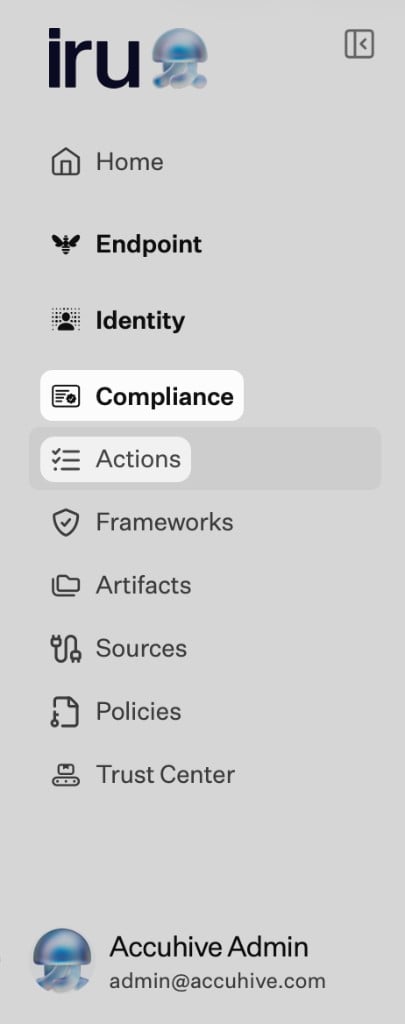
On the left navigation bar, expand **Compliance** and select **Actions**. Who can view, create, or change actions is set by role. See [Compliance Permissions](/en/compliance/compliance-permissions).
 Need help with a step? [Contact Iru Support](/en/iru/iru-support/access-to-iru-support).
## How It Works
Iru creates actions from your frameworks’ controls (from AI setup, CSV, or migration). You can add or edit actions when something is missing.
**Action descriptions** drive automation. When a description names a system and the type of evidence you need (for example "SSO policy from Okta"), integrations can pull the right artifacts from **Sources** and reduce manual uploads.
If you connect or remove a **Source**, or publish or retire a policy artifact, Iru AI may recommend new control or action wording so descriptions still match your environment. Publish and update policies in [Policies Management](/en/compliance/policies-management). You approve those edits in [Adaptive Compliance](/en/compliance/adaptive-compliance); unapproved items stay as they are.
## Capabilities
### Create and Edit Actions
* Actions are generated from framework controls.
* Only **Admin** and **Compliance Admin** can manually **create** an action. **Update** and **delete** are available to **Admin**, **Compliance Admin**, **Standard**, **Compliance Collaborator**, **Help Desk**, and **Secrets Auditor**; **Auditor**, **Compliance Auditor**, and **Iru Support** cannot change actions. See the **Actions** table in [Compliance Permissions](/en/compliance/compliance-permissions).
### Descriptions and Automation
* The description tells the product what to collect and, when applicable, which **Source** to use.
* Example: control “All employees must use MFA” → action “Collect MFA enforcement policy from identity provider” with a description that points at **Okta**, **Microsoft Entra ID**, or another connected system.
Spell out which system and what artifact you need in the description. Vague text makes automation and audits harder.
### Assign, Comment, and Track
* Owners complete the task and upload or confirm artifacts.
* Assign an **owner** or **delegate** so responsibility is clear.
* Use **comments** for questions, handoffs, or auditor notes.
* The **activity log** records assignments, uploads, comments, and status changes. Compliance action events also appear on the tenant-wide [Unified Activity](/en/iru/platform-overview/unified-activity).
### Status and Validation
* Actions move through statuses such as **Not Started**, **In Progress**, and **Completed** as evidence lands and validation passes (labels can vary slightly by screen).
* When required artifacts are in place and valid, readiness for the related control updates.
### Automated Collection
If a **Source** is on and the action description matches that system and evidence type, the product may attach artifacts without a manual upload. If nothing appears, check that the source is **Active**, the description is specific, and the integration has the right permissions. See [Sources Management](/en/compliance/sources-management).
## Related Articles
Recommended order for profile, frameworks, sources, and actions.
Policy library, publishing, and attaching policies to actions as evidence.
Review Iru AI updates to control and action text after integrations or policies change.
Connector guides by category and how evidence is collected.
Uploads, validation, and linking evidence to actions.
Need help with a step? [Contact Iru Support](/en/iru/iru-support/access-to-iru-support).
## How It Works
Iru creates actions from your frameworks’ controls (from AI setup, CSV, or migration). You can add or edit actions when something is missing.
**Action descriptions** drive automation. When a description names a system and the type of evidence you need (for example "SSO policy from Okta"), integrations can pull the right artifacts from **Sources** and reduce manual uploads.
If you connect or remove a **Source**, or publish or retire a policy artifact, Iru AI may recommend new control or action wording so descriptions still match your environment. Publish and update policies in [Policies Management](/en/compliance/policies-management). You approve those edits in [Adaptive Compliance](/en/compliance/adaptive-compliance); unapproved items stay as they are.
## Capabilities
### Create and Edit Actions
* Actions are generated from framework controls.
* Only **Admin** and **Compliance Admin** can manually **create** an action. **Update** and **delete** are available to **Admin**, **Compliance Admin**, **Standard**, **Compliance Collaborator**, **Help Desk**, and **Secrets Auditor**; **Auditor**, **Compliance Auditor**, and **Iru Support** cannot change actions. See the **Actions** table in [Compliance Permissions](/en/compliance/compliance-permissions).
### Descriptions and Automation
* The description tells the product what to collect and, when applicable, which **Source** to use.
* Example: control “All employees must use MFA” → action “Collect MFA enforcement policy from identity provider” with a description that points at **Okta**, **Microsoft Entra ID**, or another connected system.
Spell out which system and what artifact you need in the description. Vague text makes automation and audits harder.
### Assign, Comment, and Track
* Owners complete the task and upload or confirm artifacts.
* Assign an **owner** or **delegate** so responsibility is clear.
* Use **comments** for questions, handoffs, or auditor notes.
* The **activity log** records assignments, uploads, comments, and status changes. Compliance action events also appear on the tenant-wide [Unified Activity](/en/iru/platform-overview/unified-activity).
### Status and Validation
* Actions move through statuses such as **Not Started**, **In Progress**, and **Completed** as evidence lands and validation passes (labels can vary slightly by screen).
* When required artifacts are in place and valid, readiness for the related control updates.
### Automated Collection
If a **Source** is on and the action description matches that system and evidence type, the product may attach artifacts without a manual upload. If nothing appears, check that the source is **Active**, the description is specific, and the integration has the right permissions. See [Sources Management](/en/compliance/sources-management).
## Related Articles
Recommended order for profile, frameworks, sources, and actions.
Policy library, publishing, and attaching policies to actions as evidence.
Review Iru AI updates to control and action text after integrations or policies change.
Connector guides by category and how evidence is collected.
Uploads, validation, and linking evidence to actions.